
Level 1
Nov 29, 2022 10:25 PM UTC
Solved

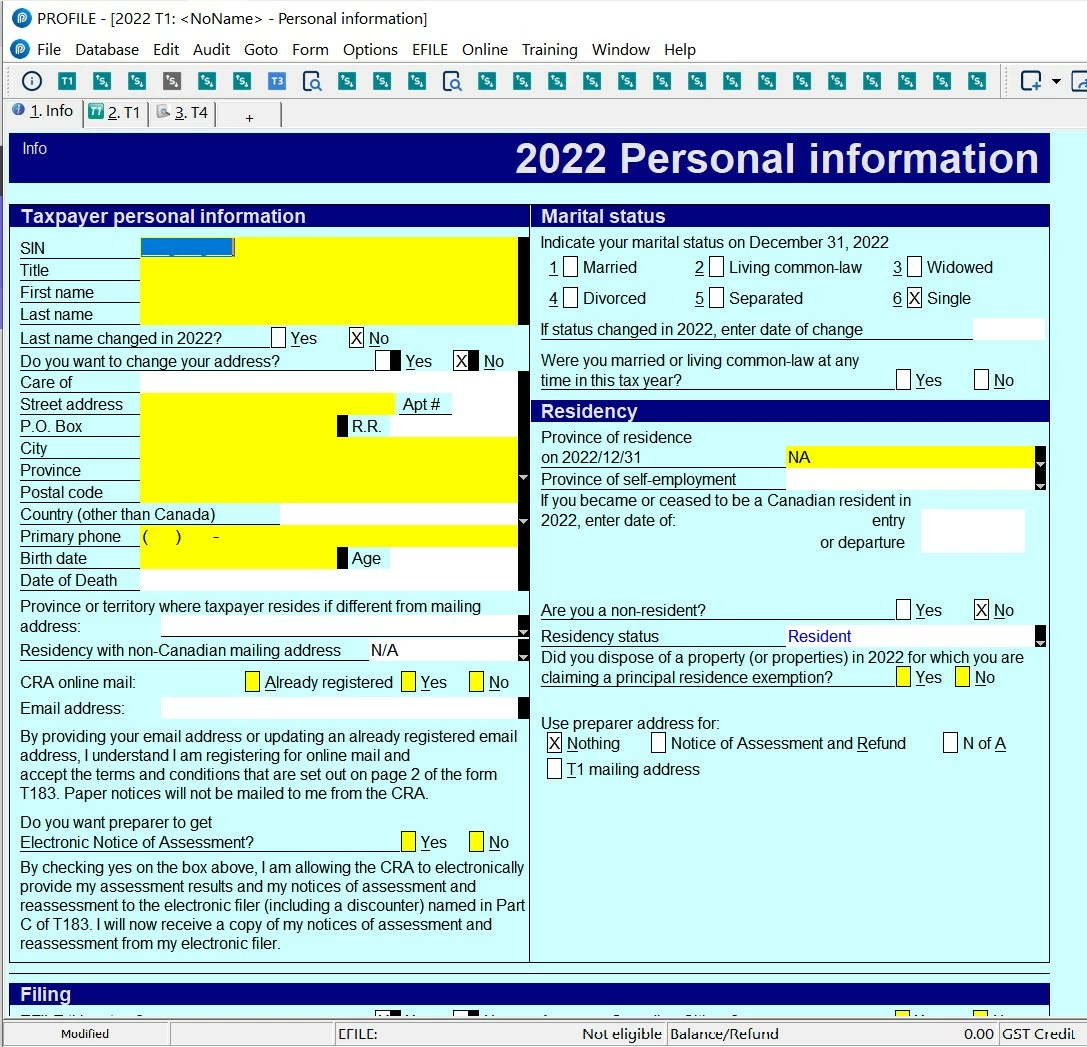
Forms toolbar only shows "+" instead of form title

After the most recent update to Profile, my forms toolbar is no longer functioning properly. The links are still there if the button is pressed but the buttons only have a "+" symbol rather than the name of the form. This is occurring in both the T1 and T2 modules. 


Adding new buttons (or trying to replace the old ones with the same form) does not resolve the problem. 
This topic has been closed for replies.
Pro4Answer
Level 8
Jan 17, 2023 5:14 PM UTC

Attached is the screen shot of this...


Hi

If you are on ProFile version 2022.2.0 , right click in the forms toolbar and click on Show captions. Hope this helps

31 replies

Level 5
Nov 29, 2022 11:29 PM UTC

With this update, the majority of my T1 & T2 file shortcut icons on ALL YEARS show this "+" look attached too, even with "Show Captions" on. Please show us quick how to fix this.

Level 5
Dec 3, 2022 8:39 PM UTC

Are these only our issues in Windows 10 Pro? Any suggestion to restore the icon look back?

Level 8
Dec 7, 2022 6:11 PM UTC

Hi, 

This ProFile error will be resolved in ProFile version 2022.2.0 due for release mid December. The toolbar icons should not display as a +. There should be no change to icon display and function from previous year. We will resolve this issue soon.

I apologize for the inconvenience

Level 5
Dec 16, 2022 3:44 AM UTC

V2022.2 now changes my T1 & T2 shortcut icons' + to an useless 's,!!!

Level 8
Dec 19, 2022 5:59 PM UTC

Hi,

ProFile version 2022.2.0, now available for download, has corrected the display of form toolbar icons. 

I apologize for the inconvenience 

Level 5
Feb 12, 2023 8:31 PM UTC
GarryP, if you've fixed the shortcut icon issue, please show me how in V2022.2.5. Thx.
Level 5
Feb 18, 2023 3:42 AM UTC

No such fix on V2022.3 still.

Level 8
Feb 20, 2023 8:43 PM UTC

Hi,

The design team is working on a fix for ProFile 2022.4.0, due for release the end of March.

I apologize for the inconvenience.


