Level 3
February 26, 2021
Question

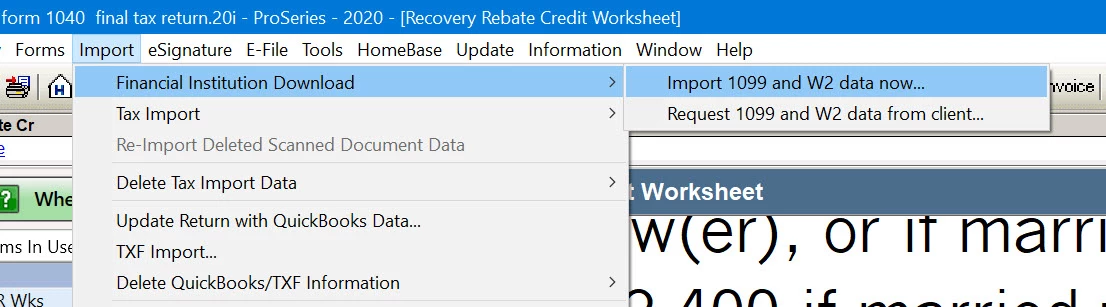
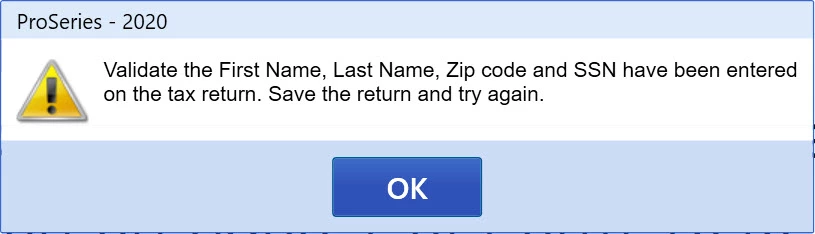
Import 1099 error message

  • February 26, 2021
  • 14 replies
  • 32 views


Anyone have a solution for this error message?

This topic has been closed for replies.

14 replies

Just-Lisa-Now-
Intuit Community Champion
February 26, 2021

If the return has all the things that error message says, Id just skip the import and enter manually.

♪♫•*¨*•.¸¸♥Lisa♥¸¸.•*¨*•♫♪
BajaPeteAuthor
Level 3
February 27, 2021

I screened shared with Intuit Agent Vanessa and she was unable to assist. She claims it is a known issue by their engineers.  I told her if Intuit can't fix it within a week I will request a refund on the product. 

BajaPeteAuthor
Level 3
February 27, 2021

Did you confirm preparer name is set and the file is not locked?


Preparer name is filled and I don't understand your comment on the file being locked. I can enter information in any of the numerous worksheets and schedules and save the file so I assume this means the file is not locked. How would one find out if the file is locked?  

Level 8
March 1, 2021

To recap and augment, if you are getting that specific "validate error".. In addition to what it says, check

  • TaxPayer email is specified and correct (with no hidden characters, which could happen if you cut and paste from somewhere)
  • Preparer Name is Specified
  • Preparer Code is entered (and Self-Prepared / Non-Paid Preparer is not checked)
BajaPeteAuthor
Level 3
March 1, 2021

It was not anything I had entered as Intuit updated the program and I no longer getting the Validate Error, but alas the Financial Institution 1099 import is still not working for brokerages. See my latest update of 3/1/2021.