Level 3
June 12, 2020
Solved

pro series professiona program will not update

  • June 12, 2020
  • 3 replies
  • 10 views

Hi everyone, 

Yesteday, I received a message that my pro series pro edition, version is no longer current.

Not my first rodeo and I have tried to do the updates, from the tool bars and even tried to let it update as regularly scheduled, I have refreshed and still no new updates are acknowledged. 

It looks like the last update on my program was 4/26/2020 and I schedule to update nightly.

Anyone else having this issue, as this is not a good time for this as I am trying to efile and work?

At wits end?!?!?

This topic has been closed for replies.
Best answer by Just-Lisa-Now-

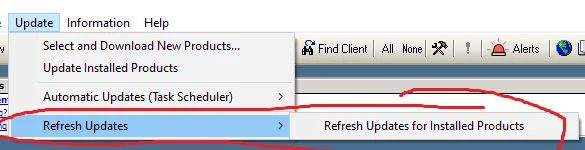
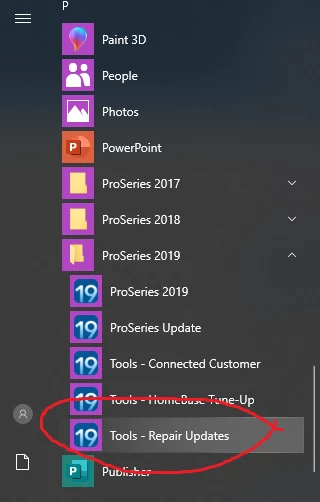
You said you refreshed already, so Im not sure if this will help. If REFRESH from within the program doesnt work, try closing ProSeries and running REPAIR updates from the Windows Programs menu


3 replies

Level 6
June 14, 2020

Did you try restarting your computer?  Sometimes, that does the trick with something like this.  

dd4vols
Intuit Community Champion
June 15, 2020

@Just-Lisa-Now-  can you post your pics to this....thanks

If an answer solves your issue, click on the "Mark as Best Answer" button! Makes it easier for people to find answers to similar questions that have already been posted.
Just-Lisa-Now-
Intuit Community Champion
June 15, 2020

You said you refreshed already, so Im not sure if this will help. If REFRESH from within the program doesnt work, try closing ProSeries and running REPAIR updates from the Windows Programs menu


♪♫•*¨*•.¸¸♥Lisa♥¸¸.•*¨*•♫♪
LisaPAuthor
Level 3
June 15, 2020

Apparently, it was a Microsoft update, issue not allowing my Proseries updates to go through.

Luckily, I did not have to do the updates as you suggested but I will keep it in mind, if it should happen again. Thank you all for your support on this crazy issue. I also have now suspended all Microsoft updates, until after tax season, if it ever ends this year. LOL 🙂


Just-Lisa-Now-
Intuit Community Champion
June 15, 2020

My office system showed a Windows update ready to install as I was leaving today, fingers crossed it doesnt screw anything up when I boot up tomorrow!

♪♫•*¨*•.¸¸♥Lisa♥¸¸.•*¨*•♫♪