
Level 3
January 13, 2021
Solved

SORTING CLIENT MISSING INFORMATION FILES IN HOME VIEW

  • January 13, 2021
  • 3 replies
  • 24 views

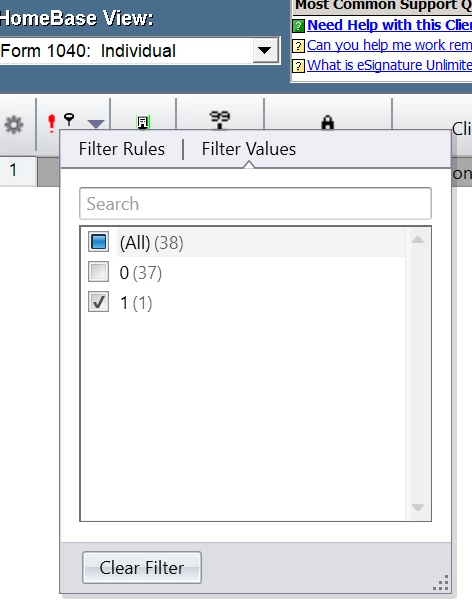
I'm in homebase view and want to sort my clients by missing information. Last year, i just had to click on the red question mark. This year it doesnt work. Is there an adjustment I need to make?
This topic has been closed for replies.
Best answer by Intuit_hieu
 

If you enlarge the column you should be able to see the sorting arrow, and the filter. Filter is a new control in TY20, you can use it to see all returns with missing info, or not.

3 replies

Just-Lisa-Now-
Intuit Community Champion
January 13, 2021

Its only Jan 13th, arent all returns missing information still?

♪♫•*¨*•.¸¸♥Lisa♥¸¸.•*¨*•♫♪
Accountant-Man
Level 13
January 13, 2021

The 2020 Home Base view was "fixed," so it's not really for prime time yet.

Some database thingie.

** I am "Elevating with Intention!"
Level 6
January 13, 2021
 

If you enlarge the column you should be able to see the sorting arrow, and the filter. Filter is a new control in TY20, you can use it to see all returns with missing info, or not.


