
Level 3
January 22, 2021
Solved

proseries error " lock by another user"

  • January 22, 2021
  • 13 replies
  • 40 views

on Pro series 2020 where is the home-base tuneup, this use to fix the problem with error " client lock by another user" issue. I have tried the home-base maintenance but no luck, is there a solution to this????
This topic has been closed for replies.
Best answer by Intuit_hieu

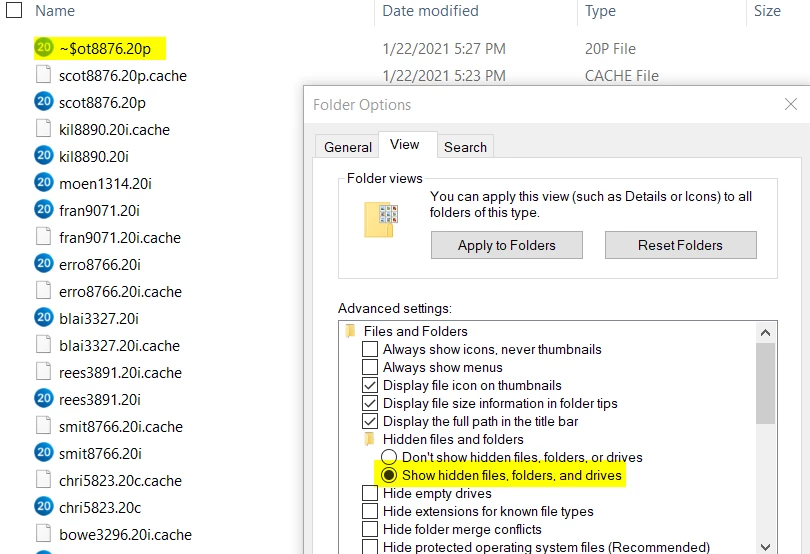
Using Windows Task Manage to ensure ProSeries is completely close. Turn on "Show hidden files..." from Windows Explorer, View, Options

With the setting on, you should be able to find the locked file as shown in the image, delete it, then you should be good to go.


13 replies

IRonMaN
Level 15
January 22, 2021

Have you tried rebooting your computer?

Slava Ukraini!
RikrdoAuthor
Level 3
January 22, 2021

I did twice , same problem

IRonMaN
Level 15
January 22, 2021

Then go with plan B and look at Lisa's link.

Slava Ukraini!
Just-Lisa-Now-
Intuit Community Champion
January 22, 2021

If a good old fashioned reboot doesnt cure what ails ya, you can try the suggestions here


https://proconnect.intuit.com/community/save-data-file/help/this-file-is-currently-locked-by-another-user-error-opening-or/00/4823

♪♫•*¨*•.¸¸♥Lisa♥¸¸.•*¨*•♫♪
Level 6
January 22, 2021

Do you have Network or Standalone installation?

RikrdoAuthor
Level 3
January 23, 2021

I have a Standalone installation, this error also happen twice and it happens when I have a file open and the program shut down for some reason, and it take a around half hour before a can open that file again.

Level 6
January 23, 2021

Using Windows Task Manage to ensure ProSeries is completely close. Turn on "Show hidden files..." from Windows Explorer, View, Options

With the setting on, you should be able to find the locked file as shown in the image, delete it, then you should be good to go.


