Level 2
April 24, 2020
Solved

How to resolve a form 2555 error message resulting from a recent Proseries software update

  • April 24, 2020
  • 70 replies
  • 254 views

The error states that dates are needed on line 10 or line 16 in order to properly calculate the exclusion.  Dates are already entered.  This error message is showing up with all my tax clients who claim a foreign earnings exclusion - even with one that I have successfully e-filed earlier this month.  How can I resolve this error?

This topic has been closed for replies.
Best answer by AshleyatIntuit

If you were experiencing an error on the address field of the Form 2555, that issue is now resolved.  Please note you will need to update your ProSeries product.

ProSeries Professional 1040 version should now be 2019.27.0.1 or higher.

ProSeries Basic 1040 version should now be 2019.27.0.2 or higher.

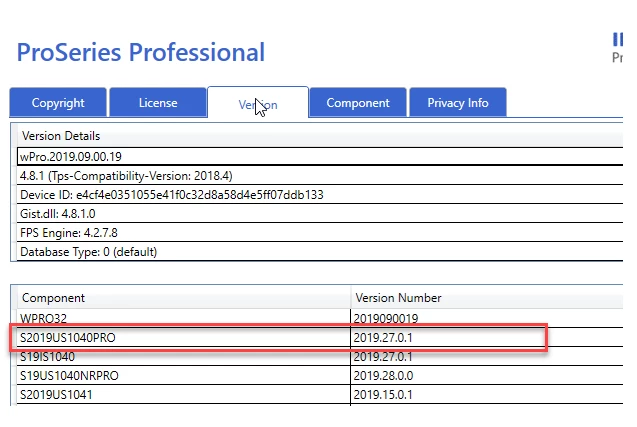
You can locate your 1040 version by going to HELP> ABOUT PROSERIES, selecting the VERSIONS tab, and looking for the section in the bottom table labeled: S2019US1040PRO (pictured below is a screenshot from ProSeries Professional)

70 replies

Level 3
May 1, 2020

I have been waiting for an update to fix this error message (10 days since April 20). The only way to Efile  is unchecking option "Enable conversion error checking" at your own risk assuming everything is correct on Form 2555. It is frustrated and disappointed that Professional Proseries is having a bug or issues with a Form by the end of April and taking more than 10 days to fix the problem after it was reported. I lost time and money first trying to figure out the problem even deleting the entire return and transfer the client again and also deleting the form itself and filling out all the information.  Tech Support just said 'WAIT' for the upcoming udate. WHEN?????????????? This is not DRAKE or ATX !!!! We paid 3 to 4 times more or thousands of dollars to get this by end of APRIL!!!! NO MORE COMMENTS

AshleyatIntuit
Level 9
May 5, 2020

If you were experiencing an error on the address field of the Form 2555, that issue is now resolved.  Please note you will need to update your ProSeries product.

ProSeries Professional 1040 version should now be 2019.27.0.1 or higher.

ProSeries Basic 1040 version should now be 2019.27.0.2 or higher.

You can locate your 1040 version by going to HELP> ABOUT PROSERIES, selecting the VERSIONS tab, and looking for the section in the bottom table labeled: S2019US1040PRO (pictured below is a screenshot from ProSeries Professional)

JeffVAuthor
Level 2
May 8, 2020

Thanks so much for resolving this problem.  It looks like the error message has been resolved.

Level 2
May 5, 2020

Update 2019.27.0.1 did fix the problem that I had with 2555.  But now when I mark the W2 as Foreign income it asks for an EIN.  AE doesn't issue W2s or have an EIN.  Before 2019-27-0-1 this wasn't a problem

Level 3
May 5, 2020

You don't need to enter a W-2 for foreign income.  The Foreign Earned Income Allocation Worksheet has a box right under Line 5 where you mark the X indicating that your foreign income does not have a W-2 and should still be included in Line 1 of the 1040.  I've always used this option and have never tried to enter the info straight into a W-2 screen.  Hope this helps.

Level 3
May 5, 2020

I've entered my clients's foreign wages on the "Wages, Salaries & Tips Worksheet", Line 8b and then checked box 8c.  This carries the wages over to the "Foreign Earned Income Allocation Worksheet" and no EIN needs entered. 

Level 2
October 18, 2022

The error message Schedule 1 total income exclusion does not equal total of for 2555; this will occur when you try to override an entry on 2555 i.e. days work in foreign country. Remove or fix all override and the IRS will accept the return