Level 3
January 25, 2023
Solved

Error Primary Signature Date

  • January 25, 2023
  • 2 replies
  • 32 views

I'm filing a 2021 return in January 2023. I have an error "Primary Signature Date". I assume it's because the Date Pin Entered needs to be in the same year of transmitting the form to the IRS. When I try to enter today's date, the software gives me an error and says the date needs to be in 2022. Thoughts?

Thanks for your help. 

Steve

This topic has been closed for replies.
Best answer by Just-Lisa-Now-

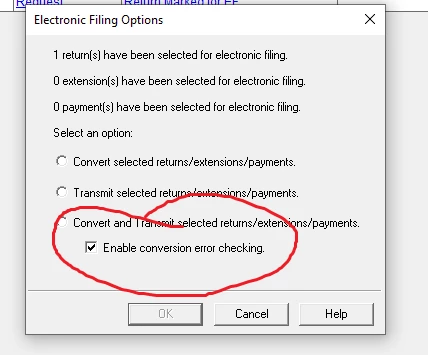
Multiple posts about this in the group, theyre working on it.  As a workaround, EFile from the EFCenter and turn off error checking at conversion and it will go through.  If you use a 2022 date, it will get rejected.

2 replies

IRonMaN
Level 15
January 25, 2023

Put today's date in and unclick the error checking box when you convert the file for e-filing.

Slava Ukraini!
Level 3
January 25, 2023

Thanks, it worked!

Just-Lisa-Now-
Intuit Community Champion
January 25, 2023

Multiple posts about this in the group, theyre working on it.  As a workaround, EFile from the EFCenter and turn off error checking at conversion and it will go through.  If you use a 2022 date, it will get rejected.

♪♫•*¨*•.¸¸♥Lisa♥¸¸.•*¨*•♫♪
Level 3
January 25, 2023

Thanks for both responses. It worked!

Level 3
January 25, 2023

it did not work for me