Level 15
January 8, 2024
Solved

Error in ProSeries Basic - Won't open new return

  • January 8, 2024
  • 2 replies
  • 18 views

Has anybody seen any posts saying that ProSeries Basic has an error and won't do anything?  It is happening on BOTH my new desktop PC and new laptop (Windows 11 Pro). [Edit:  It is also doing it on my old computer using Windows 10 Pro].

Did updates, repaired updates, uninstalled, rebooted, re-installed and it still does it.

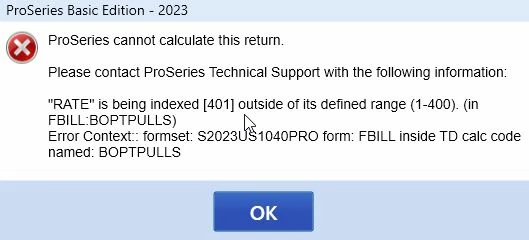
I open a new client, it show me this error, and when I hit okay it makes me close the client.

I don't see any posts about it, and so far I haven't found any support articles on it.


This topic has been closed for replies.
Best answer by TaxGuyBill

@TaxGuyBill Try these steps if you haven't already: 

1. Transfer prior-year preparer information and billing invoice operations to the current year. (See the third blue expando in How to use Client Billing Options in ProSeries) 
2. Rename client in HomeBase.  In ProSeries Professional and ProSeries Basic you can rename a client file from within the HomeBase. (From Help Article: Managing your client list) 

  1. In HomeBase, highlight the client file you wish to rename.
  2. From the File menu, select Client File Maintenance and choose Rename.
  3. Enter the new client file name.
  4. Click Rename Client.
  5. Enter the new name.

3. Restart your software

If this solution doesn't remove the popup, let me know by responding and I'll continue to research. 


@1569 


I figured it out.

I use the billing rates-per-form.  In Basic, I have several 'add on' ones that I manually check for various options (such as a PITA fee).

The 2023 program automatically transfers that from year to year   However, the 2023 program is screwing up those 'add on' entries on the rates-per-form page (I don't have those add-on items in Professional, which is why Professional has been working).

I couldn't figure out out to directly delete the forms-per-rate information (deleting the SHRFRM files wasn't doing it).  So I had to delete those 'add on' items from my 2022 software (which screws up my 2022 billing information), then do a "clean" install of 2023.


So while I have it figured out, the initial problem is that the developers screwed something up for those 'add-on' items for the billing-per-form.  So while it may not be common, there will likely be other complaints about the program error.

Thanks for looking into it.  Can you report to the developers and support about this problem that they screwed up?  At least that way there is a record of the problem for when others call to complain.

2 replies

IRonMaN
Level 15
January 9, 2024

I think your years of complaining about Intuit has finally come back to bite you.  I think the second line of the explanation is directed at you -------FBILL -------- I think they just omitted three letters so it wouldn't be so obvious 😬

I think if I try opening a new client in ProSeries Professional and it comes up with FJEFF, we will be able to confirm that.😰

Slava Ukraini!
Level 15
January 9, 2024

@IRonMaN wrote:

I think your years of complaining about Intuit has finally come back to bite you.  I think the second line of the explanation is directed at you -------FBILL -------- I think they just omitted three letters so it wouldn't be so obvious 😬

I think if I try opening a new client in ProSeries Professional and it comes up with FJEFF, we will be able to confirm that.😰


🤣

Just-Lisa-Now-
Intuit Community Champion
January 9, 2024

Thats a new one.  With the word RATE and BILL intertwined in there, do you have price per forms or special billing rates set up that carry over each year?

I think I saw someone over in the FB group mention that her prices per form did NOT carry over like she wanted them to, not sure if shes using Basic or Pro though, maybe theyve got some kind of glitch in that part of the program?

♪♫•*¨*•.¸¸♥Lisa♥¸¸.•*¨*•♫♪
Level 15
January 9, 2024

@Just-Lisa-Now- wrote:

I think I saw someone over in the FB group mention that her prices per form did NOT carry over like she wanted them to, not sure if shes using Basic or Pro though, maybe theyve got some kind of glitch in that part of the program?


It was that post that prompted me to check things.   😂

I tried opening a new client to check the billing rates, and it gave me that error.  So I thought maybe it needs the billing information transferred first, so I transfered the billing information (based on that Facebook post) but it still gives the error.

I just downloaded and installed it on my old computer (Windows 10 Pro) and get the same error.


Just-Lisa-Now-
Intuit Community Champion
January 9, 2024

I dont use any set billing rates, and I dont have access to Basic for 2023 so I cant even goof around with it to try and provoke the error.  I did post it the Lounge, see if that will get someone to put it on the fix-it list quicker.

♪♫•*¨*•.¸¸♥Lisa♥¸¸.•*¨*•♫♪