
dd4vols
Intuit Community Champion
February 13, 2021
Solved

Can't print Client Specific Letters

  • February 13, 2021
  • 3 replies
  • 40 views

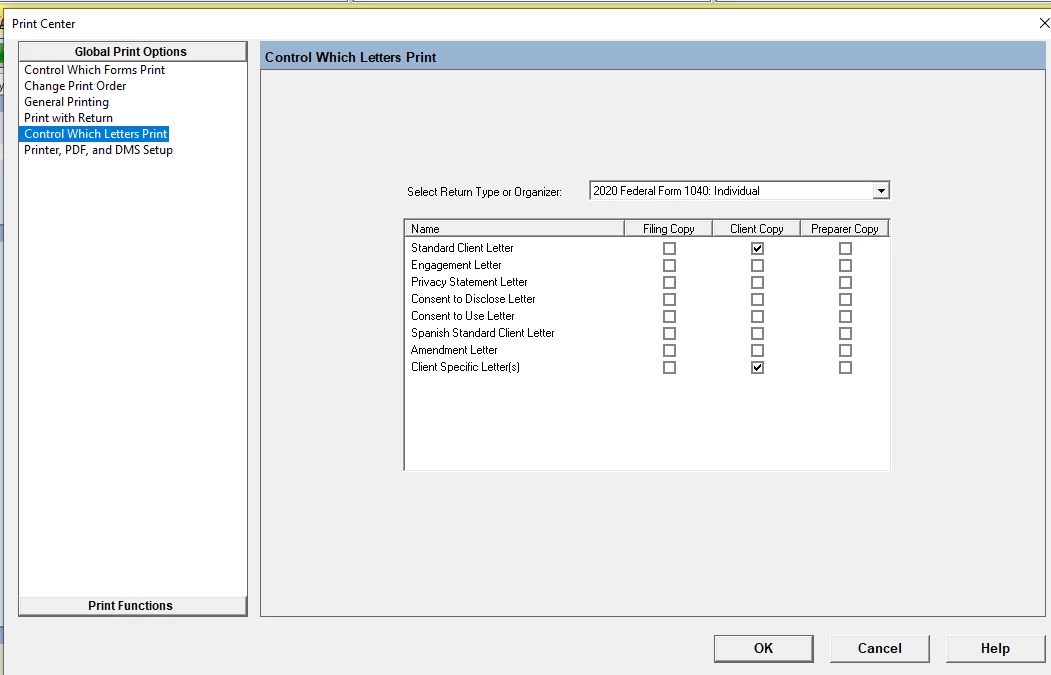
even though in Print Options>>Control Which Letters Print, I have them selected.  It will print the Standard Client Letter if you choose that option from that screen. I can print the CSL from the CSL itself when in a client,  but i do a CSL for every client.  I don't need that hassle.   The feature worked perfectly last year.

@Orlando11   any help?
This topic has been closed for replies.
Best answer by Orlando11

Hi,

I'm sorry for the frustration. It's not intuitive to me, but I think it will do what you want if you check *both* standard letter & client letter. I think this year we changed it so that if you have a client letter for any given client, it will override the corresponding standard letter. Otherwise it'll print the standard one. I don't know why we left it two separate options.. i will ask on Monday.

Please confirm that works for you and that I haven't misunderstood your issue.

Orlando


3 replies

Orlando11Answer
Level 8
February 13, 2021

Hi,

I'm sorry for the frustration. It's not intuitive to me, but I think it will do what you want if you check *both* standard letter & client letter. I think this year we changed it so that if you have a client letter for any given client, it will override the corresponding standard letter. Otherwise it'll print the standard one. I don't know why we left it two separate options.. i will ask on Monday.

Please confirm that works for you and that I haven't misunderstood your issue.

Orlando


dd4vols
dd4volsIntuit Community ChampionAuthor
Intuit Community Champion
February 13, 2021

@Orlando11  to the rescue again!!   I would have never ever thought to try doing that!!  Thanks so much!

If an answer solves your issue, click on the "Mark as Best Answer" button! Makes it easier for people to find answers to similar questions that have already been posted.
Level 8
February 13, 2021

Great, thank you for confirming! I've put in a defect to look into the experience.

I think..

* Checking any predefined letter alone (Standard, Engagement, etc) should result in the custom override of that letter printing

* The last "Custom Letter" option should only refer to custom letters not based on any template, and should be renamed to something like "Additional non-templated custom letters"