
Level 2
December 10, 2021
Question

Can't install TY2021 program

  • December 10, 2021
  • 11 replies
  • 42 views

Please help me get the TY2021 program installed.

Here is my hardware:

Dell XPS 15

7th generation Intel core I-7

16 GB RAM

62 GB Free disk space

Running only whatever firewall and anti-virus comes standard with Windows 10


I have tried to install it from within the 2020 program and also downloading the installer and running it straight.  I get the same errors either way.

When I run the installer it gets to 7% installing vc_redist.x64 and I get the following:
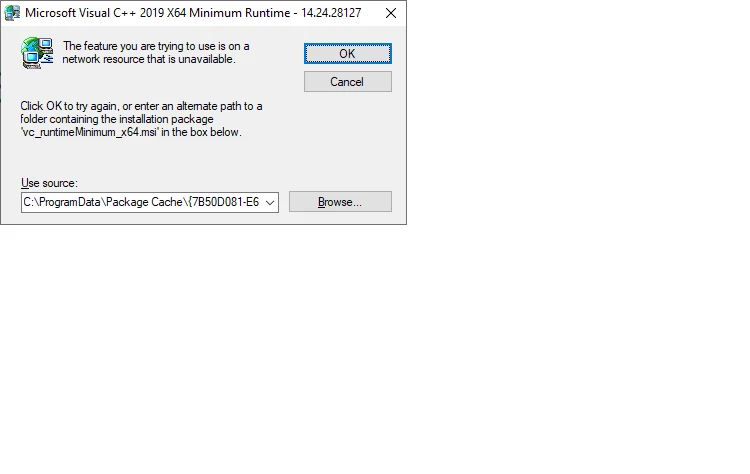
 

If you click cancel you get:
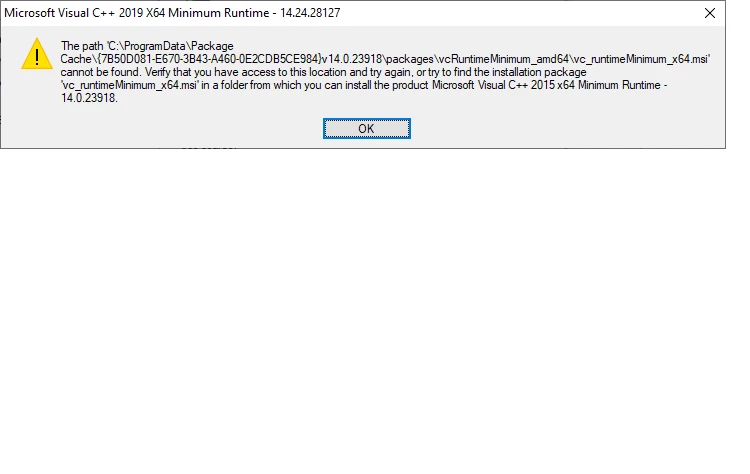
When you click OK here you get:
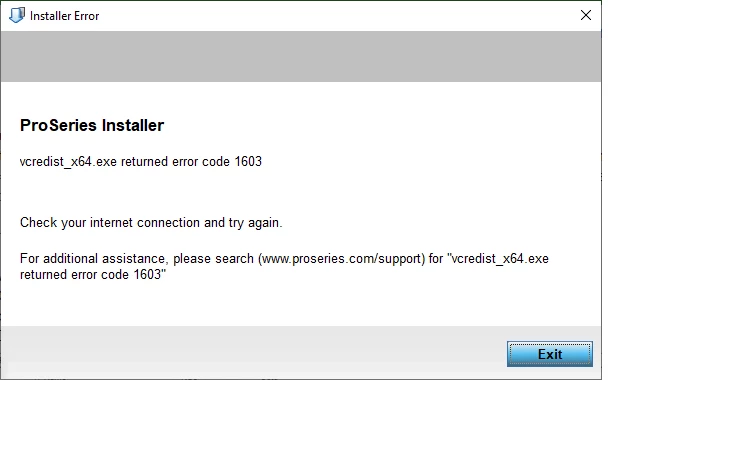
To try to recap everything we have tried would be impossible but to mention a few:

We have tried safe mode  - same result

We have created a new user, thinking that there might be a corruption in the user profile.  -  Same result

We have deleted all the Microsoft Visual C++ redistributable entries in the Control Panel, downloaded a new copy of vc_redist.x64 from Microsoft and I get the same result.


Please help.


Thanks

Charles Reid

This topic has been closed for replies.

11 replies

dkh
Level 15
December 10, 2021
Level 2
December 11, 2021

Yes and it's useless.

qbteachmt
Level 15
December 10, 2021
Level 2
December 11, 2021

Yes.

Scrolling down and clicking on the Windows 10 link the first thing I notice is that in step 7 I do NOT have .NET 4.6 Advanced Services at all.  I have .NET 4.8 Advanced Services.

Next in step 10.  Which C:/ProWinXX folder are they talking about.  I have a C/ProWin20 folder but I don't want to mess it up.  20 is working fine.  If they mean C:\ProWin21 the installer never gets far enough to create the 21 folder.

Thanks

qbteachmt
Level 15
December 10, 2021

"We have deleted all the Microsoft Visual C++ redistributable entries in the Control Panel, downloaded a new copy of vc_redist.x64 from Microsoft and I get the same result."

Here's the executable from Intuit, in this topic:

https://proconnect.intuit.com/community/proseries-tax-discussions/discussion/i-m-trying-to-install-proseries2020-and-i-m-getting-error-code/00/108065


Don't yell at us; we're volunteers
Level 2
December 11, 2021

I downloaded the file indicated vc_redistx86.14.24.28127.4.exe.  It runs and installs fine.  I how have that listed in the Control Panel.  I re-booted and tried the PS2021 install again and got the same message.

It doesn't seem to matter which version of vc_reuntime I try to use for installation (and I have tried 8-10, both x64  and x68) all the error messages say I need 23918.  (Second oval above.


qbteachmt
Level 15
December 11, 2021

It's hard for someone who is an end user to understand why a Visual C (redistributable) tool from 2019 is calling a Visual C tool from 2015. 2015 can use the latest, and 2019 should not need 2015:

"Visual Studio versions since Visual Studio 2015 share the same redistributable files. For example, any apps built by the Visual Studio 2015, 2017, 2019, or 2022 toolsets can use the latest Microsoft Visual C++ Redistributable. However, the version of the Microsoft Visual C++ redistributable installed on the machine must be the same or higher than the version of the Visual C++ toolset used to create your application."

Certainly, many things are being transferred to 64-bit and 32-bit is being abandoned, and that is the designation of x64 vs x86 (86 being the old cpu standard). It's not unusual to find both installed for the same year C++.

I'm not sure any peer user can help with this. Even if I had this computer in my hands, your own IT person is likely better geared towards resolving this. Have they contacted Intuit about it?

Don't yell at us; we're volunteers
PATAX
Level 12
December 24, 2021

Charles, I also had a problem downloading the new software on computer with Windows 10... I got another computer with Windows 11 and faster internet connection, and had absolutely no problem downloading the software... The cost of another computer is reasonable... Just my opinion

Level 2
December 24, 2021

Thanks PATAX. I came to the same conclusion. New computer is in order. 

PATAX
Level 12
December 24, 2021

You're welcome... Merry Christmas and Happy New Year...🎄🎅☃️❄


