Level 3
February 21, 2020
Solved

Billing Rates per form disappeared

I just finishing installing updates and when I logged back in, all of my billing rates per form had been erased.  They just disappeared.  Nothing is there...all form rates are blank!  How do I fix this?

This topic has been closed for replies.
IntuitAustin
Level 10
February 21, 2020

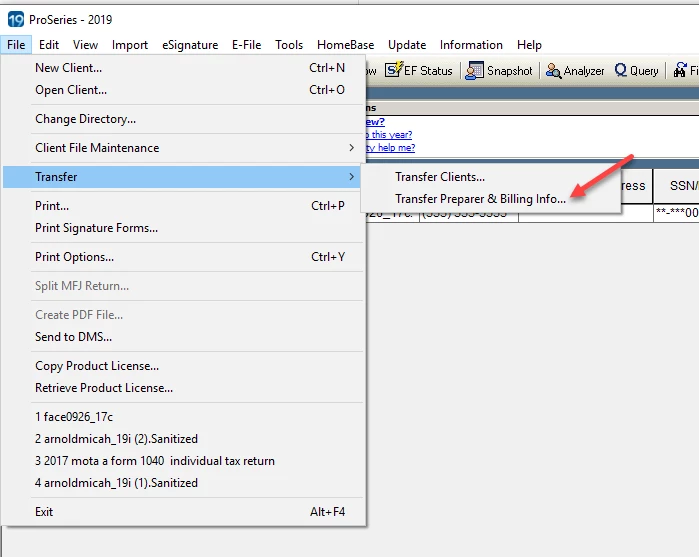
@Taxes Hispanos You can transfer prior year billing settings by clicking File > Transfer > Transfer Preparer & Billing info...


**Say "Thanks" by clicking the thumb icon in a post**Mark the post that answers your question by clicking on "Accept as solution"

10 replies

February 21, 2020

Yikes.  Have you tried restarting to see if it is just a temporary glitch?


@IntuitAustin   Is this a problem with the new update?  If so, PLEASE stop that update so everybody doesn't get this screwed up.

Level 3
February 21, 2020

OMG!!!  Yes!  I've tried EVERYTHING!  I even restarted my PC!  And I can't even find the function to transfer the rates from last year.  If I could do that, I could just go through and make a few adjustments for this years' forms.  

Level 4
March 28, 2020

I just experienced this today.  This is ridiculous.  I am definitely looking into Drake software next year.