
Level 2
February 25, 2021
Solved

1041 return

  • February 25, 2021
  • 4 replies
  • 23 views

I entered the detail of interest and dividends on Interest and Dividend Income Worksheet but the totals did not automatically transfer to page 1 of the 1041 return as it has in past years. When I manually entered the totals to page 1 the number appears in red. Why?
This topic has been closed for replies.
Best answer by JH7

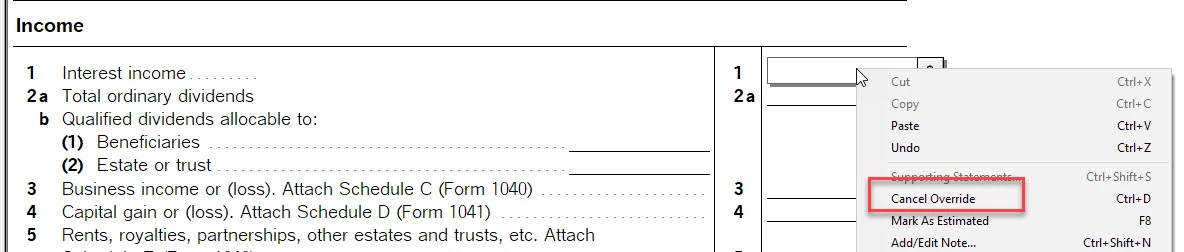
Did you make an override on Form 1041 line 1 or line 2 but later removed the number and forgot to cancel override? If you right click on the field, do you see "Cancel Override" option ? 

The calculation on the line won't work until you cancel override. 


4 replies

Employee
February 25, 2021

Which part did you enter it on Interest and Dividend Income Worksheet?

Level 2
February 25, 2021

I used the detail portion of the Interest and Dividend Income Worksheet as I have for this client for the past several years without an incident. 

Curiously, I did a second 1041 return today and is worked perfectly - no red numbers.

JH7EmployeeAnswer
Employee
February 25, 2021

Did you make an override on Form 1041 line 1 or line 2 but later removed the number and forgot to cancel override? If you right click on the field, do you see "Cancel Override" option ? 

The calculation on the line won't work until you cancel override.


