Level 5
May 17, 2021
Solved

E-File Transmission Error

  • May 17, 2021
  • 3 replies
  • 16 views
Individual 2020 Return.  No critical diagnostic alert shown - E- file transmission failure.  
The error message read: "Please check and re-upload following file list, as it seems following file(s) are corrupt or not available now: 1-Form1040.pdf,2-Form1040.pdf".  I cannot figure out how to fix this.  

The ProConnect Online auto-corrected my client's SSN.  The SSN grayed out and not available for edit.  Then I followed the solution to copy the 2020 return, correct the SSN, and submitted the refund request, then E-File the new return.  I did not delete the original return as the original return name was submitted as part of the refund requests, so I think some one will need to look at it.  

I do not understand what to do to file the new return with the SSN fixed.  Please help.

This topic has been closed for replies.
Best answer by IntuitRebecca

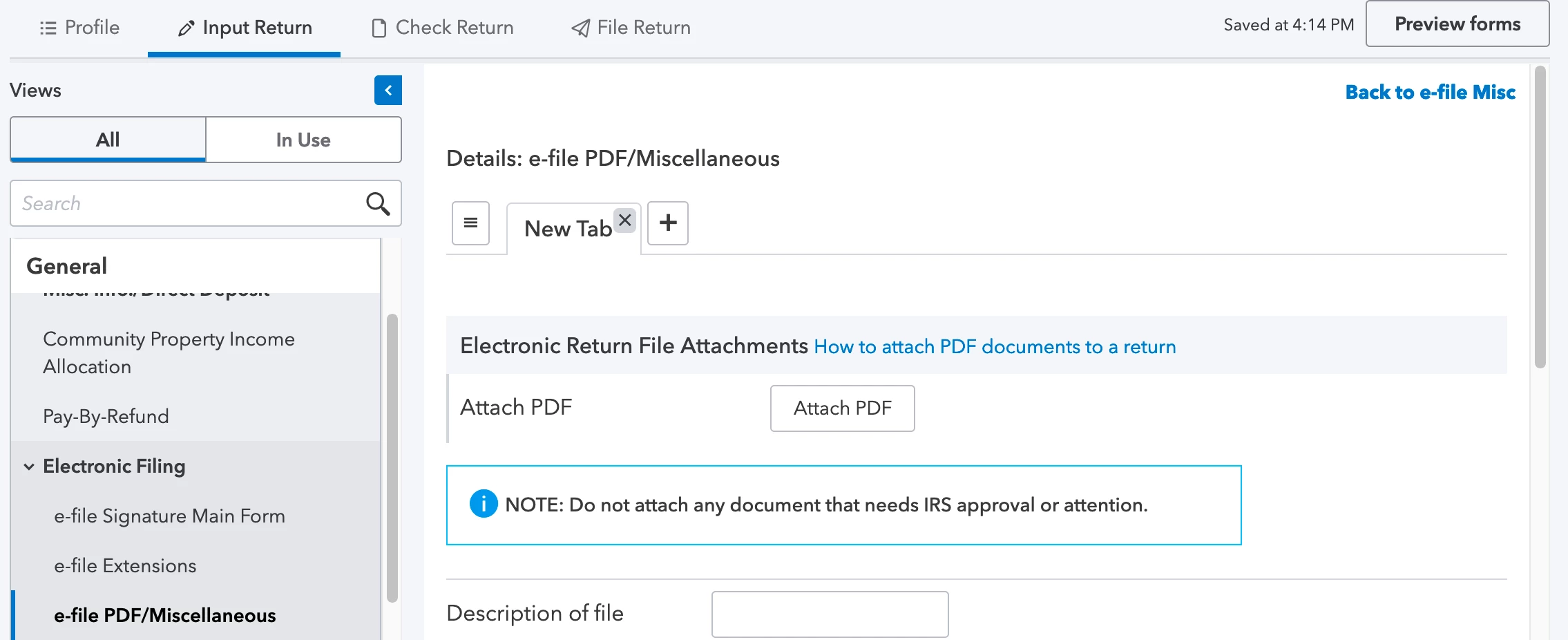
It sounds like you may have had PDFs uploaded on the return, and when you made the copy to correct the SSN, the PDFs didn't get copied.

To resolve this: 

  1. Go to Electronic FIling > e-file PDF/Miscellaneous.
  2. Click the "e-file Attachment" link at the top right.
  3. Click the "X" to delete the tab(s) where you have documents showing as uploaded.
  4. Re-attach the PDFs on this screen.

- Rebecca

3 replies

Level 5
May 17, 2021

Are you getting these errors filing a new return?  Was the initial return accepted?

TaxesTechAuthor
Level 5
May 17, 2021

Yes I am getting this error message filing an new return.  The initial return was rejected due to ProConnect tax software auto-corrected SSN and grayed it out, thus not for edit.  I followed the below instruction to correct the SSN and was trying to file the copied return and got the E-File Transmission Failure notice.  

SSN or EIN appears grayed out and can't be changed

Why can't I edit the SSN or EIN?

ProConnect Tax locks in the tax identification number (social security number or employer identification number) on your return at the time you purchase it. The program will prompt you to purchase credits or use a credit the first time you e-file or print from the return. Partial printing, generating a PDF, or e-filing an extension will all require you to use a credit if you have not already purchased the client's return.

How do I change the SNN or EIN when it's grayed out?
  1. Click the Return actions button, and select Copy Return.
  2. From the Tax Returns list, open the new copy.


  3. Go to the Client Information screen and edit the SSN or EIN.
  4. When you print or e-file from the copy, you'll be prompted to use or purchase an additional credit.
  5. Submit a refund request here for the duplicate charge.

Refunds and credits for tax ID corrections are reviewed individually and limited to 5 per account, per tax year.


Related topics


Level 5
May 17, 2021

Do you have these agencies selected in Profile and on General Information?

Are these for complete return or Extension?

IntuitRebecca
Level 6
May 17, 2021

It sounds like you may have had PDFs uploaded on the return, and when you made the copy to correct the SSN, the PDFs didn't get copied.

To resolve this: 

  1. Go to Electronic FIling > e-file PDF/Miscellaneous.
  2. Click the "e-file Attachment" link at the top right.
  3. Click the "X" to delete the tab(s) where you have documents showing as uploaded.
  4. Re-attach the PDFs on this screen.

- Rebecca

TaxesTechAuthor
Level 5
May 17, 2021

That's exactly right!  I replaced the PDF attachment several times to e-File, but did not delete those tabs and upload again.  That solved the issue, THANK YOU SO MUCH!!!

Level 2
August 17, 2022

I need copies or my 2020 taxes

sjrcpa
Level 15
August 17, 2022


You’ve come to an Intuit site supporting tax professionals, and you may be looking for support as an individual taxpayer. Please visit the TurboTax Help site for support.


The more I know the more I don’t know.