Level 2
July 16, 2020
Solved

E-File Error - for an Extension

  • July 16, 2020
  • 2 replies
  • 19 views

I am trying to efile extension. I received this error. I saw a fix from a earlier post. where I deleted and entered a new preparer it didn't work. Unless I missed something

Your request was not understood by the e-filing service. - Invalid XML. cvc-complex-type.2.4.a: Invalid content was found starting with element 'app'. One of '{senderEmail, legalName}' is expected. Please verify that your application program is up-to-date. Problem occurred transmitting efile data. 

This topic has been closed for replies.
Best answer by IntuitAustin

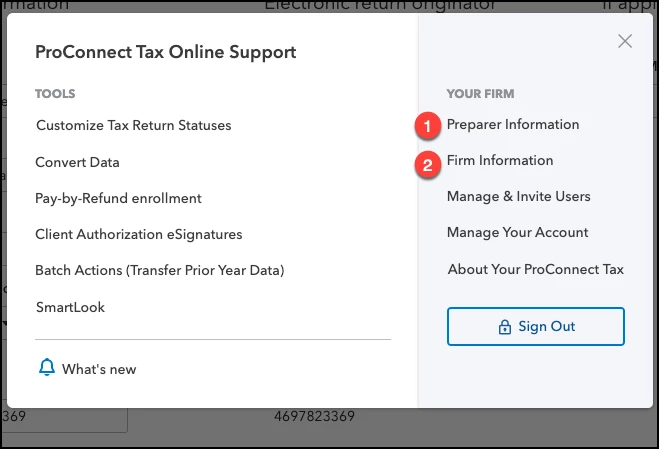
Click on Settings in the bottom left corner, select (1) Preparer Information and add a new preparer. It can be the same name, just add a middle initial or something different. Then under Settings, select (2) Firm Information. 


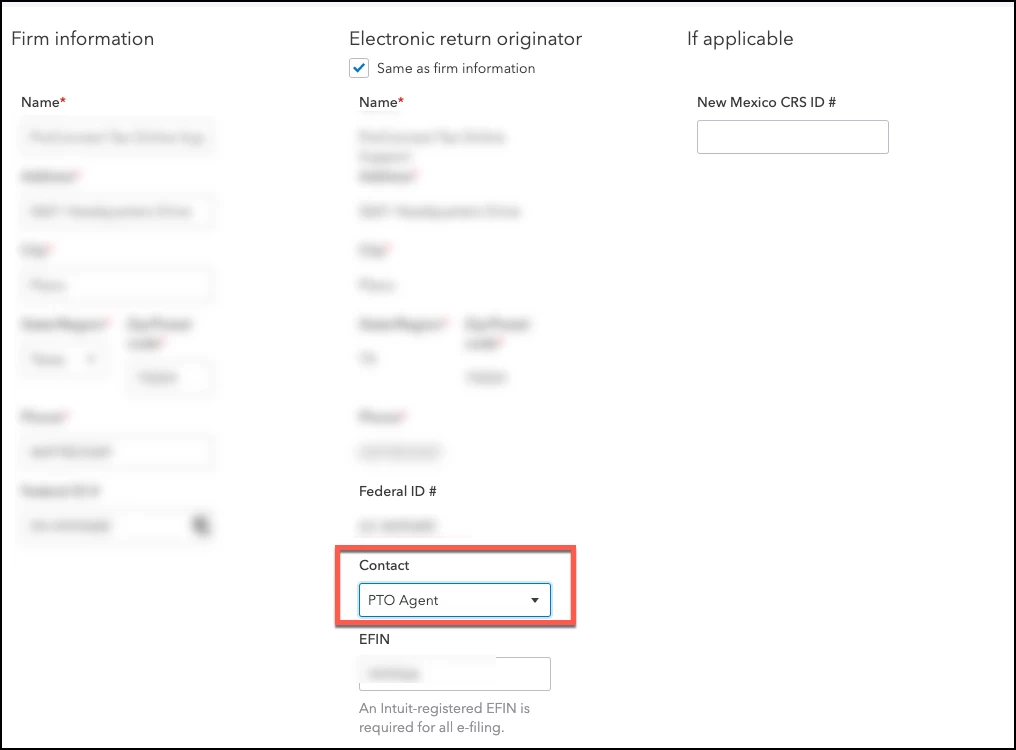
In firm info, go under ERO and change the preparer. 


2 replies

Level 2
July 16, 2020

I kept having the same issue too! I can login to Proconnect, but when I click to "add new client" my screen goes blank & I can no longer work in the system. Have you had any resolutions yet?

KGL19Author
Level 2
July 16, 2020

See solution -  it worked. It took me a while. I missed the post but someone at the call center helped me resolved it with the same step. 

IntuitAustin
Level 10
July 16, 2020

Click on Settings in the bottom left corner, select (1) Preparer Information and add a new preparer. It can be the same name, just add a middle initial or something different. Then under Settings, select (2) Firm Information. 


In firm info, go under ERO and change the preparer. 


**Say "Thanks" by clicking the thumb icon in a post**Mark the post that answers your question by clicking on "Accept as solution"