Level 3
Mar 24, 2022 2:44 PM UTC
Solved

State Allocation Incorrect?

I have a client that was a full year resident of OK. However, he has O&G royalty income from 3 other states (And none from OK) LA, TX, and AR. I have allocated income by selecting next to each entry which state that income (and expense) should go to. When reviewing the forms, my AR and LA returns look to be allocating correctly. However, my OK return is showing all the O&G income (Including taking depletion). I entered the out of state income on the state modification screen, but this made my OK AGI negative because of the depletion, so I overrode the depletion to make it 0. Did I miss an allocation somewhere that would make this easier, or is this just the way to do it?? Even though I got the result I wanted, I think it would be helpful to learn if there is an easier/more correct way to do this. Thank you in advance. 

This topic has been closed for replies.
PhoebeRoberts
Intuit Community Champion
Mar 24, 2022 8:24 PM UTC

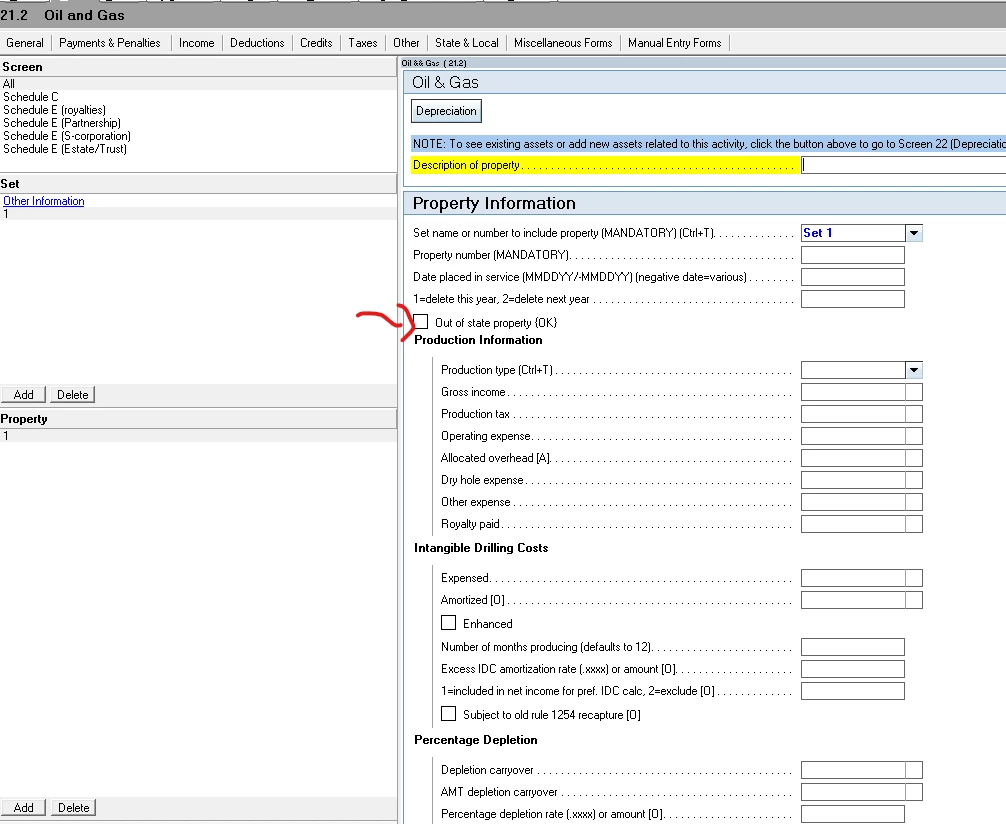
Yes, you missed a checkbox. In the O&G screen, Property subscreen, check the Out of state property {OK} box.

5 replies

sjrcpa
Level 15
Mar 24, 2022 4:12 PM UTC

OK taxes all of the OK resident's income. He gets a credit on the OK return for tax paid to other states.


The more I know the more I don’t know.
PhoebeRoberts
Intuit Community Champion
Mar 24, 2022 8:20 PM UTC

That's not true for O&G. Backing it out as out of state income is the correct treatment.

sjrcpa
Level 15
Mar 24, 2022 10:09 PM UTC

Thanks for correcting me. I should have known better than to opine on this.

@Emm1234  Phoebe is the oil & gas and OK guru around here.

The more I know the more I don’t know.
PhoebeRoberts
Intuit Community Champion
Mar 24, 2022 8:24 PM UTC

Yes, you missed a checkbox. In the O&G screen, Property subscreen, check the Out of state property {OK} box.

Emm1234Author
Level 3
Mar 25, 2022 3:22 AM UTC

Oh thank you! I don't know how I missed that honestly.