
Level 2
December 4, 2025
Question

Accounts Payables Entry Dates all wrong format!

  • December 4, 2025
  • 2 replies
  • 3 views

After updating to 2025 tax year EasyACCT all of the entry dates on my invoice numbers have been imported incorrectly. How do I bulk edit this or fix this problem? See screenshot below, thank you
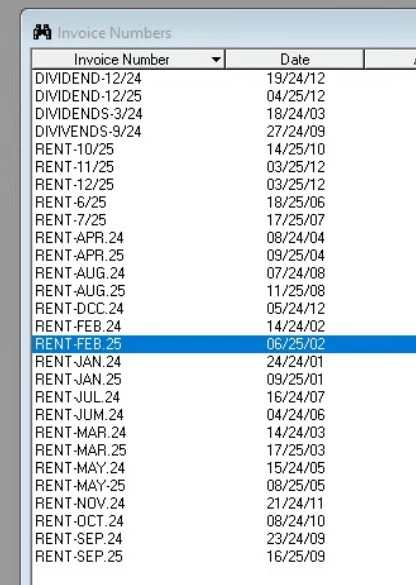
 

2 replies

IRonMaN
Level 15
December 5, 2025

I'm going to take a wild guess that the only fix is to import again if you have a backup of what you imported originally.  But Intuit could surprise me and be able to fix it.................... and it is also possible that pigs could fly for Christmas this year.

Slava Ukraini!
Kathi_at_Intuit
Moderator
December 5, 2025

Hi @gajean Welcome to the Community and thanks for bringing this to our attention. We've checked and it has already been reported to our development team. A fix will be included in an upcoming update. We do not have an estimated release date yet, but we will keep you posted as soon as more information becomes available.

Thank you for your patience while we work to get this resolved.

**Click the 👍Thumbs up icon to say thanks on a post, and click Best Answer to mark the post that answered your question.
gajeanAuthor
Level 2
December 5, 2025

There are additional problems as well, not sure if related or not.

After we have posted new AP transaction entries under the correct Vendor, when we go to print checks and the Invoice Selection screen, for some reason some invoices/transactions have spontaneously changed their vendor IDs. I double check the entry and it is entered correctly but when I go to invoice selection, it shows up under a different vendor ID (I am selecting transactions based on due date). It seems to duplicate the entry if the $ value is the same, even though it should be different vendors. This is a HUGE problem and we need help ASAP as we can no longer cut any AP checks. I am just hoping this doesnt affect payroll processing... 

Please see below screenshots. The ones marked in red for some reason duplicated themselves, even though they should be entirely different vendor IDs for those 3 transactions

Kathi_at_Intuit
Moderator
December 5, 2025

Hi @gajean Thank you for sharing more details here in the community. The development team is aware of the behavior you’re seeing and they are actively working on a resolution. You will be notified as soon as a fix becomes available. If you need further assistance or have other concerns please reach out to EasyACCT Support directly, as they would be able to assist you further. 

Again, thanks for reporting this, and we appreciate your patience while we work to resolve the issue.

**Click the 👍Thumbs up icon to say thanks on a post, and click Best Answer to mark the post that answered your question.


