
Level 2
April 24, 2020
Solved

How to resolve a form 2555 error message resulting from a recent Proseries software update

  • April 24, 2020
  • 70 replies
  • 201 views

The error states that dates are needed on line 10 or line 16 in order to properly calculate the exclusion.  Dates are already entered.  This error message is showing up with all my tax clients who claim a foreign earnings exclusion - even with one that I have successfully e-filed earlier this month.  How can I resolve this error?
This topic has been closed for replies.
Best answer by AshleyatIntuit

If you were experiencing an error on the address field of the Form 2555, that issue is now resolved.  Please note you will need to update your ProSeries product.

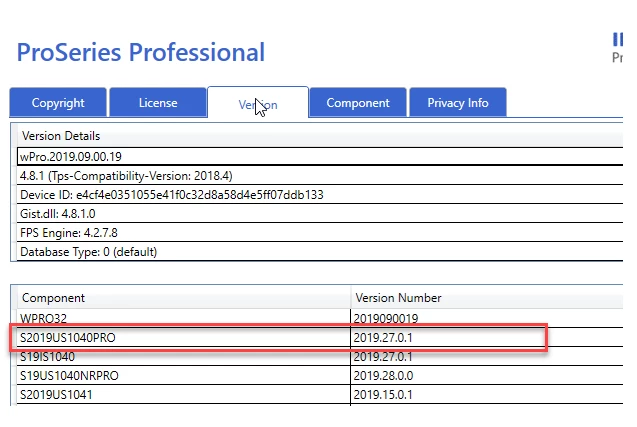
ProSeries Professional 1040 version should now be 2019.27.0.1 or higher.

ProSeries Basic 1040 version should now be 2019.27.0.2 or higher.

You can locate your 1040 version by going to HELP> ABOUT PROSERIES, selecting the VERSIONS tab, and looking for the section in the bottom table labeled: S2019US1040PRO (pictured below is a screenshot from ProSeries Professional)

70 replies

Level 3
April 24, 2020

Any update yet? I lost some clients already since I can't efile their tax return on time to get their stimulus payment direct deposited. 

Level 3
April 24, 2020

My Case number is 000546812851

Level 2
April 24, 2020

Same problem here. Error states "must enter foreign address" on 2555 "entries on foreign earned income worksheet".

Can't find any entry on the worksheet. The taxpayer isn't claiming the exclusion and doesn't have foreign earned income.

Tried deleting 2555 and error immediately comes back. Program won't allow me to efile.

The only foreign income on the return is a small amount for foreign tax credit Form 1116.

Please let me know if there is a work around or update to fix this.

Thanks

Gary Petrash [email address removed]


Level 3
April 24, 2020

I had same issue.  I efiled return with the error, unchecking the error check box.  The return was accepted by IRS.  But I would love to know the real fix.  

Level 3
April 28, 2020

how do you uncheck the error box in Pro Series.
thanks

George4Tacks
Level 15
April 24, 2020
Answers are easy. Questions are hard!
IntuitBettyJo
Community Manager
April 24, 2020

Hi @JeffV 

The unexpected behavior in regards to the Federal form 2555-T has been reported and determined to be working as designed. If your client does not qualify for the exclusion, do not enter a date in box 10 or 16, only enter in Part III of the 2555, Smart worksheet for calculating number of days less than requirement, the number for days they traveled. This will remove the error.

Hope this helps.

Cheers!

Betty Jo

Betty Jo
Level 3
April 24, 2020

The form does not work. If the client does qualify for the exclusion dates need to be entered.

Level 2
April 24, 2020

I am having the same problem

please INTUIT fix this problem ASAP, there is no time for this kind of surprises. 😞

Level 2
April 25, 2020

Not sure what causes the problem but I think its related to efile. 

I was getting an error message that foreign address was missing. Tried deleting the form but the message reselected it with same error.

Since it didn't occur until I tried to efile, I thought I'd try unchecking efile, F9 to recalculate, F10 to save without efile. 

Then I was able to delete form 2555 and efile the return. 

Don't know what caused it but it seems to be related to e-filing. 

This isn't a fix but it was a work around for my situation. Which was no foreign earned income yet still getting an error for Form 2555 when attempting to efile the return

It may help to fix your problem.

GLP

Level 2
April 26, 2020

This works!  Thank you!

Level 2
April 25, 2020

On form 2555 I get an error message box 10 or 16 must have dates entered.  On line 16 I do have the starting and ending dates for the qualifying period.  Prior to the recent software update, this error message do not exist.  Is there going to be another software update soon to fix this error.

Thank you for your help and assistance.

yosefacpa
Level 3
April 26, 2020

I'm having this same issue. I think I will need to disable error-checking to submit.

Level 3
April 26, 2020

You can do that or I think you can just delete the 2555 form.  Both methods work for me.

IRonMaN
Level 15
April 27, 2020

I think the team is getting ready to roll out the testing at any time now.

Slava Ukraini!
IRonMaN
Level 15
April 27, 2020

Not to nitpick, but I will anyway.  I brought this up early on and I will bring it up again.  Why is someone other than the person asking the original question allowed to mark posts as "solved".  Only the person with the original question really knows if their problem has been solved so why not leave it to them to mark it accordingly?  Unless of course, we are trying impress someone on how well the new forum is working due to the number of "solved" problems. 😕😕

Slava Ukraini!
IntuitBettyJo
Community Manager
April 27, 2020

Hi @IRonMaN 

The reason why we mark solutions as "Accepted Solutions" is so that you are able to see the solution when asking the question through the product; it helps surface the solution. 

I hope this clears up the confusion. 

Cheers! 

Betty Jo 

Betty Jo
IRonMaN
Level 15
April 27, 2020

But that really doesn't clear the confusion for me.  In due respect to Ashley,  JeffV hasn't said "wow - that solved my problem and I'm back to work".  It was definitely informational but it didn't solve anything.  I have seen numerous times how a post has been "solved", but most of the time it was Intuit's interpretation of the problem being solved.  Why not leave it up to the person asking the question if their problem is actually solved?  Instead of worrying about "solutions" showing up, why not just fix the search function so somebody can actually find helpful information when they do a simple search?

Slava Ukraini!
Level 2
April 28, 2020

April 28, 2020 (3:45 PM CST)

The Form 2555 error mentioned in this thread has not been resolved as of this date and time.  I am having the same problem.


