Welcome back! Ask questions, get answers, and join our large community of tax professionals.
  • Sign In
  • Elevate 2026 Pencil Banner
    cancel
    Showing results for 
    Search instead for 
    Did you mean: 

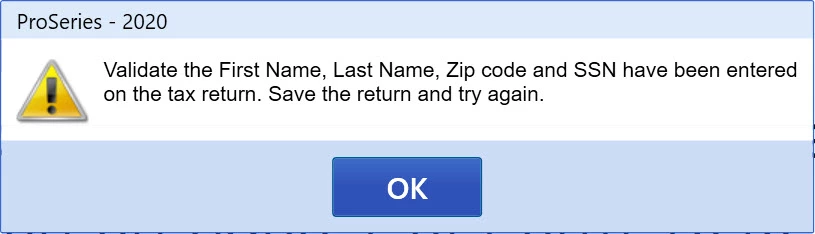
    Import 1099 error message

    BajaPete
    Level 1

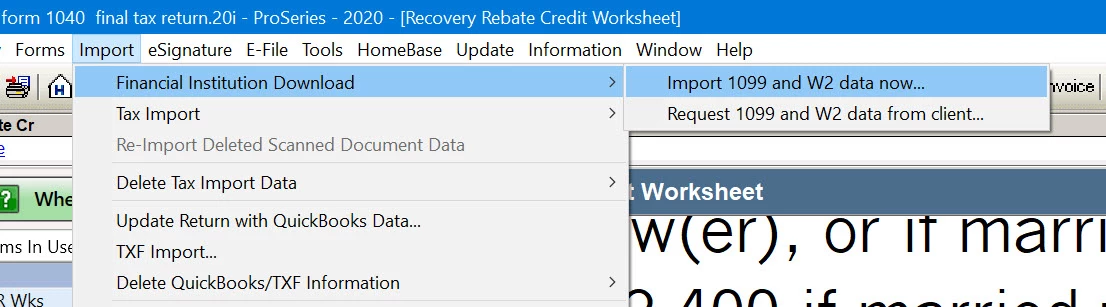
    Import.jpgValidate Error.jpg


    Anyone have a solution for this error message?

    0 Cheers

    This discussion has been locked. No new contributions can be made. You may start a new discussion here

    14 Comments 14
    Just-Lisa-Now-
    Level 15
    Level 15

    If the return has all the things that error message says, Id just skip the import and enter manually.


    ♪♫•*¨*•.¸¸♥Lisa♥¸¸.•*¨*•♫♪
    Orlando
    Intuit Alumni

    It looks like that dialog can be misleading in a couple of cases... It is also checking for a preparer name and that the file is not locked.

    There's also some edge case error checking going on that could pop that as well.


    0 Cheers
    BajaPete
    Level 1

    I screened shared with Intuit Agent Vanessa and she was unable to assist. She claims it is a known issue by their engineers.  I told her if Intuit can't fix it within a week I will request a refund on the product. 

    0 Cheers
    Orlando
    Intuit Alumni

    Did you confirm preparer name is set and the file is not locked?

    0 Cheers
    BajaPete
    Level 1

    Preparer name is filled and I don't understand your comment on the file being locked. I can enter information in any of the numerous worksheets and schedules and save the file so I assume this means the file is not locked. How would one find out if the file is locked?  

    0 Cheers
    sjrcpa
    Level 15

    Good luck with that refund.


    The more I know the more I don’t know.
    Orlando
    Intuit Alumni

    If you can enter those fields and save it's not locked.

    As an experiment, can you create a new 1040 client and enter the following:

    • SSN with nine digits
    • Zip Code, Last Name, FirstName 
    • E-mail address

    Then Choose Import - > Financial Institution Download -> Request 1099 and W2 Data from client...

    Do you get the same error code or the FIDO request wizard?

    0 Cheers
    BajaPete
    Level 1

    Validate Error.jpgI setup a sample taxpayer as suggested and I still get this same error. What is a FIDO?

    0 Cheers
    Orlando
    Intuit Alumni

    FIDO is our slang for Financial Institution Download.

    What do you see if you choose Help -> Options Setup Wizard, and you select the Preparer like below? There's no fields marked in red? There's a preparer name, preparer code & firm association?


    2021-02-27_12-57-20.png

    0 Cheers
    BajaPete
    Level 1

    Intuit finally released a software update and although it made 2 steps forward it made one step backwards. I was finally able to access the 1099-B for TdAmeritrade, Robinhood, Tastyworks. First problem Proseries directs you to enter the url of the financial institution which is wrong. www.Tastyworks.com does not work but tastyworks does work. Next when you enter in the required document/ssn/account the connection between Intuit and the financial institution is not working. I receive error message that no tax data is available. If you are a Intuit employee please review Case:560254141. No Data.jpg

     I was informed that thousands of users are unable to use this feature while Intuit takes their sweet time repairing basic import functions that should have been tested and working before 1/1/2021. Today is 2/27/2021 and unbelievable that they charge hundreds of dollars for non-working tax software.

    0 Cheers
    GHahn
    Level 2

    Were you ever able to import the 1099B information? I'm having the exact same issue. 

    0 Cheers
    BajaPete
    Level 1

    As of 3/1/2021 the broker import is not working for TdAmeritrade, Robinhood, Tastyworks.

    0 Cheers
    Orlando
    Intuit Alumni

    To recap and augment, if you are getting that specific "validate error".. In addition to what it says, check

    • TaxPayer email is specified and correct (with no hidden characters, which could happen if you cut and paste from somewhere)
    • Preparer Name is Specified
    • Preparer Code is entered (and Self-Prepared / Non-Paid Preparer is not checked)
    0 Cheers
    BajaPete
    Level 1

    It was not anything I had entered as Intuit updated the program and I no longer getting the Validate Error, but alas the Financial Institution 1099 import is still not working for brokerages. See my latest update of 3/1/2021.

     

    0 Cheers