
Level 3
January 25, 2020
Solved

Client template

  • January 25, 2020
  • 7 replies
  • 31 views

Is there a way to add forms to the forms in use in the client template so they are they every time I open a new client file?  I would like to add the Schedule B and the Client Status so they show up every time instead of having to add them. 
This topic has been closed for replies.
Best answer by Just-Lisa-Now-

Agreed, Sch B wont appear in the forms in use list until youve made an entry in it.   

I just use Where Do I Enter and type B to find the form quicker than digging through any list for it.

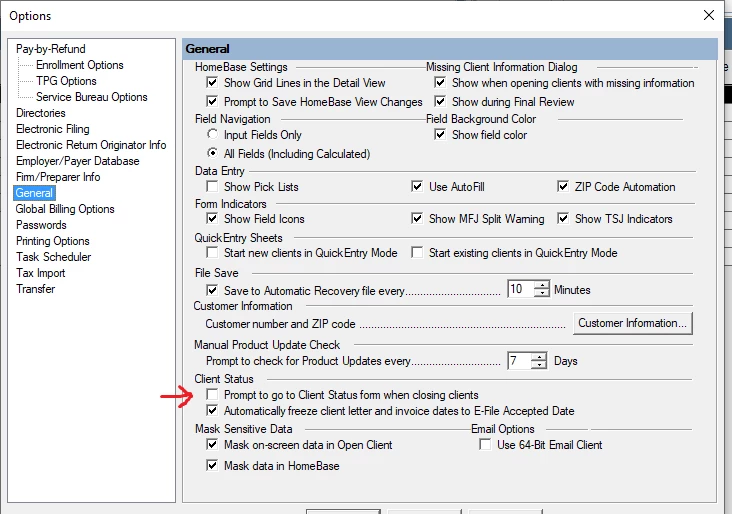
The Client Status you can can be prompted for before exiting a client file (I think thats what this setting means)

7 replies

clr600
Level 7
January 25, 2020

I believe the two forms that you ask about would need entries to show up in forms in use


Just-Lisa-Now-
Intuit Community Champion
January 25, 2020

Agreed, Sch B wont appear in the forms in use list until youve made an entry in it.   

I just use Where Do I Enter and type B to find the form quicker than digging through any list for it.

The Client Status you can can be prompted for before exiting a client file (I think thats what this setting means)

♪♫•*¨*•.¸¸♥Lisa♥¸¸.•*¨*•♫♪
Level 6
January 26, 2020

Sch B--if you click on force print-even if less than $1,500--I believe Schedule B will be in every return

Just-Lisa-Now-
Intuit Community Champion
January 26, 2020

Where is that setting?  I know Ive used that in the past to make sure my Sch B prints (I want to see the list regardless of how much $$ they have), but I cant remember where that check box is.  I want to make sure I have it checked on this new install.


♪♫•*¨*•.¸¸♥Lisa♥¸¸.•*¨*•♫♪
clr600
Level 7
January 26, 2020

F6 Bi on billing worksheet


