
Level 10
February 9, 2022
Solved

Background updates

  • February 9, 2022
  • 2 replies
  • 24 views

Just received an update: under updates>Background Updates >Deactivate Automatic Updates now shows..(Of course there is an error message) but at least that's progress.
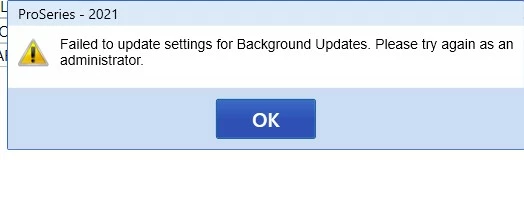
 

This topic has been closed for replies.
Best answer by jeffmcpa2010

Figured it out.

Closed Pro Series.

Opened windows start menu and scrolled down to ProSeries 2021 and Right Clicked, Selected more, then selected "run as administrator". That allowed me to change the selection to deactiviate.

2 replies

Level 10
February 9, 2022

anyone who has a guess as to how I "try again as administrator" is welcome to throw out ideas to try.

BTW My product is single user, one computer only, one user only (me). 

jeffmcpa2010AuthorAnswer
Level 10
February 9, 2022

Figured it out.

Closed Pro Series.

Opened windows start menu and scrolled down to ProSeries 2021 and Right Clicked, Selected more, then selected "run as administrator". That allowed me to change the selection to deactiviate.

Taxes-by-Rocky
Level 7
February 9, 2022

ProSeries should not have put the "updates" notification on the HomeBase screen, nor integrated it with the Windows 10 notification screen.  The notification shows up every few hours, ask me to run and apply updates, and restart the program.

Aside from being obnoxious, this leaves the appearance that the software is nothing short of high maintenance, even worse then a phone app, and full of bugs.

For appearances sake, I would suggest either:  (i) burying the update notifications; or (ii) issue updates once a day, preferably after we have all gone home so the updates will be run automatically in the morning when we first boot up.  [If, on rare occasion, you feel the need to issue one mid-day because of a security breach, so be it.  We'll live with it.]

If you are still unclear as to what I'm referring to, your ProSeries software developers should spend a little bit of time preparing their own tax return on ProSeries.  They'll get it right away.

Don't be like GM.  Road test the product first; don't use your customer base to do it for you.

Thank you.

Just-Lisa-Now-
Intuit Community Champion
February 9, 2022
that was for the background updates, wanting you to restart and install them....now you can turn those off and go back to how it was in the past....DIY or let Task Manager and schedule it.
♪♫•*¨*•.¸¸♥Lisa♥¸¸.•*¨*•♫♪
Taxes-by-Rocky
Level 7
February 9, 2022

Good tax software would not have to provide an option....because it wouldn't be a problem in the first place.

.....but thankfully, we have a message board. 🙂


