

SMZNOTARYCONSULTINGLLC
Level 3
February 23, 2022
Solved

PY State Allocation Worksheet

  • February 23, 2022
  • 3 replies
  • 13 views

Hello, 

 I have a client that moved from WI to TX and I am trying to allocate the income for each state, but I keep getting additional lines to fill in for the state of WI and I am not able to clear these to get the red errors to clear off of the section any advise on how to clear the additional line not needed?
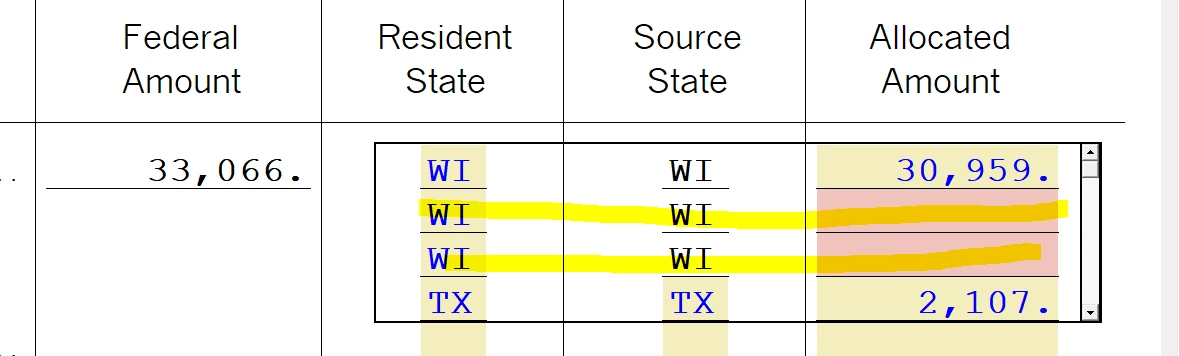
 

This topic has been closed for replies.
Best answer by rbynaker

I used to fight with this.  I think the solution is to adjust the wages on the W-2 state section rather than on the PY allocation wks.

3 replies

rbynaker
rbynakerAnswer
Level 13
February 23, 2022

I used to fight with this.  I think the solution is to adjust the wages on the W-2 state section rather than on the PY allocation wks.

Just-Lisa-Now-
Intuit Community Champion
February 23, 2022

This used to happen to me as well.

I "think" it would happen if I switched over to a state return before using the allocation worksheet...if I got rid of all state returns, then used the allocation worksheet, then opened the state returns, it would flow properly...at least thats how I always do it now, and I havent had that issue anymore.

♪♫•*¨*•.¸¸♥Lisa♥¸¸.•*¨*•♫♪
SMZNOTARYCONSULTINGLLC
Level 3
February 23, 2022

Thanks for the advice will try this and hopefully this works...I am ready to wrap this return up :-).

Level 2
February 13, 2023

This PY Allocation worksheet kept adding a line as was originally posted.

This is what I discovered as my mistake: 

On my Income section, I had an old W-2 that no longer applied to the Taxpayer.  Even though there were NO amounts on the form, the PY Allocation worksheet anticipated additional information.  Once I removed the unnecessary W-2 (the culprit), the additional lines  on the PY Allocation worksheet disappeared.


