
Level 3
February 25, 2020
Question

ProSeries - ServerBusy Error PopUp

  • February 25, 2020
  • 10 replies
  • 45 views

Hi

My firm is using ProSeries Professional and I receive a Popup on occasion that says:
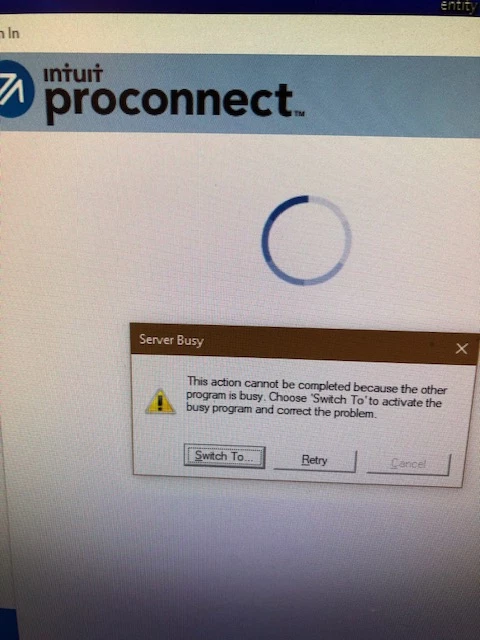


ServerBusy

This action cannot be completed because the other program is busy.  Choose "Switch To" to activate the busy program and correct the problem".   

The only way I can resolve this is to totally shut down and restart all my programs.  I am unable to open the program until I do this.  A few others in my firm have the same problem and a few have never had it happen.  Our IT person contacted ProSeries and was on a phone call trying to resolve it for a long time with NO RESOLUTION.  Its a royal pain to have to totally restart.   

My memory on my computer is sufficient so they don't think that is the issue.    If I keep the programs open, I have no issue.  Its when I close and then want to reopen, I have to do a total shutdown.  Has anyone come across this situation?  I usually have ProSeries18, ProSeries 19 and QuickBooks Premier Desktop open at the same time.  Thanks in advance for any input.

Karen

This topic has been closed for replies.

10 replies

Just-Lisa-Now-
Intuit Community Champion
February 25, 2020

I get it too!  No clue why, whether I choose Switch To or Retry it pops up a few more times then eventually resolves itself...sometimes it starting the program, sometimes while transmitting Efiles...doesnt seem to create any other problems for me besides that message, so I havent wasted much time trying to figure it out.... I havent ever have to shut down the program to get it to resolve...Im only running one program at a time though, I see you mention programs in the plural.

♪♫•*¨*•.¸¸♥Lisa♥¸¸.•*¨*•♫♪
Level 2
February 25, 2020

I have had the same problem not only in Pro Series, but when I'm not in Pro Series.  I let the computer run its course.  Wonder if my auto-back up program is causing it.


Just-Lisa-Now-
Intuit Community Champion
February 25, 2020

I have Carbonite backup running in the background as well as an anti virus, but thats all...so I'm not sure if one of those are interfering or not. 

If I click Switch To, it opens the Windows programs menu, as if I'd hit the Start button in the corner...then continues doing what its suppose to be doing....so I dont get it.

♪♫•*¨*•.¸¸♥Lisa♥¸¸.•*¨*•♫♪
lisacslater
Level 3
January 25, 2022

I'm not sure if this applies to your situation or not, but I just spent 12 hours trying to get a return filed that had the same error.

My call to Intuit resulted in them scratching their heads and unable to figure out what was wrong as well.

I had resolved myself to just doing the return in ProConnect Tax Online because there was nothing else I could do and needed to file the return. The only reason I ended up going back to ProSeries was because DEPRECIATION DID NOT TIE OUT BETWEEN PROSERIES AND PROCONNECT. I was going to have to re-send the return for signature at the S-Corp level, re-send all K-1s, Correct all Shareholder returns... I was getting very frustrated.

My significant other came in from working and we were going through the issues. As a last resort, I showed him the 3 attachments to the return because we were checking the total characters in the path of the upload to ensure they didn't exceed the 250 limit imposed by Windows. The file length was fine BUT the SIZE of the files was enormous. They were pages that had signatures that my clients took a photo up and sent to me. We compressed the files and viola... returns processed and were successfully submitted.


ljr
Level 9
January 25, 2022

I get the message every once in a while as well. Sometimes just clicking it works, sometime I have to shut it down. I see no rhyme or reason as it happens both when Proseries is the only program open and when I have other programs open as well. I just sigh and click click click.


