
Level 3
February 15, 2022
Solved

Created a custom view with & and now getting an error and can't delete - Help!

  • February 15, 2022
  • 2 replies
  • 13 views

I created a custom view in Pro Series and didn't realize & was not an accepted character.

I have tried deleting the view many times and it will not go away...although I think it is a ghost because when I do click on it there is no status associated with the view.

When I click on the view (or scroll to it) I get an error and end up having to go to task manager to close the program completely.  I have tried restarting my computer but it is still there and causing the error.

Any assistance would be greatly appreciated.
This topic has been closed for replies.
Best answer by Intuit_hieu

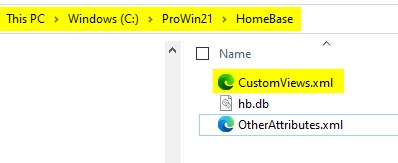
The easiest way to fix is rename the file 'CustomViews.xml' from your c:\prowin21\homebase folder to something like 'CustomViews.xml.bad'

On  next launch of ProSeries, the program will re-create the file.

For advance, you could open the above CustomViews.xml in notepad, search for the view with '&' character in the CAPTION. Note the '&' character will show up in the file as '&'. Replace/remove it. 

You should be able to relaunch ProSeries after.

I'll enter a defect and hopefully to have it fix in future release. Thanks for using ProSeries!

2 replies

Just-Lisa-Now-
Intuit Community Champion
February 15, 2022

I guess you cant edit it and change the name either.

@Intuit_hieu I think this may be your area of expertise, any suggestions?

♪♫•*¨*•.¸¸♥Lisa♥¸¸.•*¨*•♫♪
LoriBobAuthor
Level 3
February 15, 2022

It acts as if I can edit/change the name but the save doesn't take.

Level 6
February 15, 2022

The easiest way to fix is rename the file 'CustomViews.xml' from your c:\prowin21\homebase folder to something like 'CustomViews.xml.bad'

On  next launch of ProSeries, the program will re-create the file.

For advance, you could open the above CustomViews.xml in notepad, search for the view with '&' character in the CAPTION. Note the '&' character will show up in the file as '&'. Replace/remove it. 

You should be able to relaunch ProSeries after.

I'll enter a defect and hopefully to have it fix in future release. Thanks for using ProSeries!

LoriBobAuthor
Level 3
February 16, 2022

This works.  Thank you so much!



