
Level 3
January 6, 2022
Solved

2020 and 2021 proseries forms bar and client tabs distorted

  • January 6, 2022
  • 2 replies
  • 8 views

Hello Everyone!

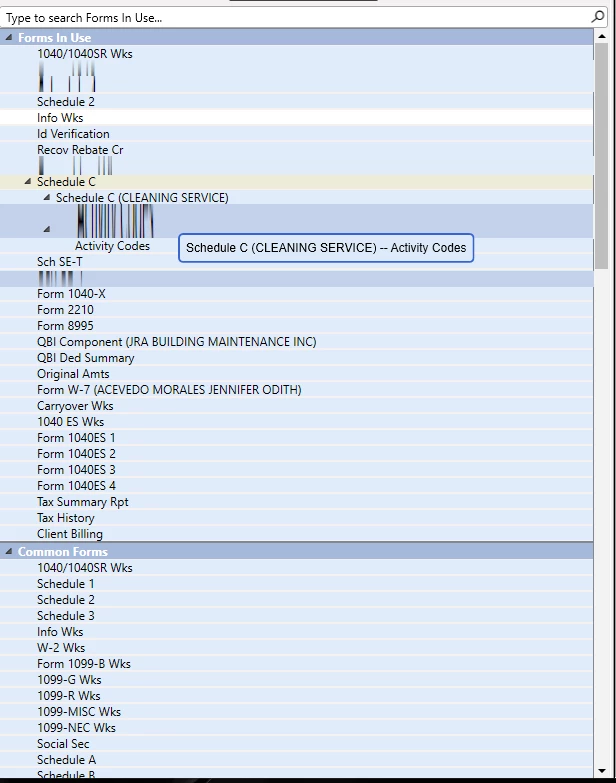
Upon installation of 2021 Proseries tax software my 2020 and 2021 forms bar and client tabs get distorted upon hovering my mouse over. Im so infuriated with the fact that we spend thousands of dollars on this software and yet proseries tech does not want to provide a solution for a software that has a flaw in it. (SEE BELOW)

 The supposed "solved" question that they have in this forum in no way works.

 https://proconnect.intuit.com/community/display-preferences/help/intuit-proconnect-proseries-menu-options-truncated-cut-off-or/00/5291


Id greatly appreciate the communities help on this!


This topic has been closed for replies.
Best answer by IntuitAngela_13

@fivestar9538 Upon further research, this issue could be related to a Dell display driver.

This article provides steps, which will hopefully resolve your issue: http://blog.walterlv.com/post/wpf-renders-wrong-because-of-nahimicosd-en.html

2 replies

IntuitAngela_13
Level 6
January 6, 2022

@fivestar9538 

I'm sorry to hear you are having this issue with your forms bar.

Could you share what your display settings are so our team can investigate this issue?


Level 3
January 6, 2022

2560x1440

100% scale

See below 

Thank you!


IntuitAngela_13
Level 6
January 7, 2022

@fivestar9538 Thanks for posting your display settings.

What are the other options in the Color Profile drop down menu?

If you change this option to the system default do you still see the issue with the Forms Bar?

IntuitAngela_13
Level 6
January 7, 2022

@fivestar9538 

While we are investigating, can you run Windows updates and be sure to include any optional updates, such as any driver updates.

Level 3
January 7, 2022

@IntuitAngela_13 

My comp is up to date with all its windows updates and driver updates.


Please id appreciate your response at your earliest convenience.


Thanks again,


Joseph R

IntuitAngela_13
Level 6
January 7, 2022

@fivestar9538 Unfortunately this issue will require more in-depth troubleshooting than what I am able to provide here. Please contact our technical support for further assistance. They can be reached at 800-434-6818.


