
Level 2
September 17, 2026
Question

1041 Line 20 QBI Error

  • September 17, 2026
  • 6 replies
  • 192 views

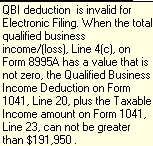
This is a new error message I’ve never seen before. I’ve attached a snip of the message. I believe it’s referencing Schedule B of the 8995A, but it seems incorrect. 89995A is specifically for complex calculations, so it’s for income greater than $191,950.  I’ve reinstalled the product; looked for any box I could’ve accidentally checked; nothing found.  I called support, and their suggestion was to uncheck the box for error checking on the efile screen. But even that didn’t work; Proseries wouldn’t prepare the efile file.

This isn’t a new return; I’ve prepared it for years. Has anybody seen this before? 
 

6 replies

IntuitDawnC
Employee Tax Pro
September 24, 2026

Do you normally file form 8995-A?   And have you always aggregated multiple businesses/properties on Schedule B, 8995-A?    Lastly, is line 6 checked on the QBI Ded Summary?    I am trying to generate that error message.  Thanks!

ou97cpaAuthor
Level 2
September 25, 2026

HI Dawn,

Yes, I normally file 8995-A and aggregate on Sch B. No, line 6 is not checked.


Thanks!

Level 2
September 30, 2026

I have the same problem with an error on the QBI deduction when I am using form 8995-A, but the program is checking it as if I used 8995.  I tried to efile by unchecking the efile box for error checking, but the return did not go through.  The calculation is correct on my return, but I get the same error message as ou97cpa.  The $191,950 is the 2024 amount for form 8995.  The 2025 number is $197,300.  Regardless when filing form 8995-A, the 191,950 (or 197,300) is not relevant.  This is a programing error.  The only answer seems to be to paper file.  Does anyone have a work around?

IntuitDawnC
Employee Tax Pro
October 1, 2026

Thank you for that information, ​@ou97cpa; I was able to generate the error and it is being investigated.   

IntuitDawnC
Employee Tax Pro
October 2, 2026

The error has been removed.   You should be able to update your software and e-file your return(s).   Make sure you are using the latest release of ProSeries.


 ​@William H  ​@ou97cpa


