Welcome back! Ask questions, get answers, and join our large community of tax professionals.
- Topics
- Training
- Community
- Product Help
- Industry Discussions
- User Groups
- Discover
- Resources
Turn on suggestions
Auto-suggest helps you quickly narrow down your search results by suggesting possible matches as you type.
Showing results for
- Intuit Accountants Community
- :
- ProConnect Tax
- :
- ProConnect Tax Discussions
- :
- Re: manual entry forms
manual entry forms
Options
- Mark Topic as New
- Mark Topic as Read
- Float this Topic for Current User
- Bookmark
- Subscribe
- Printer Friendly Page

icerider
Level 2
02-19-2024
09:45 PM
- Mark as New
- Bookmark
- Subscribe
- Permalink
- Report Inappropriate Content
How do I navigate to manual entry forms? I cant find it.
12 Comments 12

itonewbie
Level 15
02-19-2024
11:08 PM
- Mark as New
- Bookmark
- Subscribe
- Permalink
- Report Inappropriate Content
What exactly do you mean by "manual entry forms"?
If you mean making entries on forms, it is not available in ProConnect Tax, which is an input-based tax program. ProSeries, on the other hand, is form-based.
You can, however, open multiple windows to preview forms by clicking on the "Preview forms" button in the top-right corner of the input screen. Many (but not all) lines on the forms have a link (denoted as a blue highlight) that will bring you to the relevant main input screen (but not to the exact input field). The forms on preview also do not refresh themselves as you make data entries - to see the changes, you need to hit "Refresh forms". To learn more about this feature, you can watch this video on YouTube: https://www.youtube.com/watch?v=6V9sQHYbV2Q&t=27s
---------------------------------------------------------------------------------
Still an AllStar
Still an AllStar

 PhoebeRoberts
Level 12
02-20-2024
10:17 AM
- Mark as New
- Bookmark
- Subscribe
- Permalink
- Report Inappropriate Content
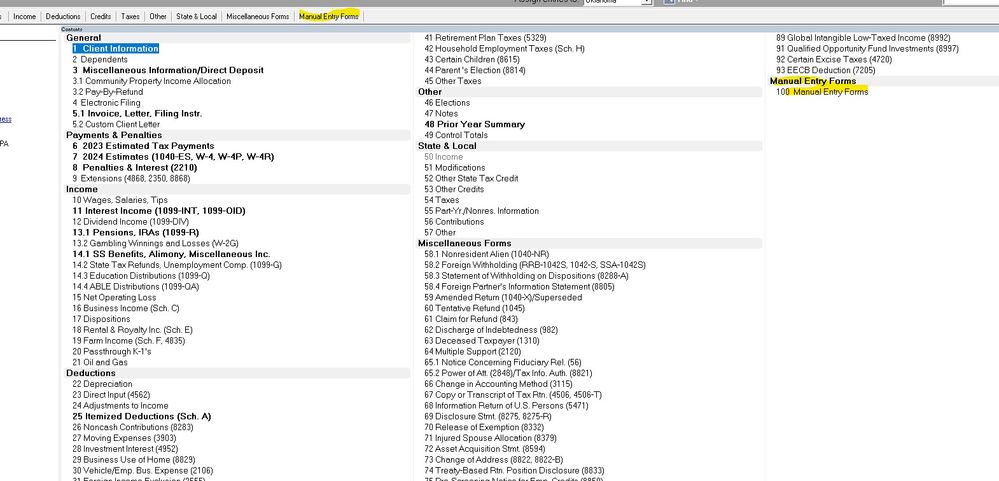
This is where it lives in Lacerte, which is similar.
itonewbie
Level 15
02-20-2024
11:12 AM
- Mark as New
- Bookmark
- Subscribe
- Permalink
- Report Inappropriate Content
Thanks for the reminder, @PhoebeRoberts. Have totally forgotten about this feature.
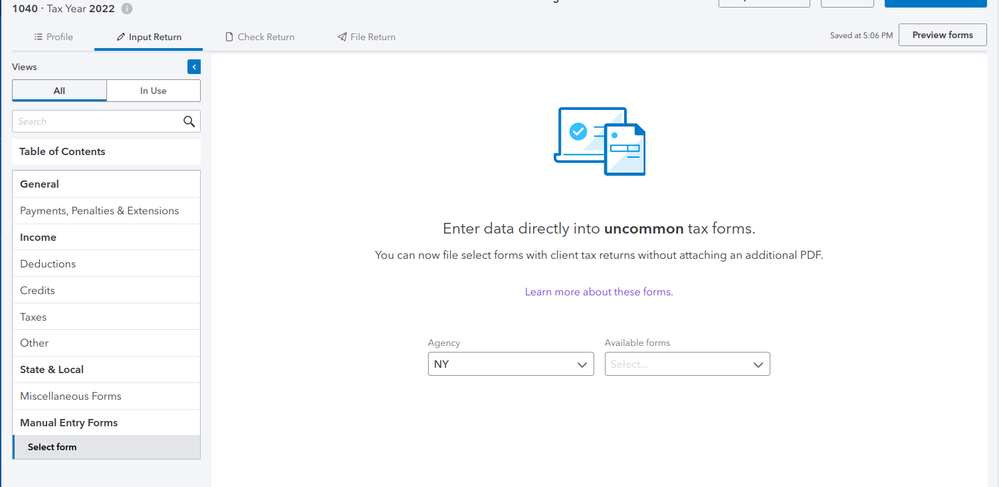
@icerider That used to be available for certain NY forms only. It appears as the last item under Table of Contents only when manual entry forms are available for the state that has been chosen under Profile.
For some reason, this feature does not appear to be available at all, at least for now, for TY2023. @Anonymous, has anything changed with the availability of manual entry forms in ProConnect Tax this year?
---------------------------------------------------------------------------------
Still an AllStar
Still an AllStar
icerider
Level 2
02-20-2024
11:57 AM
- Mark as New
- Bookmark
- Subscribe
- Permalink
- Report Inappropriate Content
Right. The manual forms input screen is not showing up in proconnect. np, I attached the PDF anyway. It is a nice idea though.
itonewbie
Level 15
02-20-2024
12:24 PM
- Mark as New
- Bookmark
- Subscribe
- Permalink
- Report Inappropriate Content
But be mindful that un-indexed forms attached as PDF will not be processed with an e-filed return. It would be advisable to paper-file returns with forms that are not supported.
Having said that, it would appear that those manual entry forms are indexed for e-file attachment as in previous years.
---------------------------------------------------------------------------------
Still an AllStar
Still an AllStar
icerider
Level 2
02-20-2024
12:39 PM
- Mark as New
- Bookmark
- Subscribe
- Permalink
- Report Inappropriate Content
Ok thanks for that info. Intuit support said to attached the form to the return, so good thing I double checked here as well.
I do not have manual entry forms on proconnect; and the NY Form CT-657 is not available under NY Credits in proconnect. I did enter the credit amount on the NY Schedule K. That field indicates that it is an override which is weird because I cant find any other place to enter this credit. Why would that field be an override?
But just to be clear I can not attach the completed CT-657 as a PDF to the return and efile it? I have to mail a paper return to them with the form included?

itonewbie
Level 15
02-20-2024
02:34 PM
- Mark as New
- Bookmark
- Subscribe
- Permalink
- Report Inappropriate Content
Since you're using CT-657, I suppose that's a C corp return you're filing? Either way, ProConnect Tax nor Lacerte support IT-657 and CT-657.
If you simply attach that as PDF, you risk the form not being processed.
Can't understand why Intuit Support is often not familiar with the very programs they support and would have told you to simply attach it for e-filing. The e-file attachment screen has a big disclaimer that says this much:
NOTE: Do not attach any document that needs IRS approval or attention.
Yes, NY does mandate e-filing. You are, however, not required to e-file returns that are not supported by your approved e-file software or those that can't be e-filed on the NY Department of Taxation and Finance's website. See this webpage for more info:
https://www.tax.ny.gov/tp/efile/mandate_participants.htm
---------------------------------------------------------------------------------
Still an AllStar
Still an AllStar
itonewbie
Level 15
02-20-2024
02:46 PM
- Mark as New
- Bookmark
- Subscribe
- Permalink
- Report Inappropriate Content
@icerider wrote:
I did enter the credit amount on the NY Schedule K. That field indicates that it is an override which is weird because I cant find any other place to enter this credit. Why would that field be an override?
Probably because there's no form to compute it and it's a plug-in. That would be my best guess.
---------------------------------------------------------------------------------
Still an AllStar
Still an AllStar

Anonymous
Not applicable
02-20-2024
06:04 PM
- Mark as New
- Bookmark
- Subscribe
- Permalink
- Report Inappropriate Content
@icerider @itonewbie @PhoebeRoberts Manual forms are not yet ready in Lacerte or ProConnect, I don't have a ETA at the moment but wanted to follow up.
icerider
Level 2
02-20-2024
09:02 PM
- Mark as New
- Bookmark
- Subscribe
- Permalink
- Report Inappropriate Content
Thank you @itonewbie
Just so there is no doubt here and if anyone else looks at this: I called NYS corporate tax and was told that if the software is unable to handle or any credit or form, then mailing the return with the form is the correct process. There will be no penalty for mailing the return.
icerider
Level 2
02-25-2024
05:33 AM
- Mark as New
- Bookmark
- Subscribe
- Permalink
- Report Inappropriate Content
@Anonymous Thanks for the info. Do you think it is likely that Intuit will include the CT-657 in the manual forms? It would be nice if they would just put in the NY credits input.


