Welcome back! Ask questions, get answers, and join our large community of tax professionals.
  • Sign In
  • Elevate 2026 Pencil Banner
    cancel
    Showing results for 
    Search instead for 
    Did you mean: 

    E-File Error - for an Extension

    KGL19
    Level 2

    I am trying to efile extension. I received this error. I saw a fix from a earlier post. where I deleted and entered a new preparer it didn't work. Unless I missed something

    Your request was not understood by the e-filing service. - Invalid XML. cvc-complex-type.2.4.a: Invalid content was found starting with element 'app'. One of '{senderEmail, legalName}' is expected. Please verify that your application program is up-to-date. Problem occurred transmitting efile data. 
    This discussion has been locked. No new contributions can be made. You may start a new discussion here

    1 Best Answer

    Accepted Solutions
    IntuitAustin
    Intuit Alumni

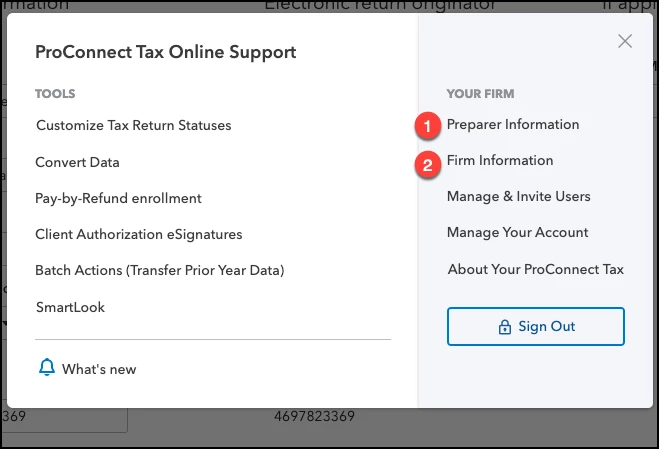
    Click on Settings in the bottom left corner, select (1) Preparer Information and add a new preparer. It can be the same name, just add a middle initial or something different. Then under Settings, select (2) Firm Information. 

    2020-07-15_23-18-11.png


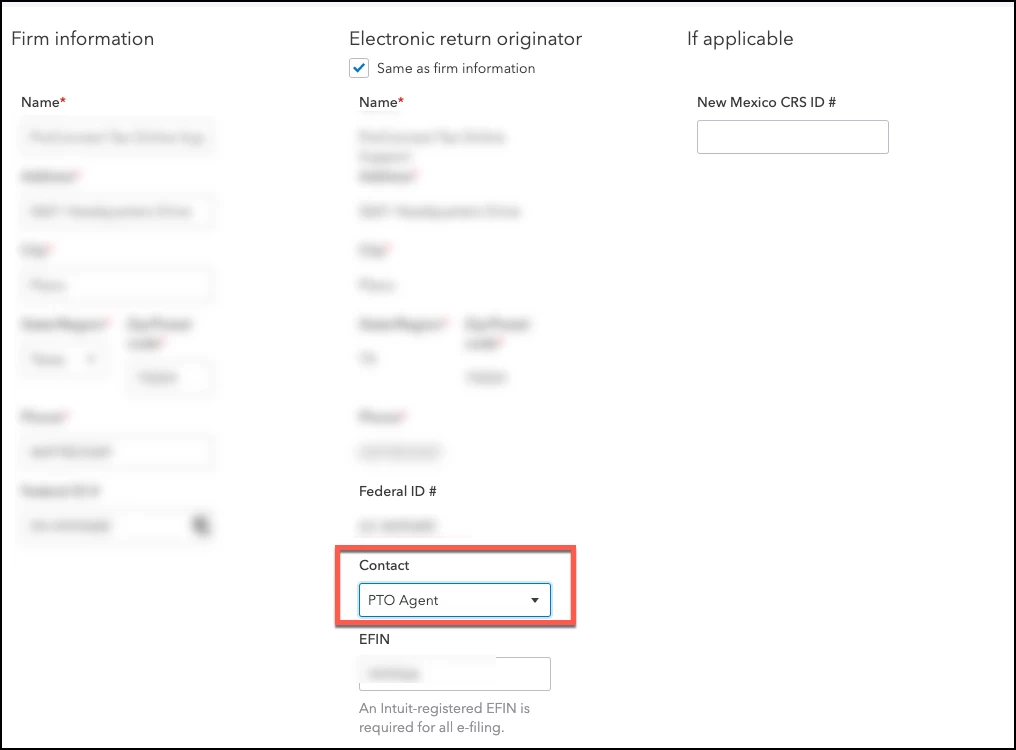
    In firm info, go under ERO and change the preparer. 

    2020-07-15_23-16-44.png


    **Say "Thanks" by clicking the thumb icon in a post
    **Mark the post that answers your question by clicking on "Accept as solution"

    View solution in original post

    0 Cheers
    3 Comments 3
    bakerbr2008
    Level 1

    I kept having the same issue too! I can login to Proconnect, but when I click to "add new client" my screen goes blank & I can no longer work in the system. Have you had any resolutions yet?

    0 Cheers
    IntuitAustin
    Intuit Alumni

    Click on Settings in the bottom left corner, select (1) Preparer Information and add a new preparer. It can be the same name, just add a middle initial or something different. Then under Settings, select (2) Firm Information. 

    2020-07-15_23-18-11.png


    In firm info, go under ERO and change the preparer. 

    2020-07-15_23-16-44.png


    **Say "Thanks" by clicking the thumb icon in a post
    **Mark the post that answers your question by clicking on "Accept as solution"
    0 Cheers
    KGL19
    Level 2

    See solution -  it worked. It took me a while. I missed the post but someone at the call center helped me resolved it with the same step. 

    0 Cheers