Welcome back! Ask questions, get answers, and join our large community of tax professionals.
- Topics
- Training
- Community
- Product Help
- Industry Discussions
- User Groups
- Discover
- Resources
Turn on suggestions
Auto-suggest helps you quickly narrow down your search results by suggesting possible matches as you type.
Showing results for
- Intuit Accountants Community
- :
- ProSeries Tax
- :
- ProSeries Tax Discussions
- :
- Unemployment Exclusion
Unemployment Exclusion
Options
- Mark Topic as New
- Mark Topic as Read
- Float this Topic for Current User
- Bookmark
- Subscribe
- Printer Friendly Page

Barry14580
Level 2
03-13-2021
12:17 PM
- Mark as New
- Bookmark
- Subscribe
- Permalink
- Report Inappropriate Content
Is ProSeries going to update to include the IRS Unemployment Exclusion Worksheet?
Best Answer Click here
Labels
 This discussion has been locked.
No new contributions can be made. You may start a new discussion
here
This discussion has been locked.
No new contributions can be made. You may start a new discussion
here
1 Best Answer
Accepted Solutions

sjrcpa
Level 15
43 Comments 43
sjrcpa
Level 15
03-13-2021
12:18 PM
- Mark as New
- Bookmark
- Subscribe
- Permalink
- Report Inappropriate Content
Yes
The more I know the more I don’t know.
Barry14580
Level 2
03-13-2021
12:19 PM
- Mark as New
- Bookmark
- Subscribe
- Permalink
- Report Inappropriate Content
Is there a timeline?
sjrcpa
Level 15
03-13-2021
12:24 PM
- Mark as New
- Bookmark
- Subscribe
- Permalink
- Report Inappropriate Content
Not that they announced.
The more I know the more I don’t know.

IRonMaN
Level 15
03-13-2021
12:42 PM
- Mark as New
- Bookmark
- Subscribe
- Permalink
- Report Inappropriate Content
Here is the best timeline available for when it will be available:
[--------------------------------------------------------------------------------------------------------------]
Today Someday
Slava Ukraini!

dascpa
Level 12
03-13-2021
01:34 PM
- Mark as New
- Bookmark
- Subscribe
- Permalink
- Report Inappropriate Content
Sarcastic - no they're not going to update.
Why would you think a professional tax software program would not update the software when they can?

harshreality
Level 1
03-13-2021
05:30 PM
- Mark as New
- Bookmark
- Subscribe
- Permalink
- Report Inappropriate Content
Yeah, I think they were just looking for a timeline. If their unemployed clients are anything like mine, they are hammering at me to file their returns so they can get their refunds. They don't really like the "it will happen when my software update happens" answer. Just my 2 cents, your trail mileage may vary.
Barry14580
Level 2
03-13-2021
06:24 PM
- Mark as New
- Bookmark
- Subscribe
- Permalink
- Report Inappropriate Content
Thank you. I guess my poorly worded question (the 1st time I ever used this forum) should have focused more on the question of anyone being aware of any timing on the part of ProSeries.
If anyone cares: I am not waiting for Proseries to install what appears to be a very simple worksheet, and I am following the IRS instructions on how to claim the exemption with an entry on Schedule 1 line 8.
Thanks to all who answered - I see that this forum can be informative. Your help is appreciated.

MonicaG
Level 4
03-14-2021
09:28 AM
- Mark as New
- Bookmark
- Subscribe
- Permalink
- Report Inappropriate Content

rcherenson
Level 4
03-16-2021
12:44 AM
- Mark as New
- Bookmark
- Subscribe
- Permalink
- Report Inappropriate Content
For Proseries, Schedule 1 Line 8 connects to gambling income, so I am not sure how to correctly manually adjust the unemployment exclusion. Do we just need to sit tight and wait for Intuit to update the forms? Considering the IRS still has not extended our tax season beyond April 15, this is a pretty crazy curve ball thrown at us when we all have clients who need this refund asap.
IRonMaN
Level 15
03-16-2021
08:38 AM
- Mark as New
- Bookmark
- Subscribe
- Permalink
- Report Inappropriate Content
The line 8 reference is talking about the line on the 1040, not an Intuit schedule. Scroll down on the worksheet and you will have blank lines that you can type the info on.
Slava Ukraini!

mm1
Level 5
03-16-2021
11:44 AM
- Mark as New
- Bookmark
- Subscribe
- Permalink
- Report Inappropriate Content
They say they are working with the IRS but I cannot wait to see if they do actually correct the situation. Because I have clients hammering me with the question of when am I going to finish their returns and they do not want to hear "I am waiting on my professional software to fix the issue", I decided to just treat the first $10,200 as repaid as long as their income is below the $150,000 max limit for married. It shows as taxable above the $10,200 or $0 as the case may be and the word repaid appears beside the line but who cares - the bottom line is it excludes the unemployment amount received up to $10,200 or whatever amount they received if less.
MonicaG
Level 4
03-16-2021
12:20 PM
- Mark as New
- Bookmark
- Subscribe
- Permalink
- Report Inappropriate Content
Wait please don't do that. What you need to do is go to Federal Sch 1 and you will see on line 7 is the unemployment. Go to line 8 other income. Click on it. the click on the magnifier icon. Scroll all the way down to line 24. Type "UCE" and in Parenthesis the negative amount of unemployment so either 10200,00. or the lesser amount. Then on the number line next to it put the the amount of unemployment excluded as a negative number.
MonicaG
Level 4
03-16-2021
12:23 PM
- Mark as New
- Bookmark
- Subscribe
- Permalink
- Report Inappropriate Content
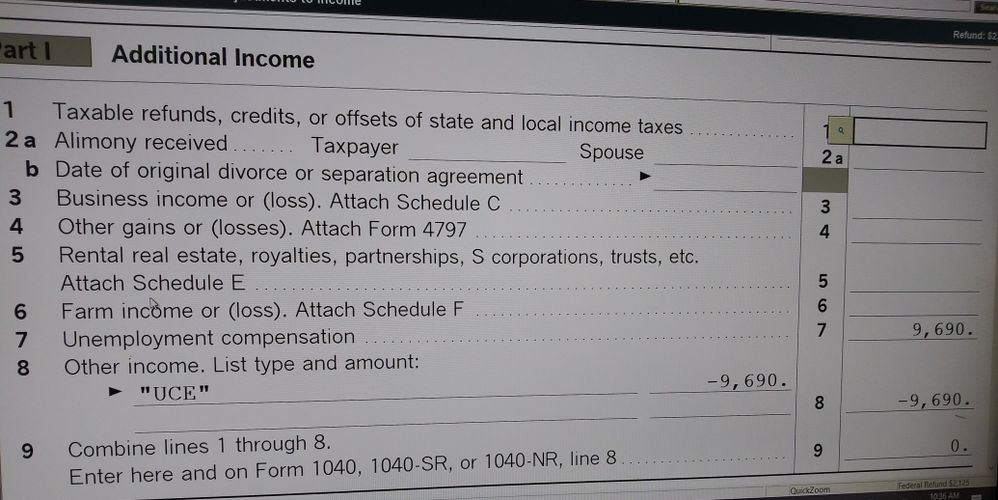
mm1
Level 5
03-16-2021
04:27 PM
- Mark as New
- Bookmark
- Subscribe
- Permalink
- Report Inappropriate Content
You cannot do it that way because it carries over to Other Income on the State return as a negative income item.
MonicaG
Level 4
03-16-2021
04:55 PM
- Mark as New
- Bookmark
- Subscribe
- Permalink
- Report Inappropriate Content
Not in my state PA. Sorry wished it helped you.

David
Level 2
03-16-2021
05:40 PM
- Mark as New
- Bookmark
- Subscribe
- Permalink
- Report Inappropriate Content
Does anyone know what are the steps to follow for State of California in regards to this deduction?
rcherenson
Level 4
03-16-2021
06:16 PM
- Mark as New
- Bookmark
- Subscribe
- Permalink
- Report Inappropriate Content
I'm in FL (no state return), so it works for me, too, but perhaps not for all my clients.
This is the way the IRS is directing us to do it on their website, which is strange if it incorrectly impacts state returns.
IRonMaN
Level 15
03-16-2021
06:35 PM
- Mark as New
- Bookmark
- Subscribe
- Permalink
- Report Inappropriate Content
"This is the way the IRS is directing us to do it on their website, which is strange if it incorrectly impacts state returns"
The IRS cares about the federal, what happens on the state is the state's issue.
Slava Ukraini!

DDANA
Level 3
03-17-2021
08:34 AM
- Mark as New
- Bookmark
- Subscribe
- Permalink
- Report Inappropriate Content
I thought of a way around the issue that NYS taxes all your unemployment.
I could Efile the state with the correct unemployment taxable amount by itself
Go back in and put the exclusion in schedule 1 per IRS instructions, the Efile federal return...
What do you all think of that??

rbynaker
Level 14
03-17-2021
10:31 AM
- Mark as New
- Bookmark
- Subscribe
- Permalink
- Report Inappropriate Content
@DDANA wrote:
I thought of a way around the issue that NYS taxes all your unemployment.
I could Efile the state with the correct unemployment taxable amount by itself
Go back in and put the exclusion in schedule 1 per IRS instructions, the Efile federal return...
What do you all think of that??
I think that's an awful lot of work to do vs. waiting until they release the update tomorrow.
I don't know how everyone else is doing things but my practice has slowed down to COVID speed, where everything takes 5x as long as it should. Maybe I'm just silly but I still provide the client with a complete copy of their federal and state returns, then get their signatures on the 8879 forms before efiling. If I'm lucky that only takes 3 days.

TGrez
Level 1
03-17-2021
12:49 PM
- Mark as New
- Bookmark
- Subscribe
- Permalink
- Report Inappropriate Content
This is how the Unemployment should be handled.
Go to Other income enter the amount as a negative and Identify.
TGrez
Level 1
03-17-2021
01:02 PM
- Mark as New
- Bookmark
- Subscribe
- Permalink
- Report Inappropriate Content
Yes, the Federal has directed to complete Federal 1040 using "other income."
In Michigan Unemployment is taxed, I did an override and corrected the amount on the state side and did not get any Errors.

taxprep
Level 2
03-17-2021
02:28 PM
- Mark as New
- Bookmark
- Subscribe
- Permalink
- Report Inappropriate Content
I agree. Just use negative "Other Income" Don't forget to reverse it on your state return though.
Barry14580
Level 2
03-17-2021
06:34 PM
- Mark as New
- Bookmark
- Subscribe
- Permalink
- Report Inappropriate Content
NYS starts their return with the federal adjusted gross income then has NYS additions and deletions. Since the Federal income adjusted gross already includes the exclusion for the 1st $10.2k of UI, that would flow to the NYS return. NYS tax law currently does not make any "addition" for UI benefits (because it is already included in the federal AGI). So, NY tax law makes not provision for this exclusion and left untouched by the NYS legislature, the NYS return would need not adjustment because it was done on the Federal side.
So, I think this is a bad idea. I don't think the $10.2K is taxable as the law is written now and my NYS Senator's office concurs AND says there is no plan in motion for the legislature to introduce a bill and vote on it - mainly because the bill would have to be specific in making the $10.2K taxable (because the way the law is now, you move forward with the Federal AGI) and that would be a timing nightmare not to mention a political hot potato.
My money says NYS will not act and therefore the 10.2K will roll forward to the state return and not be taxed in NYS. I was told that the NYS Department of Taxation and Finance was preparing a release that basically says that.
But like all things taxation... subject to change without notice. 🙂
mm1
Level 5
03-18-2021
08:51 AM
- Mark as New
- Bookmark
- Subscribe
- Permalink
- Report Inappropriate Content
You can't "reverse" it on Alabama. You have to override two lines of data input. Alabama is not a standalone state for e-filing. That presents a real problem for us!

westax
Level 3
03-19-2021
09:12 AM
- Mark as New
- Bookmark
- Subscribe
- Permalink
- Report Inappropriate Content
Go to line 24 Other Taxable Income on the Other Income worksheet. It will allow the "UCE" description and monetary entry. Other wise you are required to over write the carryforward and E filing is most likely not an option.
Return has been sent . Now if it gets processed? lol
westax
Level 3
03-19-2021
09:14 AM
- Mark as New
- Bookmark
- Subscribe
- Permalink
- Report Inappropriate Content
Go to line 24 Other Taxable Income on the Other Income worksheet. It will allow the "UCE" description and monetary entry. Other wise you are required to over write the carryforward and E filing is most likely not an option.
MonicaG
Level 4
03-19-2021
01:22 PM
- Mark as New
- Bookmark
- Subscribe
- Permalink
- Report Inappropriate Content
If you update program takes care of it.

Cheryl W
Level 1
03-19-2021
01:41 PM
- Mark as New
- Bookmark
- Subscribe
- Permalink
- Report Inappropriate Content
TGres - how did you do the Michigan adjustment? I'm wondering if Michigan will just accept the adjusted Federal Income?
MonicaG
Level 4
03-19-2021
01:45 PM
- Mark as New
- Bookmark
- Subscribe
- Permalink
- Report Inappropriate Content
If you do an update it just came through and it automatically corrects the Fed. If you had previously made the adjustment on other income you need to delete it as it will be on there twice. I'm in PA but if Michigan goes by the Federal AGI then they will most likely be honoring the exemption. I know that CT is. Please update your software though because it makes life easier. Good luck!!

dwainm
Level 1
03-20-2021
09:49 AM
- Mark as New
- Bookmark
- Subscribe
- Permalink
- Report Inappropriate Content
It appears to have been updated; opened a return with unemployment comp exceeding $10.2K and there was a credit applied without action on my part
MonicaG
Level 4
03-20-2021
10:17 AM
- Mark as New
- Bookmark
- Subscribe
- Permalink
- Report Inappropriate Content
Yes you only need to undo any adjustments that you made before because it will double deduct with the new update.

Inbalance1
Level 2
03-25-2021
12:31 AM
- Mark as New
- Bookmark
- Subscribe
- Permalink
- Report Inappropriate Content
i do not see 10.2 coming off...
what are the states doing? following Federal lead? no??
mm1
Level 5
03-25-2021
09:20 AM
- Mark as New
- Bookmark
- Subscribe
- Permalink
- Report Inappropriate Content
look at Schedule 1 where it shows the total unemployment comp. Then on the other income line it is a negative of that amount up to a maximum of $10,200. Now we have to worry about the fact that it changes taxable social security on the originally filed returns before this all came to pass. The IRS has said not to amend the returns until they figure out how to handle things.
Be aware: Proseries updates those older filed returns for the new tax law changes. When you open that client it warns you about CHANGES. Do not save the return after looking at it!
Inbalance1
Level 2
03-25-2021
09:27 AM
- Mark as New
- Bookmark
- Subscribe
- Permalink
- Report Inappropriate Content
The adjustment isn’t there and I was also wondering about NYS
mm1
Level 5
03-25-2021
12:48 PM
- Mark as New
- Bookmark
- Subscribe
- Permalink
- Report Inappropriate Content
It is there on my Proseries as a worksheet. I don't know why it isn't showing up on yours. The worksheet is on the Other Income worksheet toward the bottom of the form in a box labeled as "Unemployment Compensation Exclusion"
Every State is different. I am having to call each State to verify their procedures. My practice is mainly in Alabama which does not tax unemployment compensation. I do not know about New York as I haven't processed any NY tax return that also had unemployment compensation income yet. I only deep dive if I have to.

AndyCPA
Level 1
03-31-2021
09:02 AM
- Mark as New
- Bookmark
- Subscribe
- Permalink
- Report Inappropriate Content
Hey Everyone: Yes, it has! If you enter Unemployment Comp now, the program should automatically reduce it by up to $10,200.
westax
Level 3
02-13-2022
10:43 AM
- Mark as New
- Bookmark
- Subscribe
- Permalink
- Report Inappropriate Content
IT is not. Where should I expect this to happen?
dascpa
Level 12
02-13-2022
10:44 AM
- Mark as New
- Bookmark
- Subscribe
- Permalink
- Report Inappropriate Content
That's last year's tax law. Not this.

clr600
Level 8
02-13-2022
10:45 AM
- Mark as New
- Bookmark
- Subscribe
- Permalink
- Report Inappropriate Content
This is for year 2020
westax
Level 3
02-13-2022
10:45 AM
- Mark as New
- Bookmark
- Subscribe
- Permalink
- Report Inappropriate Content
Thats what I thought.

athaureaux6
Level 8
02-13-2022
03:39 PM
- Mark as New
- Bookmark
- Subscribe
- Permalink
- Report Inappropriate Content
Why did somebody post this question in the middle of 2021 tax season? I thought I was missing a change of last minute of the law. This belongs to the tax year 2020.
IRonMaN
Level 15
02-13-2022
03:47 PM
- Mark as New
- Bookmark
- Subscribe
- Permalink
- Report Inappropriate Content
Some folks like to piggyback on to an ancient question rather that start fresh. Beats me why they do it, but it is pretty much a daily occurrence here.
Slava Ukraini!




