Welcome back! Ask questions, get answers, and join our large community of tax professionals.
- Topics
- Training
- Community
- Product Help
- Industry Discussions
- User Groups
- Discover
- Resources
Turn on suggestions
Auto-suggest helps you quickly narrow down your search results by suggesting possible matches as you type.
Showing results for
- Intuit Accountants Community
- :
- ProSeries Tax
- :
- ProSeries Tax Discussions
- :
- Re: Can't open ProSeries 2020 Error Message "Index was outside the bound of the array".
Can't open ProSeries 2020 Error Message "Index was outside the bound of the array".
Options
- Mark Topic as New
- Mark Topic as Read
- Float this Topic for Current User
- Bookmark
- Subscribe
- Printer Friendly Page

Mike Reed
Level 2
07-20-2021
02:46 PM
- Mark as New
- Bookmark
- Subscribe
- Permalink
- Report Inappropriate Content
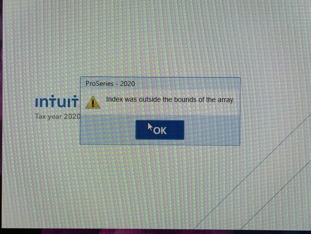
I can't open ProSeries 2020. I receive an Error Message "Index was outside the bound of the array". I can open other years, but not the 2020 version. I can't find any help online for the issue as it relates to ProSeries. I have gone through two customer service reps and also spoke to Microsoft (windows operation system) but the issue is still not resolved.
I have uninstalled, rebooted, to no avail. Any help is appreciated.
Mike
Best Answer Click here
Labels
 This discussion has been locked.
No new contributions can be made. You may start a new discussion
here
This discussion has been locked.
No new contributions can be made. You may start a new discussion
here
1 Best Answer
Accepted Solutions
Mike Reed
Level 2
07-23-2021
10:56 AM
- Mark as New
- Bookmark
- Subscribe
- Permalink
- Report Inappropriate Content
Hieu provided me an answer off line that resolved the issue. Thank you everyone for you input and help.
Mike
37 Comments 37

 Just-Lisa-Now-
Level 15
07-20-2021
03:22 PM
- Mark as New
- Bookmark
- Subscribe
- Permalink
- Report Inappropriate Content
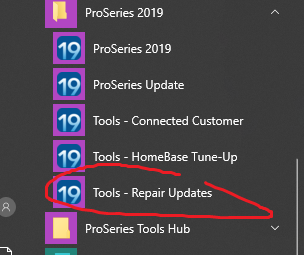
I googled that message, doesn't appear to be an Intuit message. Looks more like a Windows coding error. But since its only happening with PS 2020, Id try using REPAIR UPDATES from the ProSeries 2020 Programs menu...maybe you got some kind of corrupt installation file on the most recent PS update...this would flush out all prior updates and download fresh.
@Orlando have you seen this before?
♪♫•*¨*•.¸¸♥Lisa♥¸¸.•*¨*•♫♪
Mike Reed
Level 2
07-20-2021
03:39 PM
- Mark as New
- Bookmark
- Subscribe
- Permalink
- Report Inappropriate Content
 Just-Lisa-Now-
Level 15
07-20-2021
03:52 PM
- Mark as New
- Bookmark
- Subscribe
- Permalink
- Report Inappropriate Content
I tagged an Intuit engineer above...but I cant find any other reports of this error with ProSeries, so my guess its its some kind of conflict with Windows....that message is all over google as a coding error, but no mention of Intuit.
Did you attempt the Repair Updates?
♪♫•*¨*•.¸¸♥Lisa♥¸¸.•*¨*•♫♪
Did you attempt the Repair Updates?
♪♫•*¨*•.¸¸♥Lisa♥¸¸.•*¨*•♫♪

 Intuit_hieu
Employee
07-20-2021
06:03 PM
- Mark as New
- Bookmark
- Subscribe
- Permalink
- Report Inappropriate Content
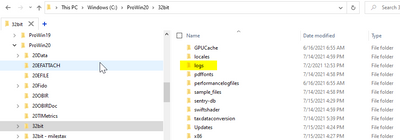
Could you please zip the logs folder from c:\prowin20\32bit, and email it to proseries_engineering@intuit.com
Mike Reed
Level 2
07-20-2021
06:13 PM
- Mark as New
- Bookmark
- Subscribe
- Permalink
- Report Inappropriate Content
Hi Hieu. Please tell me what you mean by "the logs" and I will provide this information to you. I really appreciate the help and support.
Intuit_hieu
Employee
07-20-2021
06:22 PM
- Mark as New
- Bookmark
- Subscribe
- Permalink
- Report Inappropriate Content
The 'logs' folder under c:\prowin32\32bit

Genxtax
Level 2
07-20-2021
09:06 PM
- Mark as New
- Bookmark
- Subscribe
- Permalink
- Report Inappropriate Content
Hi Hieu,
I just emailed to you as a zip file. Thank you, and the community,for your help.
Mike
Genxtax
Level 2
07-20-2021
09:11 PM
- Mark as New
- Bookmark
- Subscribe
- Permalink
- Report Inappropriate Content
Hi Lisa,
I can't open 2020, so I can't try the fix you suggested. I appreciate the help.
Mike
Just-Lisa-Now-
Level 15
07-20-2021
10:07 PM
- Mark as New
- Bookmark
- Subscribe
- Permalink
- Report Inappropriate Content
It seems to work best with Proseries closed...this is a screen shot for 2019, but 2020 has the same option in the Windows programs menu.
♪♫•*¨*•.¸¸♥Lisa♥¸¸.•*¨*•♫♪
Genxtax
Level 2
07-21-2021
08:51 AM
- Mark as New
- Bookmark
- Subscribe
- Permalink
- Report Inappropriate Content
Hi Lisa, good information and thank you for the suggestion. However, I gave it a try, but still the same result.
Mike Reed
Level 2
07-23-2021
10:56 AM
- Mark as New
- Bookmark
- Subscribe
- Permalink
- Report Inappropriate Content
Hieu provided me an answer off line that resolved the issue. Thank you everyone for you input and help.
Mike
Just-Lisa-Now-
Level 15
07-23-2021
11:11 AM
- Mark as New
- Bookmark
- Subscribe
- Permalink
- Report Inappropriate Content
Could you maybe add the "fix" tho this thread and mark it as Solved so in case anyone else has this issue, they can find the answer?
♪♫•*¨*•.¸¸♥Lisa♥¸¸.•*¨*•♫♪
♪♫•*¨*•.¸¸♥Lisa♥¸¸.•*¨*•♫♪
Mike Reed
Level 2
07-23-2021
01:51 PM
- Mark as New
- Bookmark
- Subscribe
- Permalink
- Report Inappropriate Content
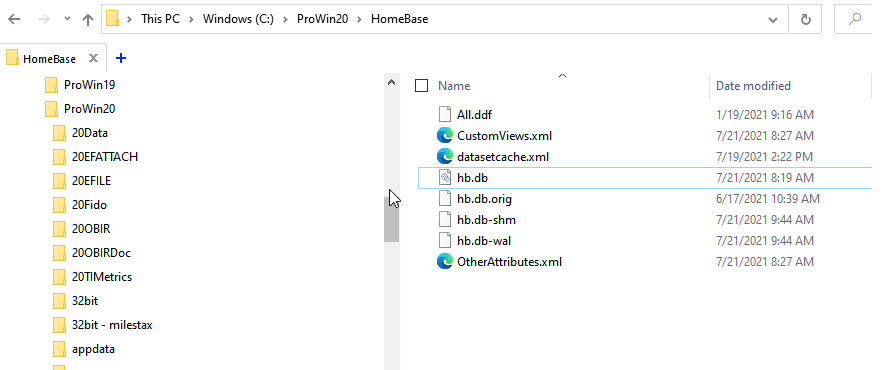
I was told to delete the hb.db and customviews.xml from the Homebase folder & relaunch PS again. It worked!

bmg
Level 1
08-15-2021
05:18 PM
- Mark as New
- Bookmark
- Subscribe
- Permalink
- Report Inappropriate Content
WELL THAT DOESEN'T DO THE REST OF US ANY GOOD???
bmg
Level 1
08-15-2021
05:41 PM
- Mark as New
- Bookmark
- Subscribe
- Permalink
- Report Inappropriate Content
And how do we get to the program menu if ProSeries 2020 does not start?

abctax55
Level 15
08-15-2021
05:52 PM
- Mark as New
- Bookmark
- Subscribe
- Permalink
- Report Inappropriate Content
You do the deleting via file explorer (as is shown in the answer posted by @Mike Reed ), NOT thru the program itself.
HumanKind... Be Both
Just-Lisa-Now-
Level 15
08-16-2021
07:12 AM
- Mark as New
- Bookmark
- Subscribe
- Permalink
- Report Inappropriate Content
Look at the post right above yours, Mike explained how he fixed it.
♪♫•*¨*•.¸¸♥Lisa♥¸¸.•*¨*•♫♪
♪♫•*¨*•.¸¸♥Lisa♥¸¸.•*¨*•♫♪
Intuit_hieu
Employee
08-16-2021
07:09 PM
- Mark as New
- Bookmark
- Subscribe
- Permalink
- Report Inappropriate Content
Hello @bmg! Had you tried to remove CustomViews.xml as suggested above?
If you are still running into the issue, could you please email us (proseries_engineering@intuit.com) your CustomViews.xml file.
Thanks,
-Hieu

ldouglas
Level 1
09-26-2021
12:44 PM
- Mark as New
- Bookmark
- Subscribe
- Permalink
- Report Inappropriate Content
I am getting the message "Index outside the bounds of the array" when attempting to launch Proseries 2020. I've seen a few other posts about it but cant seem to get to the solution that was offered. Any help will be appreciated.
Intuit_hieu
Employee
09-26-2021
01:04 PM
- Mark as New
- Bookmark
- Subscribe
- Permalink
- Report Inappropriate Content
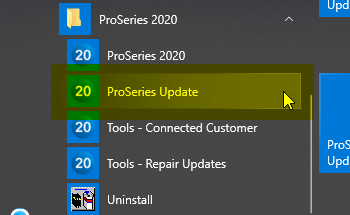
Could you please update to the latest ProSeries? We had a release on 9/22 which supposes to address the issue. Thanks!

TaxLady1_
Level 1
10-29-2021
01:09 PM
- Mark as New
- Bookmark
- Subscribe
- Permalink
- Report Inappropriate Content
How do you update without opening intuit proseries.
Intuit_hieu
Employee
10-29-2021
01:14 PM
- Mark as New
- Bookmark
- Subscribe
- Permalink
- Report Inappropriate Content
pacfanab
Level 2
11-23-2021
09:44 AM
- Mark as New
- Bookmark
- Subscribe
- Permalink
- Report Inappropriate Content
I'm having this issue today - followed the solution in the original post. Did not work -- Ran update on ProSeries and tools repair.....still doesn't work -- HELP!
Intuit_hieu
Employee
11-23-2021
10:11 AM
- Mark as New
- Bookmark
- Subscribe
- Permalink
- Report Inappropriate Content
Are you available sometime today for a zoom session? If you do, please send an email to proseries_engineering@intuit.com, and include the URL of this thread in the email (https://proconnect.intuit.com/community/forums/replypage/board-id/203/message-id/96385).

Befuddled
Level 1
12-20-2021
07:17 AM
- Mark as New
- Bookmark
- Subscribe
- Permalink
- Report Inappropriate Content
Today is 12/20/21. Just sent email to Pro Series Engineering. Not one of the solutions offered in the thred helped in any way. Stuck. Can't print client labels for mailing to go out a week from now. Can't offer Clients updates on estimated taxes. Very upset.
Just-Lisa-Now-
Level 15
12-20-2021
09:53 AM
- Mark as New
- Bookmark
- Subscribe
- Permalink
- Report Inappropriate Content
Youre not the original poster, right? Are you getting the index outside of array message also? or is your situation different?
♪♫•*¨*•.¸¸♥Lisa♥¸¸.•*¨*•♫♪
♪♫•*¨*•.¸¸♥Lisa♥¸¸.•*¨*•♫♪

APCPA
Level 1
12-20-2021
10:11 AM
- Mark as New
- Bookmark
- Subscribe
- Permalink
- Report Inappropriate Content
I had this same problem today. Tried the fix “ delete the hb.db and customviews.xml from the Homebase folder & relaunch PS “ and repaired all updates. That did not fix the problem.
I uninstalled the windows update KB5008212 Security update for windows installed 12/15/21 and now Pro Series 2020 is working again.
Pro Series, can we get an update to fix this so I can reinstall the windows security update?
APCPA
Level 1
12-20-2021
10:13 AM
- Mark as New
- Bookmark
- Subscribe
- Permalink
- Report Inappropriate Content
Check to see if windows installed a security update on your computer last week. I uninstalled the one that installed on mine last week and Pro Series started working again.
Intuit_hieu
Employee
12-20-2021
10:14 AM
- Mark as New
- Bookmark
- Subscribe
- Permalink
- Report Inappropriate Content
Sorry to about the issue? Could you please send us your contact info to proseries_engineering@intuit.com? We will reach out to you for troubleshooting.
Thanks!
-Hieu
abctax55
Level 15
12-20-2021
10:22 AM
- Mark as New
- Bookmark
- Subscribe
- Permalink
- Report Inappropriate Content
Befuddled
Level 1
12-20-2021
09:50 PM
- Mark as New
- Bookmark
- Subscribe
- Permalink
- Report Inappropriate Content
I can OPEN proseries but all my client database is missing! All I did was uninstall the Windows update. Please let me know what you need EXACTLY and I'll send.

KK16
Level 3
01-10-2022
02:29 PM
- Mark as New
- Bookmark
- Subscribe
- Permalink
- Report Inappropriate Content
Today is 1-10-22 - I am having the exact same issues as you. I have followed this thread and done everything in this thread that has been instructed to do. Still getting the error message "Index was outside the bounds of the array."
Any other help would be appreciated.
Just-Lisa-Now-
Level 15
01-10-2022
04:51 PM
- Mark as New
- Bookmark
- Subscribe
- Permalink
- Report Inappropriate Content
@Intuit_hieu heres another one for you!
♪♫•*¨*•.¸¸♥Lisa♥¸¸.•*¨*•♫♪
Intuit_hieu
Employee
01-10-2022
06:27 PM
- Mark as New
- Bookmark
- Subscribe
- Permalink
- Report Inappropriate Content
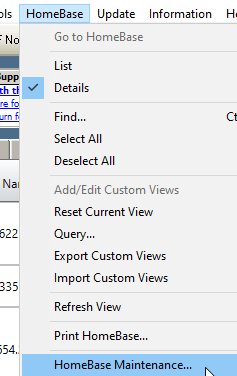
@Befuddled are you still having issue? if you do please run to repopulate the Homebase. Sorry for the late response
Intuit_hieu
Employee
01-10-2022
06:33 PM
- Mark as New
- Bookmark
- Subscribe
- Permalink
- Report Inappropriate Content
@KK16 Could you please send your contact info to proseries_engineering@intuit.com. Sorry for the trouble.
KK16
Level 3
01-11-2022
07:33 PM
- Mark as New
- Bookmark
- Subscribe
- Permalink
- Report Inappropriate Content
I sent my contact info to the email address you provided.
Thank you very much!

hnouri
Level 2
03-16-2022
06:10 PM
- Mark as New
- Bookmark
- Subscribe
- Permalink
- Report Inappropriate Content
I tried the information provided on this website, but nothing worked out. I saw my 2020 QuickBooks needs updates. After updating my QuickBooks, everything is working now.




