Welcome back! Ask questions, get answers, and join our large community of tax professionals.
- Topics
- Training
- Community
- Product Help
- Industry Discussions
- User Groups
- Discover
- Resources
Intuit
Virtual · Free
Elevate 2026
Tax Day isn't the finish line — grow your firm at our two-day virtual conference
Free CPE/CE
Intuit
Virtual · Free
Elevate 2026
Tax Day isn't the finish line — grow your firm at our two-day virtual conference
Free CPE/CE
Turn on suggestions
Auto-suggest helps you quickly narrow down your search results by suggesting possible matches as you type.
Showing results for
- Intuit Accountants Community
- :
- ProSeries Tax
- :
- ProSeries Tax Discussions
- :
- Re: 1040NR printing errors
1040NR printing errors
Options
- Mark Topic as New
- Mark Topic as Read
- Float this Topic for Current User
- Bookmark
- Subscribe
- Printer Friendly Page

OCEnAgent
Level 1
02-21-2023
11:57 PM
- Mark as New
- Bookmark
- Subscribe
- Permalink
- Report Inappropriate Content
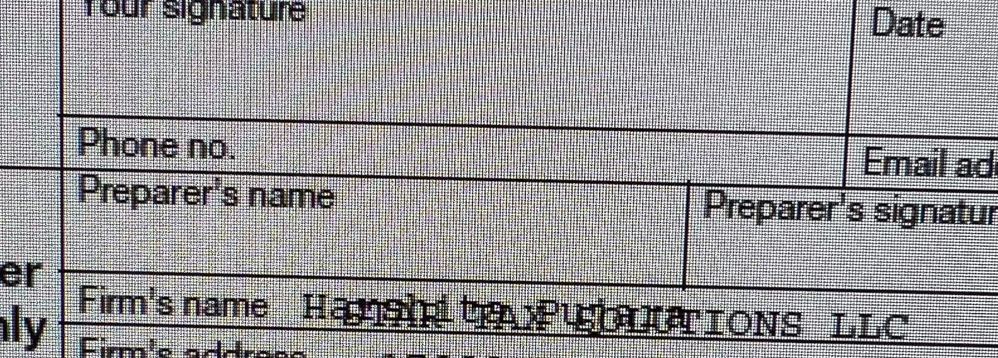
Preparer’s name on 1040NR printing issues. See picture attached.
Paid preparer’s name prints over the Firm’s name on the client’s copy of the 1040NR. Is there a way I can stop the software to print the preparer’s name on the return?
Labels
 This discussion has been locked.
No new contributions can be made. You may start a new discussion
here
This discussion has been locked.
No new contributions can be made. You may start a new discussion
here
14 Comments 14

 Just-Lisa-Now-
Level 15
02-22-2023
06:58 AM
- Mark as New
- Bookmark
- Subscribe
- Permalink
- Report Inappropriate Content
@Intuitjhaze can you add this to someone's fix it list? @OCEnAgent Your picture didnt load, but I grabbed it from the FB group....its garbled in Print Preview, Print to PDF and Print to Paper
♪♫•*¨*•.¸¸♥Lisa♥¸¸.•*¨*•♫♪

Intuitjhaze
Intuit Alumni
02-22-2023
01:30 PM
- Mark as New
- Bookmark
- Subscribe
- Permalink
- Report Inappropriate Content
hey there @Just-Lisa-Now- thanks for flagging me. @OCEnAgent we are currently investigating this behavior and will reach out to you as soon as it is resolved.
Just-Lisa-Now-
Level 15
02-22-2023
01:57 PM
- Mark as New
- Bookmark
- Subscribe
- Permalink
- Report Inappropriate Content
@OCEnAgent you can choose NOT to print the preparers name on the form,
Tools > Options > Firm & Preparer Info, uncheck the box that says Print Name in Signature Area.
♪♫•*¨*•.¸¸♥Lisa♥¸¸.•*¨*•♫♪
OCEnAgent
Level 1
02-22-2023
01:59 PM
- Mark as New
- Bookmark
- Subscribe
- Permalink
- Report Inappropriate Content
That box is unchecked, it still prints my name on the 1040NR.
Just-Lisa-Now-
Level 15
02-22-2023
02:32 PM
- Mark as New
- Bookmark
- Subscribe
- Permalink
- Report Inappropriate Content
So that must be part of the programming problem, its not respecting that option either.
♪♫•*¨*•.¸¸♥Lisa♥¸¸.•*¨*•♫♪

DCI
Level 3
02-28-2023
05:16 AM
- Mark as New
- Bookmark
- Subscribe
- Permalink
- Report Inappropriate Content
Fixing this issue would be appreciated - any idea how long it will take to be resolved?
Thanks

h0250722
Level 3
03-03-2023
10:46 AM
- Mark as New
- Bookmark
- Subscribe
- Permalink
- Report Inappropriate Content
This issue is still unsolved. Cannot print any paper returns for my clients. unchecking the box does not help!
Pro Series please HELP fix it!! @Intuitjhaze
Intuitjhaze
Intuit Alumni
03-03-2023
01:40 PM
- Mark as New
- Bookmark
- Subscribe
- Permalink
- Report Inappropriate Content
@DCI @h0250722 are you both having the exact same issue as @OCEnAgent ? ("Preparer's name on 1040NR printing issues") .. please keep us posted.
OCEnAgent
Level 1
03-03-2023
01:52 PM
- Mark as New
- Bookmark
- Subscribe
- Permalink
- Report Inappropriate Content
Yes, its the exact same issue for me too. Checking or unchecking the box to print the preparer's name doesn't change anything, and the preparer's name is printed over the firm name.......
When can we expect any resolution to this issue? I have reported it many days back......
h0250722
Level 3
03-03-2023
02:17 PM
- Mark as New
- Bookmark
- Subscribe
- Permalink
- Report Inappropriate Content
Yes same issue here ...

TaxGuyBill
Level 15
03-03-2023
02:19 PM
- Mark as New
- Bookmark
- Subscribe
- Permalink
- Report Inappropriate Content
Does it still do that when you 'print' it to a PDF?
The printing has been screwed up for the last few years, especially with State returns, and it only works if you 'print' it to a PDF first. I'm sick of going through the extra steps because Intuit won't fix it. Maybe @Intuitjhaze can push somebody to start working on all of the printing problems.
h0250722
Level 3
03-03-2023
02:23 PM
- Mark as New
- Bookmark
- Subscribe
- Permalink
- Report Inappropriate Content
Yes it happens when printing to PDF. Also its only with the 1040NR - not with the other forms
Intuitjhaze
Intuit Alumni
03-10-2023
06:55 PM
- Mark as New
- Bookmark
- Subscribe
- Permalink
- Report Inappropriate Content
Hi there @OCEnAgent @h0250722 @DCI just checking in - has the issue been resolved? Fingers crossed!
h0250722
Level 3
03-10-2023
07:12 PM
- Mark as New
- Bookmark
- Subscribe
- Permalink
- Report Inappropriate Content
no, I just did an update. It is only with the 1040NRs




