Welcome back! Ask questions, get answers, and join our large community of tax professionals.
- Topics
- Training
- Community
- Product Help
- Industry Discussions
- User Groups
- Discover
- Resources
Turn on suggestions
Auto-suggest helps you quickly narrow down your search results by suggesting possible matches as you type.
Showing results for
- Intuit Accountants Community
- :
- ProSeries Tax
- :
- ProSeries Tax Discussions
- :
- Re: Up date
Up date
Options
- Mark Topic as New
- Mark Topic as Read
- Float this Topic for Current User
- Bookmark
- Subscribe
- Printer Friendly Page

 Terry53029
Level 15
08-11-2021
09:08 AM
- Mark as New
- Bookmark
- Subscribe
- Permalink
- Report Inappropriate Content
Morning all, any takers on up dating this morning Personally I'm going to try and hold off as long as possible
Best Answer Click here
Labels
 This discussion has been locked.
No new contributions can be made. You may start a new discussion
here
This discussion has been locked.
No new contributions can be made. You may start a new discussion
here
1 Best Answer
Accepted Solutions

IRonMaN
Level 15
08-11-2021
09:26 AM
- Mark as New
- Bookmark
- Subscribe
- Permalink
- Report Inappropriate Content
Looks like Lisa is the only one running with scissors today:
Solved: I sense a disturbance in the Force - Intuit Accountants Community
Slava Ukraini!
9 Comments 9
IRonMaN
Level 15
08-11-2021
09:26 AM
- Mark as New
- Bookmark
- Subscribe
- Permalink
- Report Inappropriate Content
Looks like Lisa is the only one running with scissors today:
Solved: I sense a disturbance in the Force - Intuit Accountants Community
Slava Ukraini!

PATAX
Level 15
08-11-2021
09:33 AM
- Mark as New
- Bookmark
- Subscribe
- Permalink
- Report Inappropriate Content
Why take a chance .... Just wait.... And I also believe you can choose not to opt into it.... just my opinion...
 Just-Lisa-Now-
Level 15
08-11-2021
11:32 AM
- Mark as New
- Bookmark
- Subscribe
- Permalink
- Report Inappropriate Content
and oddly, even after updating, I dont have the Beta option under my Updates menu...so I dunno how to participate in the experiment!
PS: Im only willing to sacrifice my home system for this LOL
♪♫•*¨*•.¸¸♥Lisa♥¸¸.•*¨*•♫♪
Terry53029
Level 15
08-11-2021
11:38 AM
- Mark as New
- Bookmark
- Subscribe
- Permalink
- Report Inappropriate Content
@Just-Lisa-Now- Did you launch from the new icon like the notice said "
- Important! For background updates to work during the beta, you will need to launch ProSeries using a new shortcut that should be on your desktop:"
Just-Lisa-Now-
Level 15
08-11-2021
11:39 AM
- Mark as New
- Bookmark
- Subscribe
- Permalink
- Report Inappropriate Content
How do I get a new icon?
♪♫•*¨*•.¸¸♥Lisa♥¸¸.•*¨*•♫♪
Just-Lisa-Now-
Level 15
08-11-2021
11:42 AM
- Mark as New
- Bookmark
- Subscribe
- Permalink
- Report Inappropriate Content
Update ProSeries on 8/11, then in ProSeries, go to
Menu > Update > Beta Background Updates > Activate Background Updates
^^^^ I dont see the Beta Background Updates choice anywhere to download it.^^^^
♪♫•*¨*•.¸¸♥Lisa♥¸¸.•*¨*•♫♪
Terry53029
Level 15
08-11-2021
11:57 AM
- Mark as New
- Bookmark
- Subscribe
- Permalink
- Report Inappropriate Content
The instructions say it will automatically appear ??? Here are the instructions
How to participate in the beta
- Wait for the new release of ProSeries on 8/11
- Update your ProSeries to the latest version
- Start ProSeries
- Activate Beta Background Updates via Menu > Update > Beta Background Updates > Activate Background Updates
- Follow the prompts on the screen, providing credentials as needed
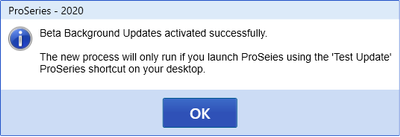
- Upon a successful activation, you will see
- Important! For background updates to work during the beta, you will need to launch ProSeries using a new shortcut that should be on your desktop:
IRonMaN
Level 15
08-11-2021
01:05 PM
- Mark as New
- Bookmark
- Subscribe
- Permalink
- Report Inappropriate Content
They do say "should be" ------------------ they don't say "will be" 😁
Slava Ukraini!

 Matt C
Employee
08-12-2021
12:41 PM
- Mark as New
- Bookmark
- Subscribe
- Permalink
- Report Inappropriate Content
Sorry, I should've written 8/12. We didn't release until later in the afternoon yesterday.




