Welcome back! Ask questions, get answers, and join our large community of tax professionals.
- Topics
- Training
- Community
- Product Help
- Industry Discussions
- User Groups
- Discover
- Resources
Turn on suggestions
Auto-suggest helps you quickly narrow down your search results by suggesting possible matches as you type.
Showing results for
- Intuit Accountants Community
- :
- ProSeries Tax
- :
- ProSeries Tax Discussions
- :
- Re: Return not transmitted
Return not transmitted
Options
- Mark Topic as New
- Mark Topic as Read
- Float this Topic for Current User
- Bookmark
- Subscribe
- Printer Friendly Page

Hub
Level 4
03-03-2021
10:21 AM
- Mark as New
- Bookmark
- Subscribe
- Permalink
- Report Inappropriate Content
For the past few days I have a 1040 return that will not transmit either the federal or the state to Intuit. It says "Return not transmitted"
I have rerun the review, rerun the conversion and still will not go through. Any suggestions short of calling support. NO error codes at all. I have run update refresh etc. without success.
Any suggestions?
Labels
 This discussion has been locked.
No new contributions can be made. You may start a new discussion
here
This discussion has been locked.
No new contributions can be made. You may start a new discussion
here
13 Comments 13

 Just-Lisa-Now-
Level 15
03-03-2021
11:22 AM
- Mark as New
- Bookmark
- Subscribe
- Permalink
- Report Inappropriate Content
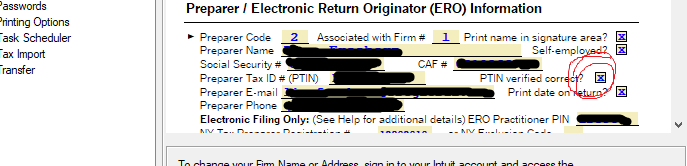
Is this the first 1040 youve tried to file? Be sure youve got this box checked in the firm/preparer info area.
♪♫•*¨*•.¸¸♥Lisa♥¸¸.•*¨*•♫♪
Hub
Level 4
03-03-2021
11:48 AM
- Mark as New
- Bookmark
- Subscribe
- Permalink
- Report Inappropriate Content
I have been filing without issue for weeks now. The box is checked for PTIN verified. This is the first time I have had an issue
Just-Lisa-Now-
Level 15
03-03-2021
11:52 AM
- Mark as New
- Bookmark
- Subscribe
- Permalink
- Report Inappropriate Content
weird, that ptin verify box was creating that same situation, but sounds like thats not your issue.
♪♫•*¨*•.¸¸♥Lisa♥¸¸.•*¨*•♫♪
♪♫•*¨*•.¸¸♥Lisa♥¸¸.•*¨*•♫♪
Just-Lisa-Now-
Level 15
03-03-2021
11:54 AM
- Mark as New
- Bookmark
- Subscribe
- Permalink
- Report Inappropriate Content
Are you trying to Efile from the EFCenter or from within the return?
♪♫•*¨*•.¸¸♥Lisa♥¸¸.•*¨*•♫♪
♪♫•*¨*•.¸¸♥Lisa♥¸¸.•*¨*•♫♪
Hub
Level 4
03-03-2021
03:08 PM
- Mark as New
- Bookmark
- Subscribe
- Permalink
- Report Inappropriate Content
I always have e-filed from the E File Center. Should I try filing from the return?
Just-Lisa-Now-
Level 15
03-03-2021
03:34 PM
- Mark as New
- Bookmark
- Subscribe
- Permalink
- Report Inappropriate Content
I thought I remembered people having weird issues filing from within the return in past years, I always file from the EFCenter too...so it converts, but just wont transmit?
♪♫•*¨*•.¸¸♥Lisa♥¸¸.•*¨*•♫♪
♪♫•*¨*•.¸¸♥Lisa♥¸¸.•*¨*•♫♪
Hub
Level 4
03-03-2021
06:04 PM
- Mark as New
- Bookmark
- Subscribe
- Permalink
- Report Inappropriate Content
Yes that is the case. And there are no errors in the returns.
Just-Lisa-Now-
Level 15
03-03-2021
06:33 PM
- Mark as New
- Bookmark
- Subscribe
- Permalink
- Report Inappropriate Content
@IntuitBettyJo I feel like Ive seen this issue before in the past, my brain is coming up empty on what could be the cause though, got any ideas?
♪♫•*¨*•.¸¸♥Lisa♥¸¸.•*¨*•♫♪

 IntuitBettyJo
Community Manager
03-04-2021
11:52 AM
- Mark as New
- Bookmark
- Subscribe
- Permalink
- Report Inappropriate Content
Checking with our ProSeries team to see what I find.
-Betty Jo

LakeLife
Level 2
03-04-2021
08:16 PM
- Mark as New
- Bookmark
- Subscribe
- Permalink
- Report Inappropriate Content
I've got the exact same thing happening right now. I have been e-filing without any problems all season and today, I get the same "Return Not Transmitted" message with the red finger.
Hub
Level 4
03-04-2021
08:54 PM
- Mark as New
- Bookmark
- Subscribe
- Permalink
- Report Inappropriate Content
Today after a considerable time on the phone with support we solved the problem. What we finally did was save the return with a different number in my case or you could use a different name. Then opened the new return and ran all the normal protocols, review etc. Then went to EF center and filed it. Wala! It transmitted. So the issue was the file must have been corrupted somehow. Support is saying it might be the virus software, but I doubt that since I use Microsoft Office 365 with the virus software of theirs and have never had an issue and have file dozens of returns already, both before and after this return.
So try saving your file as another and then use that file to transmit.
Good Luck
Just-Lisa-Now-
Level 15
03-04-2021
09:09 PM
- Mark as New
- Bookmark
- Subscribe
- Permalink
- Report Inappropriate Content
I wondered if saving as a different file name would do anything...not sure how or why it would, but Im glad you got it fixed!
♪♫•*¨*•.¸¸♥Lisa♥¸¸.•*¨*•♫♪
♪♫•*¨*•.¸¸♥Lisa♥¸¸.•*¨*•♫♪
 JOFI
JOFI
Level 7
09-20-2021
01:55 PM
- Mark as New
- Bookmark
- Subscribe
- Permalink
- Report Inappropriate Content
This solution worked for me as well when I was able to file a state return for a client, but the federal return kept stalling with "Return not transmitted" error showing.




