Welcome back! Ask questions, get answers, and join our large community of tax professionals.
- Topics
- Training
- Community
- Product Help
- Industry Discussions
- User Groups
- Discover
- Resources
Turn on suggestions
Auto-suggest helps you quickly narrow down your search results by suggesting possible matches as you type.
Showing results for
- Intuit Accountants Community
- :
- ProSeries Tax
- :
- ProSeries Tax Discussions
- :
- Re: CLIENT INVOICE
CLIENT INVOICE
Options
- Mark Topic as New
- Mark Topic as Read
- Float this Topic for Current User
- Bookmark
- Subscribe
- Printer Friendly Page

4TAX
Level 2
01-18-2023
11:01 AM
- Mark as New
- Bookmark
- Subscribe
- Permalink
- Report Inappropriate Content
CLINT INVOICE IS NOT AVAILABLE IN FORMS SELECTION BOX IN 1040 PROGRAM
Best Answer Click here
Labels
 This discussion has been locked.
No new contributions can be made. You may start a new discussion
here
This discussion has been locked.
No new contributions can be made. You may start a new discussion
here
1 Best Answer
Accepted Solutions

 Just-Lisa-Now-
Level 15
01-18-2023
11:19 AM
- Mark as New
- Bookmark
- Subscribe
- Permalink
- Report Inappropriate Content
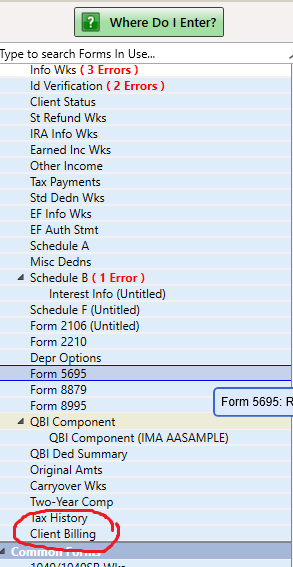
Should be at the very bottom of your Forms In Use list...I know last week it seemed to be MIA Oh wait, that was for 1065 billing invoice, not 1040.
♪♫•*¨*•.¸¸♥Lisa♥¸¸.•*¨*•♫♪
3 Comments 3
Just-Lisa-Now-
Level 15
01-18-2023
11:19 AM
- Mark as New
- Bookmark
- Subscribe
- Permalink
- Report Inappropriate Content
Should be at the very bottom of your Forms In Use list...I know last week it seemed to be MIA Oh wait, that was for 1065 billing invoice, not 1040.
♪♫•*¨*•.¸¸♥Lisa♥¸¸.•*¨*•♫♪
4TAX
Level 2
01-18-2023
11:29 AM
- Mark as New
- Bookmark
- Subscribe
- Permalink
- Report Inappropriate Content
Thanks
I usually use the F6 command and pick from the box, but it was not there. Just prior to your reply, I did the refresh update manual update from the bar at the top and that fixed it, although I though those updates were happening automatically. There were actually several fixes for forms that actually took place during that manual update also.
Go figure-----
Thanks again
Just-Lisa-Now-
Level 15
01-18-2023
11:32 AM
- Mark as New
- Bookmark
- Subscribe
- Permalink
- Report Inappropriate Content
Yea. thats my go-to when things get wonky.
You may want to check that you have Background Updates Activated, I think they took away Task Manager when you could schedule Updates at a certain time/day.
♪♫•*¨*•.¸¸♥Lisa♥¸¸.•*¨*•♫♪




