Welcome back! Ask questions, get answers, and join our large community of tax professionals.
- Topics
- Training
- Community
- Product Help
- Industry Discussions
- User Groups
- Discover
- Resources
Turn on suggestions
Auto-suggest helps you quickly narrow down your search results by suggesting possible matches as you type.
Showing results for
- Intuit Accountants Community
- :
- ProSeries Tax
- :
- ProSeries Tax Discussions
- :
- Re: Adding addresses to Homebase view
Adding addresses to Homebase view
Options
- Mark Topic as New
- Mark Topic as Read
- Float this Topic for Current User
- Bookmark
- Subscribe
- Printer Friendly Page

LesC
Level 2
12-08-2020
01:04 PM
- Mark as New
- Bookmark
- Subscribe
- Permalink
- Report Inappropriate Content
I want to add the street address to the Homebase view (so I can export a mailing list), but it's not in the list of columns to add when I open "Column Headings." Is there anyway to do this? Or another way to get names and addresses to export?
Labels
 This discussion has been locked.
No new contributions can be made. You may start a new discussion
here
This discussion has been locked.
No new contributions can be made. You may start a new discussion
here
12 Comments 12

 Just-Lisa-Now-
Level 15
12-08-2020
01:21 PM
- Mark as New
- Bookmark
- Subscribe
- Permalink
- Report Inappropriate Content
For 2020 or 2019?
Actually, I think in both years its labeled as Client Street Address in the list of headings.
♪♫•*¨*•.¸¸♥Lisa♥¸¸.•*¨*•♫♪

clr600
Level 8
12-08-2020
01:29 PM
- Mark as New
- Bookmark
- Subscribe
- Permalink
- Report Inappropriate Content
In 2019 or 2020 add a custom view in homebase with name and address and then print it out or export it.
LesC
Level 2
12-08-2020
01:30 PM
- Mark as New
- Bookmark
- Subscribe
- Permalink
- Report Inappropriate Content
It's not in the list of choices I show. But thanks.
clr600
Level 8
12-08-2020
01:38 PM
- Mark as New
- Bookmark
- Subscribe
- Permalink
- Report Inappropriate Content
What year are you in
LesC
Level 2
12-08-2020
01:41 PM
- Mark as New
- Bookmark
- Subscribe
- Permalink
- Report Inappropriate Content
2019
clr600
Level 8
12-08-2020
01:44 PM
- Mark as New
- Bookmark
- Subscribe
- Permalink
- Report Inappropriate Content
Just go to Homebase menu and change column headings to suit you, client name, client street and apt address and client city, state and zip, then save in a new view like addresses. then you can export as a cvs file or print a copy of that homebase view
LesC
Level 2
12-08-2020
01:57 PM
- Mark as New
- Bookmark
- Subscribe
- Permalink
- Report Inappropriate Content
Thanks, I know how to do that, but what I'm saying is that Client Street Address is not among the items I can add to my Homebase view. I can get City, State, Zip, SSN, etc., but not Client Street Address.

dkh
Level 15
12-08-2020
04:01 PM
- Mark as New
- Bookmark
- Subscribe
- Permalink
- Report Inappropriate Content
There is column heading 'Client Address' and 'Client Street and Apt Address'
LesC
Level 2
12-08-2020
04:46 PM
- Mark as New
- Bookmark
- Subscribe
- Permalink
- Report Inappropriate Content
There was supposed to be, but there wasn't. But after I switched to List view, then back to Details, all the column headings were available. Just a weird glitch. Thanks for all the efforts.

sheri414
Level 3
11-16-2021
10:59 AM
- Mark as New
- Bookmark
- Subscribe
- Permalink
- Report Inappropriate Content
I also cannot get the client address to show. I've created a custom view and exported custom view but still no address. Can someone spell it out because I just don't see anywhere to change column headings. Only add custom view, which does nothing after I save it.
Just-Lisa-Now-
Level 15
11-16-2021
11:33 AM
- Mark as New
- Bookmark
- Subscribe
- Permalink
- Report Inappropriate Content
are you working with 2020 or 2021? I havent tried editing HB in the 2021 program, I just Exported my custom views in 2020 and Imported them into 2021, seemed to work as expected.
♪♫•*¨*•.¸¸♥Lisa♥¸¸.•*¨*•♫♪
♪♫•*¨*•.¸¸♥Lisa♥¸¸.•*¨*•♫♪
Just-Lisa-Now-
Level 15
11-16-2021
11:41 AM
- Mark as New
- Bookmark
- Subscribe
- Permalink
- Report Inappropriate Content
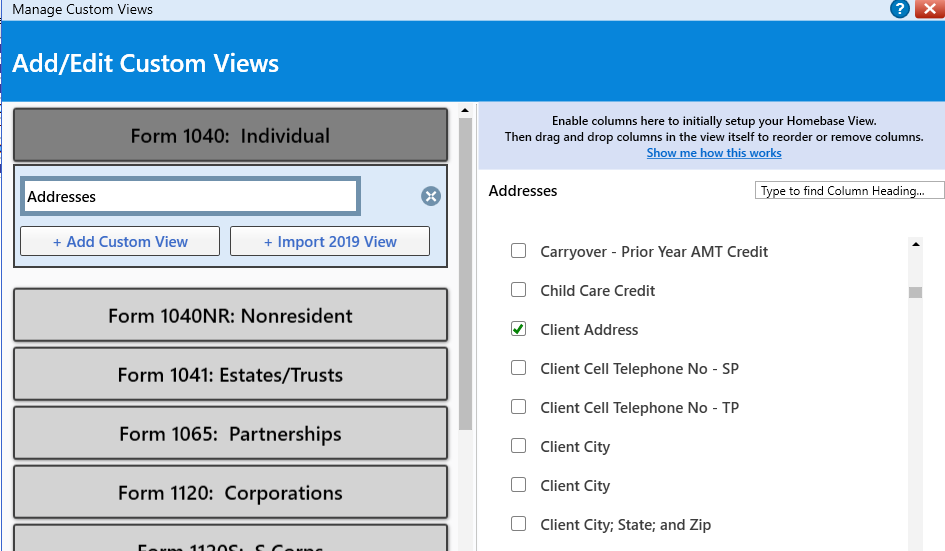
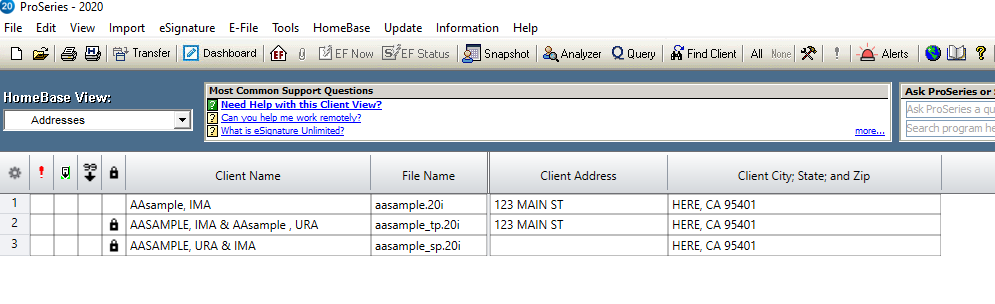
There are not column headings anymore, that was for 2019 and prior. For 2020 you need to create or edit your views Homebase > Add/Edit Custom View...I created on called Addresses and removed the checkboxes next to everything then checked off Client Address and scrolled down to City,State, Zip and Saved it...see screen shots below...that gave me a HB view that shows only the names and addresses including city, state and zip.
♪♫•*¨*•.¸¸♥Lisa♥¸¸.•*¨*•♫♪




