Welcome back! Ask questions, get answers, and join our large community of tax professionals.
- Topics
- Training
- Community
- Product Help
- Industry Discussions
- User Groups
- Discover
- Resources
Turn on suggestions
Auto-suggest helps you quickly narrow down your search results by suggesting possible matches as you type.
Showing results for
- Intuit Accountants Community
- :
- ProSeries Tax
- :
- ProSeries Tax Discussions
- :
- Re: 2020 Proseries login for first time issue
2020 Proseries login for first time issue
Options
- Mark Topic as New
- Mark Topic as Read
- Float this Topic for Current User
- Bookmark
- Subscribe
- Printer Friendly Page

mmaci
Level 1
01-04-2021
12:42 PM
- Mark as New
- Bookmark
- Subscribe
- Permalink
- Report Inappropriate Content
I have downloaded the Proseries 2020 software. When I try to open it a screen pops up that says set up or sign in to your account. I try to choose sign in as my account has been set up for years. However, when I choose that option the next box seems to ask for customer number and "sold to" zip code yet it is greyed out and does not let me enter any information. So I back out and try the set up my firm option, I log into my account but see nowhere to clear this issue up.
I am at a loss on how to get into the 2020 software. I can log into prior years software with no issue.
Labels
 This discussion has been locked.
No new contributions can be made. You may start a new discussion
here
This discussion has been locked.
No new contributions can be made. You may start a new discussion
here
3 Comments 3

TaxJock
Level 2
01-04-2021
12:57 PM
- Mark as New
- Bookmark
- Subscribe
- Permalink
- Report Inappropriate Content
You may want to open a ticket with them. I'm a 10+ year user and it worked fine with sign-in option.

 Just-Lisa-Now-
Level 15
01-04-2021
01:54 PM
- Mark as New
- Bookmark
- Subscribe
- Permalink
- Report Inappropriate Content
what happens if you choose Set Up?
♪♫•*¨*•.¸¸♥Lisa♥¸¸.•*¨*•♫♪
♪♫•*¨*•.¸¸♥Lisa♥¸¸.•*¨*•♫♪

Orlando
Intuit Alumni
01-04-2021
04:51 PM
- Mark as New
- Bookmark
- Subscribe
- Permalink
- Report Inappropriate Content
I'm sorry for the frustration.. this is odd. Can you go to the Start Menu and select ProSeries 2020 -> Tools - Connected Customer?
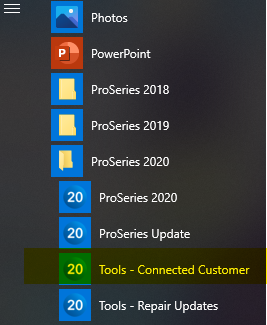
This should allow you to enter your Customer Number & Zip Code
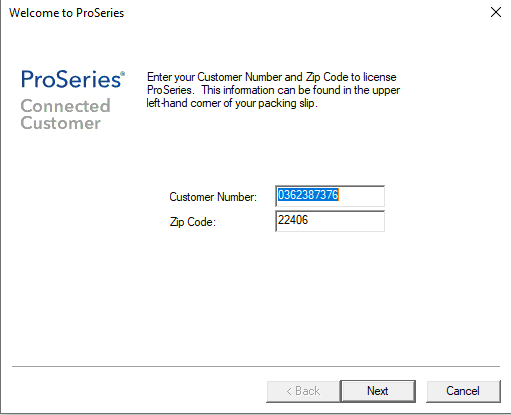
After that, you should be able to login with any user / password associated with that Customer Number / Zip.
If something along the way isn't working in that sequence, respond here or call into customer support so we can get you going.




