Welcome back! Ask questions, get answers, and join our large community of tax professionals.
- Topics
- Training
- Community
- Product Help
- Industry Discussions
- User Groups
- Discover
- Resources
Turn on suggestions
Auto-suggest helps you quickly narrow down your search results by suggesting possible matches as you type.
Showing results for
- Intuit Accountants Community
- :
- ProSeries Tax
- :
- ProSeries Tax Discussions
- :
- 2018 Electronic filing
2018 Electronic filing
Options
- Mark Topic as New
- Mark Topic as Read
- Float this Topic for Current User
- Bookmark
- Subscribe
- Printer Friendly Page

khorshed
Level 4
05-08-2020
02:00 PM
- Mark as New
- Bookmark
- Subscribe
- Permalink
- Report Inappropriate Content
I am trying to file 2018 Tax returns electronically, I keep getting an error msg saying that the I need to update software. I did go update on the top menu, selected "update installed products", it goes through the process of updating. However, when I try to file again I keep getting the same error MSG.
Best Answer Click here
Labels
 This discussion has been locked.
No new contributions can be made. You may start a new discussion
here
This discussion has been locked.
No new contributions can be made. You may start a new discussion
here
1 Best Answer
Accepted Solutions

 Just-Lisa-Now-
Level 15
05-08-2020
03:46 PM
- Mark as New
- Bookmark
- Subscribe
- Permalink
- Report Inappropriate Content
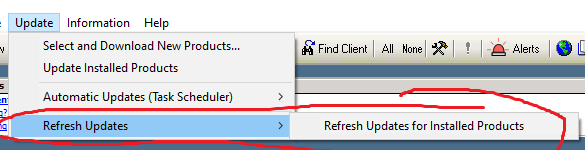
Go back up to the Update drop down menu, this time choose REFRESH UPDATES at the very bottom of the drop down list.
♪♫•*¨*•.¸¸♥Lisa♥¸¸.•*¨*•♫♪
5 Comments 5
Just-Lisa-Now-
Level 15
05-08-2020
03:46 PM
- Mark as New
- Bookmark
- Subscribe
- Permalink
- Report Inappropriate Content
Go back up to the Update drop down menu, this time choose REFRESH UPDATES at the very bottom of the drop down list.
♪♫•*¨*•.¸¸♥Lisa♥¸¸.•*¨*•♫♪

Helpemout
Level 3
05-08-2020
04:18 PM
- Mark as New
- Bookmark
- Subscribe
- Permalink
- Report Inappropriate Content
I am having the same problem. The Federal will not file but the state did. I did your suggestion of refreshing the update but still getting the error.
Just-Lisa-Now-
Level 15
05-08-2020
04:45 PM
- Mark as New
- Bookmark
- Subscribe
- Permalink
- Report Inappropriate Content
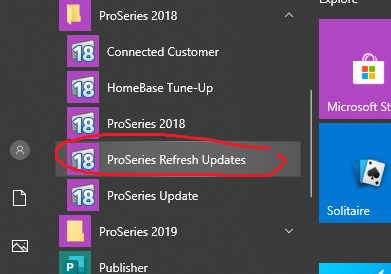
Using REFRESH is the go-to fix for this situation with 2018...you may need to do it multiple times.
You may want to try closing ProSeries and use the Refresh Updates option from the Windows Programs menu under the ProSeries 2018 heading.
♪♫•*¨*•.¸¸♥Lisa♥¸¸.•*¨*•♫♪
khorshed
Level 4
05-08-2020
07:47 PM
- Mark as New
- Bookmark
- Subscribe
- Permalink
- Report Inappropriate Content
Thank you so much
Helpemout
Level 3
05-10-2020
05:11 PM
- Mark as New
- Bookmark
- Subscribe
- Permalink
- Report Inappropriate Content
The refresh did work. Thank you

Related Topics



