Welcome back! Ask questions, get answers, and join our large community of tax professionals.
- Topics
- Training
- Community
- Product Help
- Industry Discussions
- User Groups
- Discover
- Resources
Turn on suggestions
Auto-suggest helps you quickly narrow down your search results by suggesting possible matches as you type.
Showing results for
- Intuit Accountants Community
- :
- Lacerte Tax
- :
- Lacerte Tax Discussions
- :
- Re: ref #59016
ref #59016
Options
- Mark Topic as New
- Mark Topic as Read
- Float this Topic for Current User
- Bookmark
- Subscribe
- Printer Friendly Page

armen_odesho
Level 1
09-18-2023
02:43 PM
- Mark as New
- Bookmark
- Subscribe
- Permalink
- Report Inappropriate Content
i need help with diagnostic i'm getting for this ref #59016
regarding QBI ,
thanks
Labels
11 Comments 11

 Karl
Karl
Level 9
09-27-2023
12:00 AM
- Mark as New
- Bookmark
- Subscribe
- Permalink
- Report Inappropriate Content
You need to provide the text of the diagnostic. Lacerte hasn't built a full repository of them for us to look them up. The easiest way to make it selectable text to copy-paste is to print the diagnostics to a pdf and copy and paste the one you need help with. Once we can see the verbiage of it, we might be able to help you.
*If this (or another answer/reply) solves your problem, please click "Accept as Solution" to get this post out of the "Unanswered" queue of posts.*

Brian Hansen
Level 2
10-04-2023
06:56 PM
- Mark as New
- Bookmark
- Subscribe
- Permalink
- Report Inappropriate Content
I think the diagnostic is
"The program does not automatically reduce Qualified Business Income (QBI) by unreimbursed partnership expenses. Enter the correct QBI as an override. (ref. #59016).
I'm seeing this diagnostic for the first time and can't figure out how to clear it either. It is a critical diagnostic.
Brian Hansen
Level 2
10-04-2023
06:58 PM
- Mark as New
- Bookmark
- Subscribe
- Permalink
- Report Inappropriate Content
Further note, I went in to the QBI schedule and added the QBI already entered as an override as well and that seemed to clear the diag. But, I would rather figure out why it was there in the first place. Only one of more than 30 K-1s with QBI entries triggered the diagnostic.
 PhoebeRoberts
Level 12
10-05-2023
10:47 AM
- Mark as New
- Bookmark
- Subscribe
- Permalink
- Report Inappropriate Content
Did your other QBI entries have UPE? That diagnostic really means "make sure the QBI calculation gets done right, because you have an entry that you can't lean on Lacerte for."
Brian Hansen
Level 2
10-05-2023
10:54 AM
- Mark as New
- Bookmark
- Subscribe
- Permalink
- Report Inappropriate Content
None of my entries had UPE.
Karl
Level 9
10-05-2023
11:56 AM
- Mark as New
- Bookmark
- Subscribe
- Permalink
- Report Inappropriate Content
There are some inputs for K-1s that just throw a wrench in Lacerte being able to not error out on calculating QBI. UPE is the most common one, but there are others. It's hunt-and-peck method to find them, there's not a master list (at least that's available to us). If you can't see what's different about this K-1 and you want to know, you can call Support, but it's a toss-up as to whether or not they'll be able to find it for you.
*If this (or another answer/reply) solves your problem, please click "Accept as Solution" to get this post out of the "Unanswered" queue of posts.*

brent
Level 3
10-16-2023
04:52 PM
- Mark as New
- Bookmark
- Subscribe
- Permalink
- Report Inappropriate Content
I'm having the same issue and I entered UPE on the associated K1 screen box 21. It shows up on form 8995 and appropriately reduces calculated QBI. But I cant shake the diagnostic. Where is the right place to override QBI in order to clear this diagnostic?
Karl
Level 9
10-16-2023
05:23 PM
- Mark as New
- Bookmark
- Subscribe
- Permalink
- Report Inappropriate Content
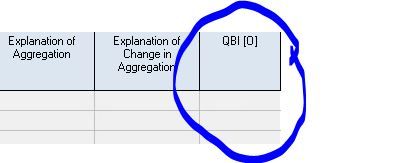
I was able to clear the diagnostics by making input(s) here in the "Line 20 & 21" section.
*If this (or another answer/reply) solves your problem, please click "Accept as Solution" to get this post out of the "Unanswered" queue of posts.*





