Welcome back! Ask questions, get answers, and join our large community of tax professionals.
- Topics
- Training
- Community
- Product Help
- Industry Discussions
- User Groups
- Discover
- Resources
Intuit
Virtual · Free
Elevate 2026
Tax Day isn't the finish line — grow your firm at our two-day virtual conference
Free CPE/CE
Intuit
Virtual · Free
Elevate 2026
Tax Day isn't the finish line — grow your firm at our two-day virtual conference
Free CPE/CE
Turn on suggestions
Auto-suggest helps you quickly narrow down your search results by suggesting possible matches as you type.
Showing results for
- Intuit Accountants Community
- :
- ProSeries Tax
- :
- ProSeries Tax Discussions
- :
- Re: having trouble accessing my software
having trouble accessing my software
Options
- Mark Topic as New
- Mark Topic as Read
- Float this Topic for Current User
- Bookmark
- Subscribe
- Printer Friendly Page

085nicky
Level 2
01-04-2020
10:06 AM
- Mark as New
- Bookmark
- Subscribe
- Permalink
- Report Inappropriate Content
when i sign in , the message indicates that i need my administrator to grant me access .
i am the administrator and only user of my product for the last 3 years .
in any event m it will not allow me to indicate an email address so that i can grant me access
something wrong
Best Answer Click here
Labels
 This discussion has been locked.
No new contributions can be made. You may start a new discussion
here
This discussion has been locked.
No new contributions can be made. You may start a new discussion
here
1 Best Answer
Accepted Solutions

IntuitAustin
Intuit Alumni
01-06-2020
08:14 AM
- Mark as New
- Bookmark
- Subscribe
- Permalink
- Report Inappropriate Content
@085nicky wrote:
when i sign in , the message indicates that i need my administrator to grant me access .
i am the administrator and only user of my product for the last 3 years .
in any event m it will not allow me to indicate an email address so that i can grant me access
something wrong
I would encourage you to reach out to our ProSeries support team on this one. https://proconnect.intuit.com/community/help-articles/help/how-to-contact-proseries-for-help/00/4714
**Say "Thanks" by clicking the thumb icon in a post
**Mark the post that answers your question by clicking on "Accept as solution"
19 Comments 19

 Just-Lisa-Now-
Level 15
01-04-2020
10:40 AM
- Mark as New
- Bookmark
- Subscribe
- Permalink
- Report Inappropriate Content
Ive seen others mention this same issue. If you Right click on the desktop icon for ProSeries and select Run As Administrator, does that do anything different?
♪♫•*¨*•.¸¸♥Lisa♥¸¸.•*¨*•♫♪
085nicky
Level 2
01-04-2020
10:50 AM
- Mark as New
- Bookmark
- Subscribe
- Permalink
- Report Inappropriate Content
unfortunately it does not help
Just-Lisa-Now-
Level 15
01-04-2020
10:54 AM
- Mark as New
- Bookmark
- Subscribe
- Permalink
- Report Inappropriate Content
I feel like I got that message one time back in November shortly after installing the program and the Run as Administrator fixed it...but Ive seen others mention a similar issue.
@IntuitBettyJo or @IntuitAustin any ideas on this?
♪♫•*¨*•.¸¸♥Lisa♥¸¸.•*¨*•♫♪
085nicky
Level 2
01-04-2020
10:54 AM
- Mark as New
- Bookmark
- Subscribe
- Permalink
- Report Inappropriate Content
any other thoughts
i never had this problem before
Just-Lisa-Now-
Level 15
01-04-2020
10:55 AM
- Mark as New
- Bookmark
- Subscribe
- Permalink
- Report Inappropriate Content
Im not sure how my answer got marked as a solution, but maybe that can be undone since it did not solve it.
♪♫•*¨*•.¸¸♥Lisa♥¸¸.•*¨*•♫♪
♪♫•*¨*•.¸¸♥Lisa♥¸¸.•*¨*•♫♪
085nicky
Level 2
01-04-2020
10:56 AM
- Mark as New
- Bookmark
- Subscribe
- Permalink
- Report Inappropriate Content
ok i will stay connected for other solutions
085nicky
Level 2
01-04-2020
11:06 AM
- Mark as New
- Bookmark
- Subscribe
- Permalink
- Report Inappropriate Content
my issue is not solved .
can someone please help .
the accept solution was not intended
Just-Lisa-Now-
Level 15
01-04-2020
11:21 AM
- Mark as New
- Bookmark
- Subscribe
- Permalink
- Report Inappropriate Content
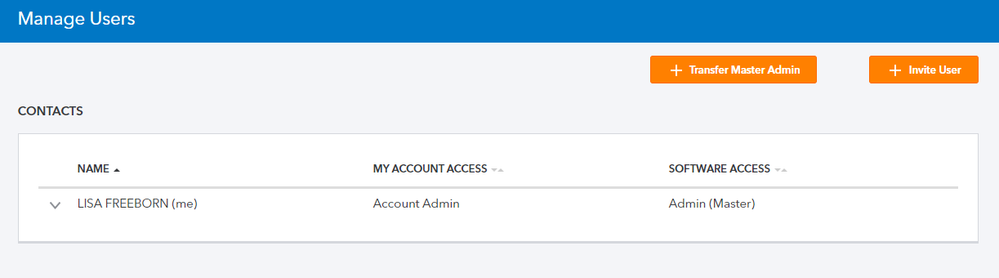
nicky, when you log in here https://www.intuit.com/sign-in/ and look at Manage Users, are you the only name showing? and it shows you as the Account Administrator and gives you Admin Access like this?
♪♫•*¨*•.¸¸♥Lisa♥¸¸.•*¨*•♫♪
 Terry53029
Level 15
01-04-2020
11:25 AM
- Mark as New
- Bookmark
- Subscribe
- Permalink
- Report Inappropriate Content
Do you have more than one user on your COMPUTER, or when you first setup computer the administrator account is established when Windows is first installed or used on the machine. You need to log on as administrator.
085nicky
Level 2
01-04-2020
11:31 AM
- Mark as New
- Bookmark
- Subscribe
- Permalink
- Report Inappropriate Content
i am confused . if i cannot loin to my product , then how do i check manage users ?
085nicky
Level 2
01-04-2020
11:34 AM
- Mark as New
- Bookmark
- Subscribe
- Permalink
- Report Inappropriate Content
ok will try that
Just-Lisa-Now-
Level 15
01-04-2020
11:35 AM
- Mark as New
- Bookmark
- Subscribe
- Permalink
- Report Inappropriate Content
@085nicky wrote:
i am confused . if i cannot loin to my product , then how do i check manage users ?
So you cant log into the your Intuit Online account at all either? its not just the program?
You may want to call support on this...not sure if they are open on weekends yet.
♪♫•*¨*•.¸¸♥Lisa♥¸¸.•*¨*•♫♪
Just-Lisa-Now-
Level 15
01-04-2020
11:43 AM
- Mark as New
- Bookmark
- Subscribe
- Permalink
- Report Inappropriate Content
@Terry53029 wrote:
Do you have more than one user on your COMPUTER, or when you first setup computer the administrator account is established when Windows is first installed or used on the machine. You need to log on as administrator.
Good call Terry, I'm the only person that uses any of my computers, so Ive never had any other logins setup, I dont know what kind of limitations are in place in that situation.
♪♫•*¨*•.¸¸♥Lisa♥¸¸.•*¨*•♫♪
085nicky
Level 2
01-04-2020
12:27 PM
- Mark as New
- Bookmark
- Subscribe
- Permalink
- Report Inappropriate Content
in the manage users , next to my name under my access it says account admin , so that looks ok.
however under software access IT IS BLANK it does not say admin ( master)
I think that is the problem .
and there does not appear to be a way to type in admin ( master )
looks to me like intuit will need to fix this .
do you agree ?
thank you
Just-Lisa-Now-
Level 15
01-04-2020
01:28 PM
- Mark as New
- Bookmark
- Subscribe
- Permalink
- Report Inappropriate Content
Yes, something is goofy on their end, I'm afraid you'll need to make the dreaded call to support, sorry.
♪♫•*¨*•.¸¸♥Lisa♥¸¸.•*¨*•♫♪
085nicky
Level 2
01-04-2020
01:31 PM
- Mark as New
- Bookmark
- Subscribe
- Permalink
- Report Inappropriate Content
i agree , no issue like this the last 4 years i used the software .
thanks for trying to help .
i will cal monday .
IntuitAustin
Intuit Alumni
01-06-2020
08:14 AM
- Mark as New
- Bookmark
- Subscribe
- Permalink
- Report Inappropriate Content
@085nicky wrote:
when i sign in , the message indicates that i need my administrator to grant me access .
i am the administrator and only user of my product for the last 3 years .
in any event m it will not allow me to indicate an email address so that i can grant me access
something wrong
I would encourage you to reach out to our ProSeries support team on this one. https://proconnect.intuit.com/community/help-articles/help/how-to-contact-proseries-for-help/00/4714
**Say "Thanks" by clicking the thumb icon in a post
**Mark the post that answers your question by clicking on "Accept as solution"

fapsmith7
Level 1
05-18-2020
08:06 AM
- Mark as New
- Bookmark
- Subscribe
- Permalink
- Report Inappropriate Content
having trouble signing in to proseries basic 2019

lukaliz
Level 1
02-20-2021
11:16 AM
- Mark as New
- Bookmark
- Subscribe
- Permalink
- Report Inappropriate Content
This is ridiculous!!!




