Welcome back! Ask questions, get answers, and join our large community of tax professionals.
- Topics
- Training
- Community
- Product Help
- Industry Discussions
- User Groups
- Discover
- Resources
Turn on suggestions
Auto-suggest helps you quickly narrow down your search results by suggesting possible matches as you type.
Showing results for
- Intuit Accountants Community
- :
- ProConnect Tax
- :
- ProConnect Tax Discussions
- :
- How do I edit the name of a Client in Pro Connect? The return shows up under a business name but the return is an Individual Income Tax Return (1040) in Pro Connect.
How do I edit the name of a Client in Pro Connect? The return shows up under a business name but the return is an Individual Income Tax Return (1040) in Pro Connect.
Options
- Mark Topic as New
- Mark Topic as Read
- Float this Topic for Current User
- Bookmark
- Subscribe
- Printer Friendly Page

dawnelwelch5
Level 1
07-15-2020
01:31 PM
- Mark as New
- Bookmark
- Subscribe
- Permalink
- Report Inappropriate Content
Labels
 This discussion has been locked.
No new contributions can be made. You may start a new discussion
here
This discussion has been locked.
No new contributions can be made. You may start a new discussion
here
3 Comments 3

 Ross
Ross
Employee
07-15-2020
01:50 PM
- Mark as New
- Bookmark
- Subscribe
- Permalink
- Report Inappropriate Content
Hello dawnelwelch5!
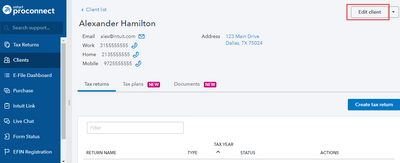
You can change the name of a client by going to the Client tab, clicking on the desired client, and choosing "Edit Client" in the upper right.
~Intuit Tax Product Specialist
**Say "Thanks" by clicking the thumb icon in a post
**Mark the post that answers your question by clicking on "Accept as solution"
dawnelwelch5
Level 1
07-20-2020
12:24 PM
- Mark as New
- Bookmark
- Subscribe
- Permalink
- Report Inappropriate Content
The problem is that the client name for the 1040 (Individual) is a Business name not the name of the Individual. There is also a Business Return (1120S) with the same name and is valid. How to I get the
Business name off of the Individual Return? When I click on the name to make a change it says it is a Business not an Individual. If someone wants to call me I can quickly share and show you the problem.
Dawnel Welch
[phone # removed]

sjrcpa
Level 15
07-20-2020
01:22 PM
- Mark as New
- Bookmark
- Subscribe
- Permalink
- Report Inappropriate Content
No one from Intuit Pro Connect will call you. However since this is a public forum you should remove your phone number so fraudsters, schemers, etc don't call you.
The more I know the more I don’t know.


