Welcome back! Ask questions, get answers, and join our large community of tax professionals.
- Topics
- Training
- Community
- Product Help
- Industry Discussions
- User Groups
- Discover
- Resources
Turn on suggestions
Auto-suggest helps you quickly narrow down your search results by suggesting possible matches as you type.
Showing results for
- Intuit Accountants Community
- :
- Lacerte Tax
- :
- Lacerte Tax Discussions
- :
- Re: Exporting 1099 B data
Exporting 1099 B data
Options
- Mark Topic as New
- Mark Topic as Read
- Float this Topic for Current User
- Bookmark
- Subscribe
- Printer Friendly Page

Eiger
Level 3
03-22-2021
04:53 PM
- Mark as New
- Bookmark
- Subscribe
- Permalink
- Report Inappropriate Content
Is there a way to export 1099-B data directly into Lacerte?
Best Answer Click here
Labels
 This discussion has been locked.
No new contributions can be made. You may start a new discussion
here
This discussion has been locked.
No new contributions can be made. You may start a new discussion
here
1 Best Answer
Accepted Solutions

 TylorValdez1
Employee
03-23-2021
11:02 AM
- Mark as New
- Bookmark
- Subscribe
- Permalink
- Report Inappropriate Content
1) Yes
2)Go through the process to Import client data from accounts now in order to search for a FI.
3}Yes, could can do that.
20 Comments 20
TylorValdez1
Employee
03-22-2021
05:38 PM
- Mark as New
- Bookmark
- Subscribe
- Permalink
- Report Inappropriate Content
Yes. Please review the following article. https://proconnect.intuit.com/community/individual/help/importing-financial-institution-data-into-la...
Eiger
Level 3
03-22-2021
05:56 PM
- Mark as New
- Bookmark
- Subscribe
- Permalink
- Report Inappropriate Content
Thank you, but the video does not play!
TylorValdez1
Employee
03-22-2021
05:59 PM
- Mark as New
- Bookmark
- Subscribe
- Permalink
- Report Inappropriate Content
Sorry about that. Use this link for the video. https://www.youtube.com/watch?v=728s7ygrKUY

George4Tacks
Level 15
03-22-2021
06:15 PM
- Mark as New
- Bookmark
- Subscribe
- Permalink
- Report Inappropriate Content
If the majority of transactions are covered, they can be entered as single line items - 1 long and 1 short. Then the few that are not covered can be entered or done as an attachment. https://proconnect.intuit.com/community/form-8949/help/individual-form-8949-exception-2-to-reporting...
Importing is tedious and sometimes difficult to reconcile.
Answers are easy. Questions are hard!
Eiger
Level 3
03-22-2021
08:38 PM
- Mark as New
- Bookmark
- Subscribe
- Permalink
- Report Inappropriate Content
Thank you. Both links were very helpful. Some questions (exclusively in relation to 1099-B):
1) I assume when data is imported from the client's financial institution, there is no longer any need to report summaries or attach pdf statements, correct?
2) Is there a list of 'participating' financial institutions? I assume one cannot import the data if the financial institution does not participate. That is to say, there are no other workarounds like getting a CSV file from the client and uploading it to Lacerte, etc.
3) Would summary reporting and attaching a pdf copy of client 1099 be acceptable, even if there are numerous wash sale adjustments in the total? i.e. Is summary reporting (entering the totals for Proceeds, Cost, and Wash Sale Adjustments) on a single line acceptable?
Thank you so much for your help.
TylorValdez1
Employee
03-23-2021
11:02 AM
- Mark as New
- Bookmark
- Subscribe
- Permalink
- Report Inappropriate Content
1) Yes
2)Go through the process to Import client data from accounts now in order to search for a FI.
3}Yes, could can do that.
Eiger
Level 3
03-23-2021
12:19 PM
- Mark as New
- Bookmark
- Subscribe
- Permalink
- Report Inappropriate Content
Thank you!
Eiger
Level 3
03-23-2021
12:28 PM
- Mark as New
- Bookmark
- Subscribe
- Permalink
- Report Inappropriate Content
1) Not exactly sure what you mean by 'covered' and 'not covered'.
2) Can the importing be reversed easily if it subsequently looks ugly and hard to reconcile?
TylorValdez1
Employee
03-23-2021
01:00 PM
- Mark as New
- Bookmark
- Subscribe
- Permalink
- Report Inappropriate Content
On screen 17.1 there is an option to delete all on the left side.
Eiger
Level 3
03-23-2021
01:09 PM
- Mark as New
- Bookmark
- Subscribe
- Permalink
- Report Inappropriate Content
Thanks. Your responses were very helpful.
Eiger
Level 3
03-23-2021
03:40 PM
- Mark as New
- Bookmark
- Subscribe
- Permalink
- Report Inappropriate Content
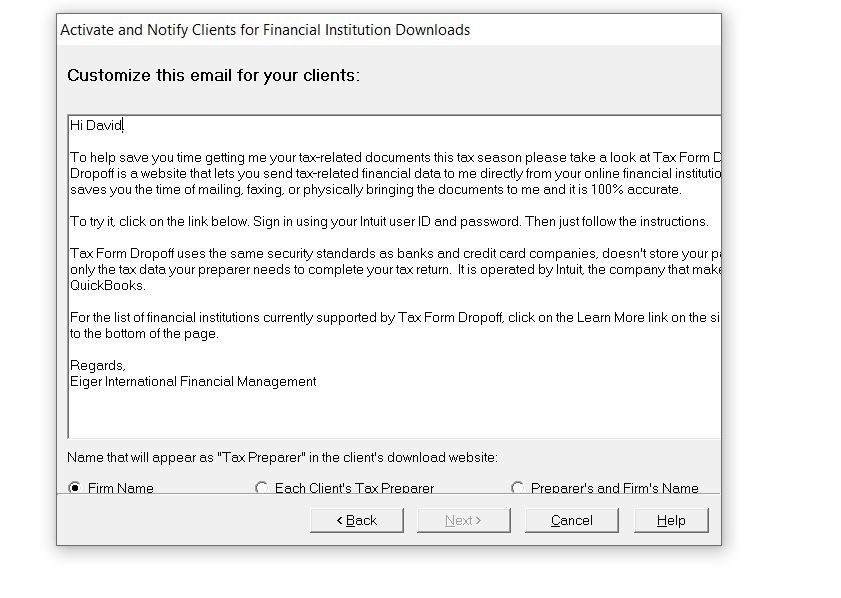
When I tried the Tax Import option to invite the client to send data ... it opened up the letter and I customized it, but the NEXT button remains inactive, so I cannot get past that point!
TylorValdez1
Employee
03-23-2021
03:46 PM
- Mark as New
- Bookmark
- Subscribe
- Permalink
- Report Inappropriate Content
You need to enter your email address at the bottom.
Eiger
Level 3
03-23-2021
04:17 PM
- Mark as New
- Bookmark
- Subscribe
- Permalink
- Report Inappropriate Content
I do. It's the next page, where I see the actual letter ... at the bottom of that page, the NEXT button is inactive and remains inactive even after I TAB through the fields.
 TylorValdez1
Employee
03-23-2021
04:20 PM
- Mark as New
- Bookmark
- Subscribe
- Permalink
- Report Inappropriate Content
You need to expand the window more. There is a field for email address below the bullets that is currently cut off. Try going to the bottom right corner of the window and click and drag to make the window larger.
Eiger
Level 3
03-23-2021
04:32 PM
- Mark as New
- Bookmark
- Subscribe
- Permalink
- Report Inappropriate Content
The page is not a regular page; it's a pop-up page and it cannot be resized in any way. Clicking around the corners just allows the entire page to be grabbed and moved around. That's all.
TylorValdez1
Employee
03-23-2021
04:39 PM
- Mark as New
- Bookmark
- Subscribe
- Permalink
- Report Inappropriate Content
1. Close Lacerte
2. Right-click on the desktop and select the "Display Settings" option:.
3. Go to Scale and Layout
4.Change the option to 100%
5.Reopen Lacerte and try again.
Eiger
Level 3
03-23-2021
04:54 PM
- Mark as New
- Bookmark
- Subscribe
- Permalink
- Report Inappropriate Content
Ok, that did the trick! Thanks.
One thing about the wording of the standard letter. It says nothing about 'if you do not have an Intuit user account, you can create one ...'. If I customize the letter, will it be saved so I do not have to add the same wording for each and every client I invite?
TylorValdez1
Employee
03-23-2021
04:57 PM
- Mark as New
- Bookmark
- Subscribe
- Permalink
- Report Inappropriate Content
The email template will save your changes automatically.
Eiger
Level 3
03-23-2021
05:00 PM
- Mark as New
- Bookmark
- Subscribe
- Permalink
- Report Inappropriate Content
Perfect!
I tried it on myself and was able to pull in data from Fidelity and Schwab; although with Schwab I had to first log into my account and enable third-party access. But Chase is giving me grief and I haven't been able to resolve it yet!
Thanks.
Eiger
Level 3
03-24-2021
12:11 PM
- Mark as New
- Bookmark
- Subscribe
- Permalink
- Report Inappropriate Content
I did one for an actual client. I received their Fidelity 1099 and imported it. The program says "Import Completed", but I don't see the 1099 information flowing anywhere on screen 17.1





