
Welcome back! Ask questions, get answers, and join our large community of tax professionals.
cancel
Showing results for 
Search instead for 
Did you mean: 

Lacerte E-Organizer

Kathryn S
Level 2

Is there a reason that Social Security does not appear in the E-Organizer?  The clients have been confused when it is not there to add and they had it the year before.  Also, is there some way to add a new type of income, ie interest or dividend income if it was not there the year before?

Also, will this be made available for Apple products in the future?  Some of our clients are very frustrated that they cannot use this without having to purchase a compatibility program.


Thanks,
 

0 Cheers
1 Best Answer

Accepted Solutions
Kathi_at_Intuit
Moderator
Moderator

Hi @Kathryn S 

Thanks for posting in the Community!

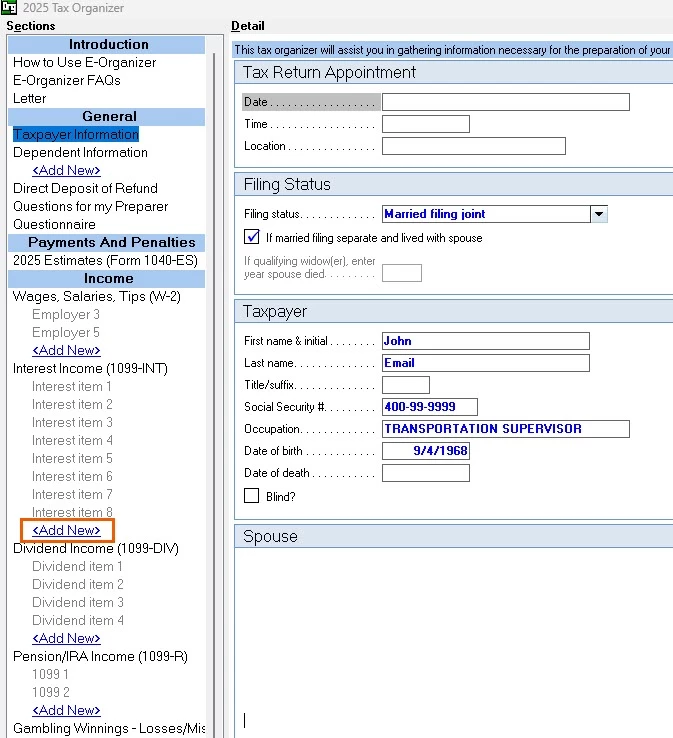
We checked on this and the Social Security information should appear under General > Taxpayer Information in the E-Organizer. If it’s missing, check Screen 1 Client Information to confirm it’s entered correctly. If it is there and is correct we'd recommend contacting Lacerte Support for help. The E-Organizer does allow for new income types (like interest or dividends) to be added by selecting <Add New> under the appropriate income category and entering the details.

As for Apple product compatibility, we understand the frustration this causes for clients and appreciate the feedback. We’ve shared this feedback with our development team for consideration in future updates.

2025-10-31_06-47-19.jpg


**Say "Thanks" by clicking the thumb icon in a post
**Click "Mark as Best Answer " to mark the post that answers your question.

View solution in original post

6 Comments 6
sjrcpa
Level 15

It has never been available for Apple products. I gave up asking/suggesting.


The more I know the more I don’t know.
Kathryn S
Level 2

Thanks for responding.  I agree with "The more I know the more I don't know."

0 Cheers
Kathi_at_Intuit
Moderator
Moderator

Hi @Kathryn S 

Thanks for posting in the Community!

We checked on this and the Social Security information should appear under General > Taxpayer Information in the E-Organizer. If it’s missing, check Screen 1 Client Information to confirm it’s entered correctly. If it is there and is correct we'd recommend contacting Lacerte Support for help. The E-Organizer does allow for new income types (like interest or dividends) to be added by selecting <Add New> under the appropriate income category and entering the details.

As for Apple product compatibility, we understand the frustration this causes for clients and appreciate the feedback. We’ve shared this feedback with our development team for consideration in future updates.

2025-10-31_06-47-19.jpg


**Say "Thanks" by clicking the thumb icon in a post
**Click "Mark as Best Answer " to mark the post that answers your question.
Kathryn S
Level 2

I did not ask about the Social Security number input. my issue is that there is no place for the 1099-SSA income to be reported on the E-organizer.  Where is this to be input?

0 Cheers
Kathi_at_Intuit
Moderator
Moderator

Hi @Kathryn S Thanks for the clarification! In the e-organizer, if the option to add the SSA-1099 is not available, you can add a new form. To enter it:

  1. In the e-organizer select Add New Form
  2. Click Income
  3. Scroll down to the Social Security /Other Income section. Select that option to input the Social Security benefits information.


eOrg.jpg

**Say "Thanks" by clicking the thumb icon in a post
**Click "Mark as Best Answer " to mark the post that answers your question.
0 Cheers
Kathryn S
Level 2

Thanks so much.


