Welcome back! Ask questions, get answers, and join our large community of tax professionals.
- Topics
- Training
- Community
- Product Help
- Industry Discussions
- User Groups
- Discover
- Resources
Turn on suggestions
Auto-suggest helps you quickly narrow down your search results by suggesting possible matches as you type.
Showing results for
- Intuit Accountants Community
- :
- Industry Discussions
- :
- Tax Talk
- :
- Safe Harbor Election for Rentals (250 hour rule)
Safe Harbor Election for Rentals (250 hour rule)
Options
- Mark Topic as New
- Mark Topic as Read
- Float this Topic for Current User
- Bookmark
- Subscribe
- Printer Friendly Page

socaltax
Level 1
02-01-2019
01:00 PM
- Mark as New
- Bookmark
- Subscribe
- Permalink
- Report Inappropriate Content
Is there going to be a safe harbor election added to the Proseries software for the 250 hour safe harbor election for rental properties?
Best Answer Click here
Labels
 This discussion has been locked.
New comments cannot be posted on this discussion anymore. Start a
new discussion
This discussion has been locked.
New comments cannot be posted on this discussion anymore. Start a
new discussion
1 Best Answer
Accepted Solutions

 IntuitJim
Employee
02-25-2019
10:39 AM
- Mark as New
- Bookmark
- Subscribe
- Permalink
- Report Inappropriate Content
Lacerte and Tax Online now include the statement and the planned release date for ProSeries is March 6. In the interim, you can type a statement to print, sign and attach. Apologize for the delay. Like customers, our teams are working very hard to incorporate all the tax reform changes in product. Thanks for your patience.
23 Comments 23

 IntuitCharlene
Moderator
02-01-2019
04:44 PM
- Mark as New
- Bookmark
- Subscribe
- Permalink
- Report Inappropriate Content
I've looked into the new Safe Harbor Elections that you are referencing.
To get the calculation to work in ProSeries you would simply fill out the Qualified Business Income Deduction Info Smart Worksheet at the bottom of your Schedule E Worksheet.
If the IRS needs an election statement to go with it, this election statement has not been added to ProSeries 2018 so it would need to be added on the Preparer Notes worksheet or via a PDF Attachment.
https://accountants-community.intuit.com/articles/1605889-individual-using-preparer-notes-for-e-file... shows you how to use the Preparer Notes.
https://accountants-community.intuit.com/articles/1606302-attaching-pdf-files-to-federal-or-state-in... shows you how to add a PDF attachment to the return.
**Say "Thanks" by clicking the thumb icon in a post
**Mark the post that answers your question by clicking on "Accept as solution" and then just changing the Accept as solution to Mark as Best Answer, mine gets cutoff, so it is too long. I changed mine to the following and it fits. -->**Say "Thanks" by clicking the thumb icon in a post
**Click "Mark as Best Answer " to mark the post that answers your question.
**Mark the post that answers your question by clicking on "Accept as solution" and then just changing the Accept as solution to Mark as Best Answer, mine gets cutoff, so it is too long. I changed mine to the following and it fits. -->**Say "Thanks" by clicking the thumb icon in a post
**Click "Mark as Best Answer " to mark the post that answers your question.
IntuitJim
Employee
02-12-2019
09:24 PM
- Mark as New
- Bookmark
- Subscribe
- Permalink
- Report Inappropriate Content
Yes, we will be adding a Section 199A Trade or Business Safe Harbor Statement for Rental Real Estate (pursuant to Notice 2019-07) to all 3 products (ProSeries, Lacerte, ProConnect Tax Online). You can print the statement for the taxpayer signature then attach as a PDF to e-file with the return. We expect the statement to be added in the next week.

MrMojo
Level 3
02-19-2019
12:15 PM
- Mark as New
- Bookmark
- Subscribe
- Permalink
- Report Inappropriate Content
Any word on when that 199A election form will be included in 2018 ProSeries?
Will it be added in the 1040 Individual Elections Summary sheet?
Thanks!

Marc-TaxMan
Level 8
02-19-2019
05:47 PM
- Mark as New
- Bookmark
- Subscribe
- Permalink
- Report Inappropriate Content
Yes, where will that statement appear?
Marc-TaxMan
Level 8
02-21-2019
11:37 AM
- Mark as New
- Bookmark
- Subscribe
- Permalink
- Report Inappropriate Content
Hi Jim: How are you guys doing on the Safe Harbor Stmt?
And the 706 typo fix?
And the printing crisis?
And why is there no list of known problems and ETA on solutions, other than soon?

Taxmanandy
Level 1
02-21-2019
08:08 PM
- Mark as New
- Bookmark
- Subscribe
- Permalink
- Report Inappropriate Content
I have aggregated several properties and Lacerte creates a Sec199A Renatal Real Estate safe harbor statement for each rental property. I would think if we did an aggregation that the statement should list all aggregated properties on one statement not individual statements
Marc-TaxMan
Level 8
02-23-2019
03:58 PM
- Mark as New
- Bookmark
- Subscribe
- Permalink
- Report Inappropriate Content
Hi Jim: Is the Safe Harbor released yet? Hidden somewhere?

TrumpJ
Level 3
02-24-2019
10:43 AM
- Mark as New
- Bookmark
- Subscribe
- Permalink
- Report Inappropriate Content
Is this statement for the 250 Hour Safe Harbor Rule available yet in ProSeries? If so, where is it? I am unable to locate it.
Marc-TaxMan
Level 8
02-24-2019
11:44 AM
- Mark as New
- Bookmark
- Subscribe
- Permalink
- Report Inappropriate Content
JIM: Please give us an ETA on Safe Harbor
 Kathi_at_Intuit
Moderator
02-25-2019
10:20 AM
- Mark as New
- Bookmark
- Subscribe
- Permalink
- Report Inappropriate Content
Let me check on this.
**Say "Thanks" by clicking the thumb icon in a post
**Click "Mark as Best Answer " to mark the post that answers your question.
**Click "Mark as Best Answer " to mark the post that answers your question.
IntuitJim
Employee
02-25-2019
10:39 AM
- Mark as New
- Bookmark
- Subscribe
- Permalink
- Report Inappropriate Content
Lacerte and Tax Online now include the statement and the planned release date for ProSeries is March 6. In the interim, you can type a statement to print, sign and attach. Apologize for the delay. Like customers, our teams are working very hard to incorporate all the tax reform changes in product. Thanks for your patience.
Marc-TaxMan
Level 8
02-25-2019
10:52 AM
- Mark as New
- Bookmark
- Subscribe
- Permalink
- Report Inappropriate Content
Funny: Lacerte + PTO (?) has it now. ProSeries is 2 weeks out. Hmm. TurdoTax has it now?

Michelle
Level 1
02-26-2019
10:29 AM
- Mark as New
- Bookmark
- Subscribe
- Permalink
- Report Inappropriate Content
Since Lacerte and Tax online have it now, will you post a pdf of what they have so that we can use it.
Kathi_at_Intuit
Moderator
02-26-2019
12:03 PM
- Mark as New
- Bookmark
- Subscribe
- Permalink
- Report Inappropriate Content
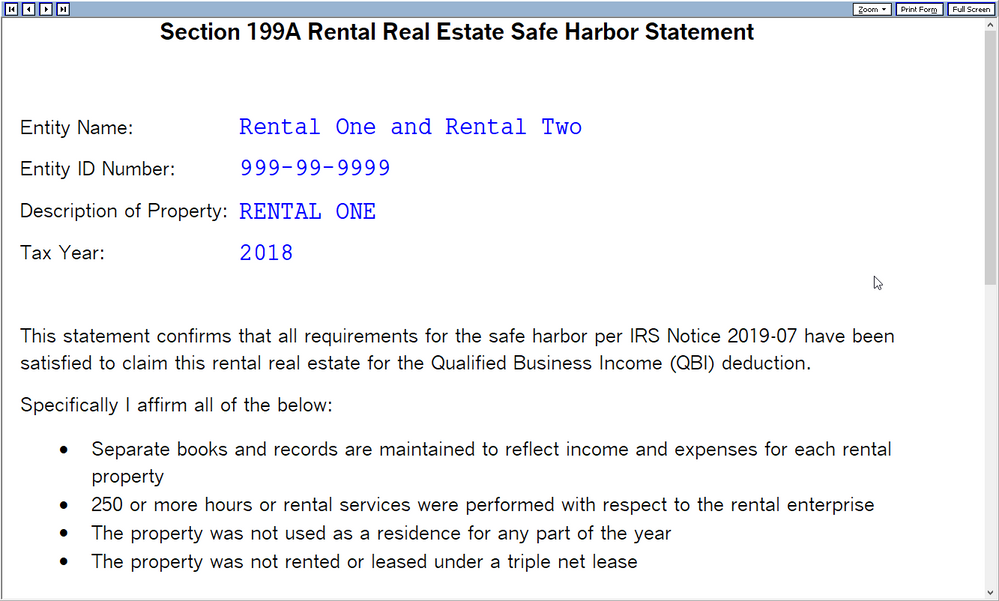
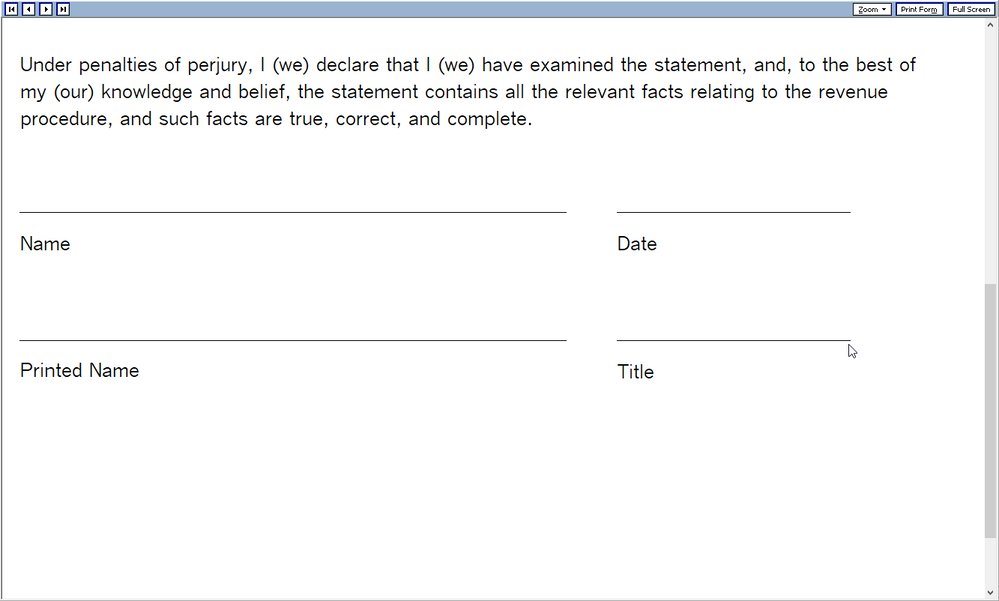
This is what it looks like in PTO and Lacerte:
**Say "Thanks" by clicking the thumb icon in a post
**Click "Mark as Best Answer " to mark the post that answers your question.
**Click "Mark as Best Answer " to mark the post that answers your question.
MrMojo
Level 3
03-04-2019
10:33 AM
- Mark as New
- Bookmark
- Subscribe
- Permalink
- Report Inappropriate Content
Please ADD that Statement to the K-1 Partnership/S-Corp worksheets as well!
Thanks!

SNOWY86303
Level 2
03-04-2019
12:11 PM
- Mark as New
- Bookmark
- Subscribe
- Permalink
- Report Inappropriate Content
I've found the election statement. Cannot find how to attach it to the federal/state tax returns, since it appears to be part of the Lacerte elections and doesn't appear as a separate PDF to attach.
Kathi_at_Intuit
Moderator
03-06-2019
09:53 AM
- Mark as New
- Bookmark
- Subscribe
- Permalink
- Report Inappropriate Content
In Forms view in Lacerte, you would be able to print the election to a PDF and then attach it to the return. In Lacerte if you were to type in the upper right "PDF attachment" it would bring up this knowledge base for you:
Attaching PDF Documents to an E-file Return
**Say "Thanks" by clicking the thumb icon in a post
**Click "Mark as Best Answer " to mark the post that answers your question.
**Click "Mark as Best Answer " to mark the post that answers your question.

AndyReynolds
Level 2
03-19-2019
08:23 AM
- Mark as New
- Bookmark
- Subscribe
- Permalink
- Report Inappropriate Content
I keep hearing for ProSeries there will be a safe harbor election in the software, and it will be out in a week. It's been a month! Where is it?
 IntuitBoris
Employee
03-19-2019
01:14 PM
- Mark as New
- Bookmark
- Subscribe
- Permalink
- Report Inappropriate Content
ProSeries has it released.
On the QBI Deduction Info wksht, there's a checkbox right below the yes/no question whether it's QBI to indicate it qualifies for safe harbor.
AndyReynolds
Level 2
03-26-2019
07:55 AM
- Mark as New
- Bookmark
- Subscribe
- Permalink
- Report Inappropriate Content
I was expecting to find the statement to attach to the return by going Forms\look up 199A. It was not clear to me that checking off that box BELOW the A - Is this a qualified trade or businees, that I had to check off the next box "This rental qualified as abusiness under safe harbor 2019-07, AND BY CHECKING THIS OFF, the statement gets automatically generated... This is slightly a diferent approach to adding statements, which was not clear to me. Thanks so much!

David Stone
Level 3
04-04-2019
12:34 PM
- Mark as New
- Bookmark
- Subscribe
- Permalink
- Report Inappropriate Content
Is this election statement available for Form 1065, Form 8825 (Real estate income) available yet? If yes, how do I navigate to this election to the PDF pring out? Thank you.

atwood
Level 2
02-22-2020
09:11 PM
- Mark as New
- Bookmark
- Subscribe
- Permalink
- Report Inappropriate Content
Once again, ProSeries lags Lacerte and online. The lagging software.

Stella503
Level 1
02-26-2020
05:31 PM
- Mark as New
- Bookmark
- Subscribe
- Permalink
- Report Inappropriate Content
Is there a reason why Proconnect is not doing a formal statement to sign for the 2019 tax year as they provided for 2018? The only response I received was to type it up myself for this year.

