Welcome back! Ask questions, get answers, and join our large community of tax professionals.
- Topics
- Training
- Community
- Product Help
- Industry Discussions
- User Groups
- Discover
- Resources
Turn on suggestions
Auto-suggest helps you quickly narrow down your search results by suggesting possible matches as you type.
Showing results for
- Intuit Accountants Community
- :
- Lacerte Tax
- :
- Lacerte Tax News and Updates
- :
- How to create a filter to find Individual Clients with Unemployment Visual Guide:
How to create a filter to find Individual Clients with Unemployment Visual Guide:
Options
- Mark Topic as New
- Mark Topic as Read
- Float this Topic for Current User
- Bookmark
- Subscribe
- Printer Friendly Page

 IntuitBettyJo
Community Manager
03-11-2021
09:56 AM
- Mark as New
- Bookmark
- Subscribe
- Permalink
- Report Inappropriate Content
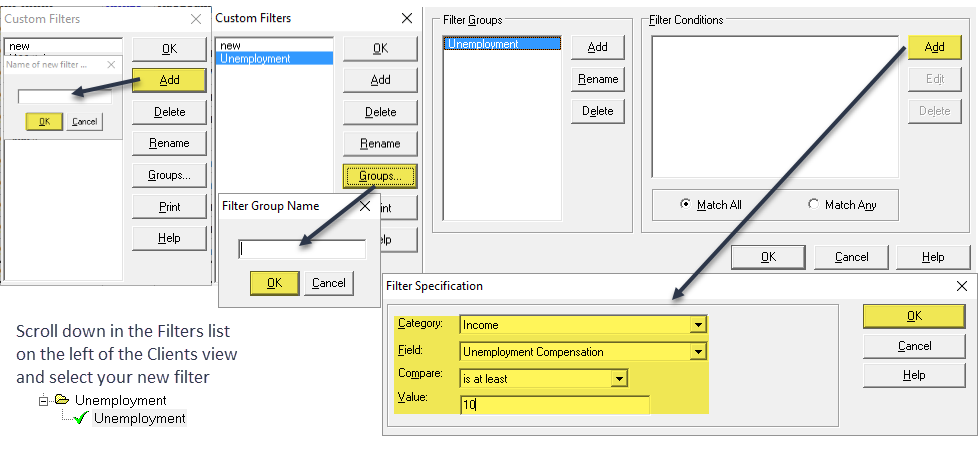
1. First, click on the Filter dropdown at the top of Lacerte
2. Modify Filters > Add
3. Type the desired name (ie. Unemployment) and click "OK"
4. Next, select "Groups" and type desired name (ie. Unemployment) and "OK"
5. Click Add on the right for "Filter Conditions" and select dropdowns as written below and hit ok.
Category: Income
Field: Unemployment Compensation
Compare: "is at least"
Value: 10
6. Scroll down in the Filters List on the left of the Clients view and select your new filter.
Best Answer Click here
Labels
1 Best Answer
Accepted Solutions
IntuitBettyJo
Community Manager
03-11-2021
09:57 AM
- Mark as New
- Bookmark
- Subscribe
- Permalink
- Report Inappropriate Content
For more Lacerte Tax News & Updates, click here.
1 Comment 1
IntuitBettyJo
Community Manager
03-11-2021
09:57 AM
- Mark as New
- Bookmark
- Subscribe
- Permalink
- Report Inappropriate Content
For more Lacerte Tax News & Updates, click here.