 Intuit HelpIntuit
Common questions about Schedule EIC in ProSeries
by Intuit•8• Updated 7 months ago
What should I check in ProSeries if EIC is not calculating?
Earned Income Credit (EIC) is calculated based on the entries made throughout the program. If the return does not qualify for EIC, page 2 of the EIC Worksheet will list what disqualified the credit.
How can I suspend the EIC calculation?
The easiest way to suspend the calculation of EIC:
- Open the Federal Information Worksheet.
- Scroll down to Part IV- Earned Income Credit Information.
- Check the box Taxpayer notified by IRS that EIC cannot be claimed in 20YY.
This will suspend the calculation of EIC without causing any other forms or worksheets to generate.
Using the prior year earned income amounts for tax year 2020 or 2021 returns:
Earned Income Tax Credit (EITC) Relief:
If your earned income was higher in 2019 than in 2020 or 2021, you can use the 2019 amount to figure your EITC for 2020 and 2021. This temporary relief is provided through the Taxpayer Certainty and Disaster Tax Relief Act of 2020.
To elect to use the 2019 earned income amounts in ProSeries:
- Press F6 to bring up Open Forms.
- Type EICW and select OK.
- Scroll down to the Prior Year Earned Income Election Smart Worksheet above line 6.
- On line A check Yes and review the transferred amount on line B.
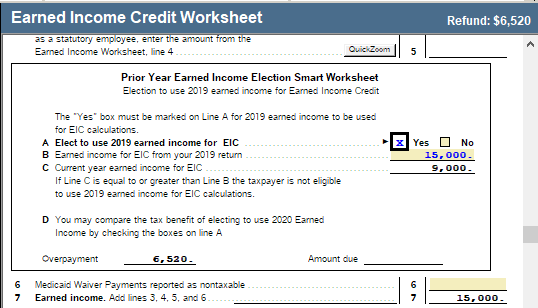
- ProSeries will now use the 2019 Earned Income to calculate any Earned Income Credit amount.
Related topics
More like this
- Common questions about the Earned Income Credit in Lacerteby Intuit
- Common questions about Schedule E in ProSeriesby Intuit
- Common questions about Schedule F in ProSeriesby Intuit
- Entering Form 1125-A, Cost of Goods Sold in ProConnect Taxby Intuit
- Common questions about Form 8903 and domestic production activities deductions in ProConnect Taxby Intuit
