
- Mark as New
- Bookmark
- Subscribe
- Permalink
- Report Inappropriate Content
Where can I enter partner information from J,K, and L of the K-1 into ProSeries Professional for an individual return?
Best Answer Click here

- Mark as New
- Bookmark
- Subscribe
- Permalink
- Report Inappropriate Content
In the ProSeries program, using the Schedule K-1 worksheet, you will find all the necessary line items to be able to "input" the information from Schedule K-1 received, which will then "flow" to the appropriate lines on the tax return, Sch E and the like. You mention J, K and L of the K-1, are you looking at supporting statements or the actual K-1 provided by the client?
- Mark as New
- Bookmark
- Subscribe
- Permalink
- Report Inappropriate Content
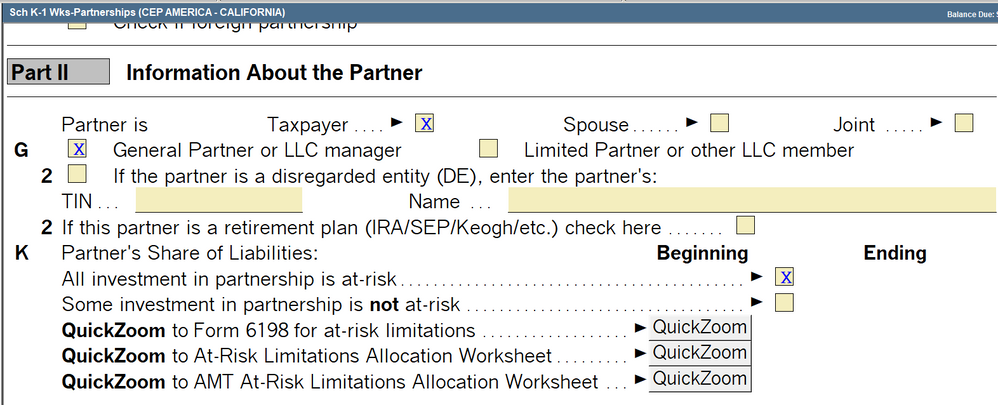
Looking at the actual K-1, Partner information section--these include the partner's share of profit, loss, and capital, partner's share of liabilities, and partner's capital account analysis. This is in Part II of the K-1. In ProSeries there is a small section for Part II the entry worksheet but nowhere to enter these details. See below:

 IntuitCharlene
- Mark as New
- Bookmark
- Subscribe
- Permalink
- Report Inappropriate Content
The Schedule K-1 Worksheet in the 1040 return does not have data entry fields for those lines. That informaiton would be for your records.
**Mark the post that answers your question by clicking on "Accept as solution" and then just changing the Accept as solution to Mark as Best Answer, mine gets cutoff, so it is too long. I changed mine to the following and it fits. -->**Say "Thanks" by clicking the thumb icon in a post
**Click "Mark as Best Answer " to mark the post that answers your question.

- Mark as New
- Bookmark
- Subscribe
- Permalink
- Report Inappropriate Content
What about Box L, capital contributed, current year net income or loss, and ending capital account?
IntuitCharlene
- Mark as New
- Bookmark
- Subscribe
- Permalink
- Report Inappropriate Content
Those may come into play if there are any sort of basis limitations on losses that need to be accounted for. ProSeries does not have a worksheet for Basis Limitations but this article shows you how you can track that if the taxpayer does have basis limitations.
**Mark the post that answers your question by clicking on "Accept as solution" and then just changing the Accept as solution to Mark as Best Answer, mine gets cutoff, so it is too long. I changed mine to the following and it fits. -->**Say "Thanks" by clicking the thumb icon in a post
**Click "Mark as Best Answer " to mark the post that answers your question.

- Mark as New
- Bookmark
- Subscribe
- Permalink
- Report Inappropriate Content
Did you ever figure it out? I'm running into the same issue.
