 Intuit HelpIntuit
Calculating the Child Tax Credit for a qualified child in ProConnect Tax
by Intuit• Updated 10 months ago
This article will help you determine why the Child Tax Credit isn't calculating on your client's return. For details on who qualifies for this credit, see the IRS instructions for Schedule 8812.
For returns 2022 and beyond
- A child must be under age 17 at the end of 2022 to be considered a qualifying child.
- Enhanced credits for children under age 6 and under age 18 expired. The maximum credit can be up to $2,000 for each qualifying child.
- The Additional Child Tax Credit (ACTC) can be worth up to $1,600, depending on your income. You must have at least $2,500 in earned income to claim the credit.
- Bona-fide residents of Puerto Rico are no longer required to have three or more qualifying children in order to claim the ACTC.
- See the IRS instructions for Form 8812 for phase-out and calculation information.
If the Child Tax Credit isn't generating:
- Select Check Return from along the top of the screen.
- Make sure Form 1040, line 6c, column (4) is marked, indicating the dependent is a Qualifying Child.
- If the check isn't present, go to the Dependents screen and review your entries.
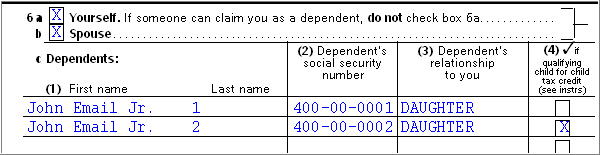
- Within the Worksheets, locate the Child Tax Credit Worksheet.
- Review the calculation on the Child Tax Credit Worksheet.
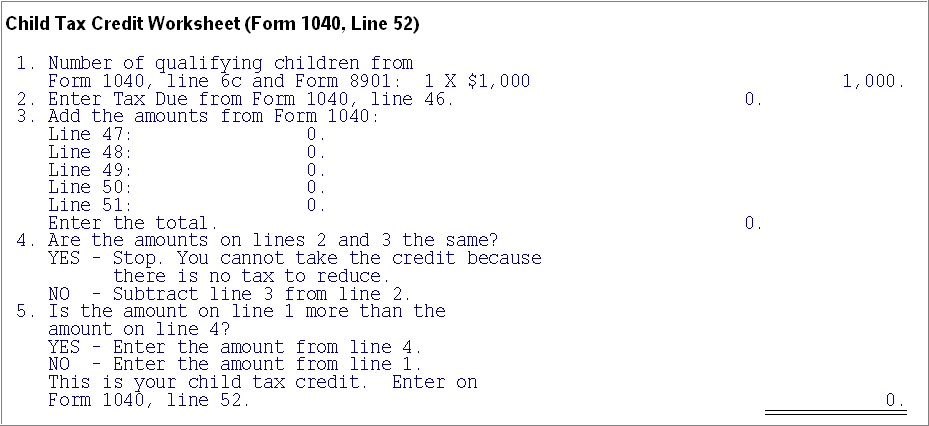
Common reasons the credit won't appear:
- If there's no taxable income on the return, a credit won't be calculated (except for tax year 2021 returns).
- The client's Social Security number and date of birth haven't been entered yet in the Client Information screen.
- The child's Social Security number and date of birth haven't been entered yet in the Dependents screen.
For tax year 2021 only:
- The Child Tax Credit was expanded to apply to qualifying children who hadn't yet reached age 18 by the end of 2021.
- The initial amount of the Child Tax Credit was increased to $3,600 for each qualifying child under age 6 at the end of 2021 and $3,000 for each qualifying child under age 18 by the end of 2021.
- If you met certain residency requirements, the Child Tax Credit could be fully refundable, even if you received no income.
- See the IRS instructions for Form 8812 for phase-out and calculation information.
Advanced payments
From July 2021 to December 2021, taxpayers may have received an advance payment of the Child Tax Credit equal to 50% of the IRS estimate of the Child Tax Credit.
- If your client received advance Child Tax Credit payments during 2021 and the credits you figure using Schedule 8812 are less than what they received, your client may owe an additional tax.
- See Reconciling Your Advance Child Tax Credit Payments on Your 2021 Tax Return for details.
Sign in now for personalized help
Ask questions, get answers, and join our large community of Intuit Accountants users.
More like this
- Generating the Additional Child Tax Credit on Form 8812 in ProConnect Taxby Intuit
- Common questions about the Child Tax Credit and 8812 in ProSeriesby Intuit
- Entering dependents for Form 1040 in ProSeriesby Intuit
- Common questions on Form 2441 Child and Dependent Care Qualified Expenses in ProSeriesby Intuit
