

Level 2
Dec 7, 2019 12:06 AM UTC
Solved

For 2018 what is the file format to save a transfer file for the bridge program?

No text available
This topic has been closed for replies.
George4Tacks
Level 15
Dec 7, 2019 12:06 AM UTC

This is a user forum, so a call to support may be in order:

  1. 2018 is not fully functional yet, so don't be too trustful of the results. https://proconnect.intuit.com/community/help-articles/help/2018-lacerte-release-dates/00/4516
  2. To the best of my knowledge, there is no change in the bridge function from prior years. 

Lacerte GL Bridge Software Developer's Kit

This manual is for general ledger program developers who want to create transfer files that are compatible with the file format of the Lacerte GL Bridge program. It provides all the information you need to create transfer files that can be read by the GL Bridge program. This manual also includes the file structures and field parameters required for creating successful transfer files.

Detailed Information

See the Lacerte Bridge Software Developer's Kit manual for more information.

*Note- Lacerte Technical Support will not be able to assist with questions or issues.

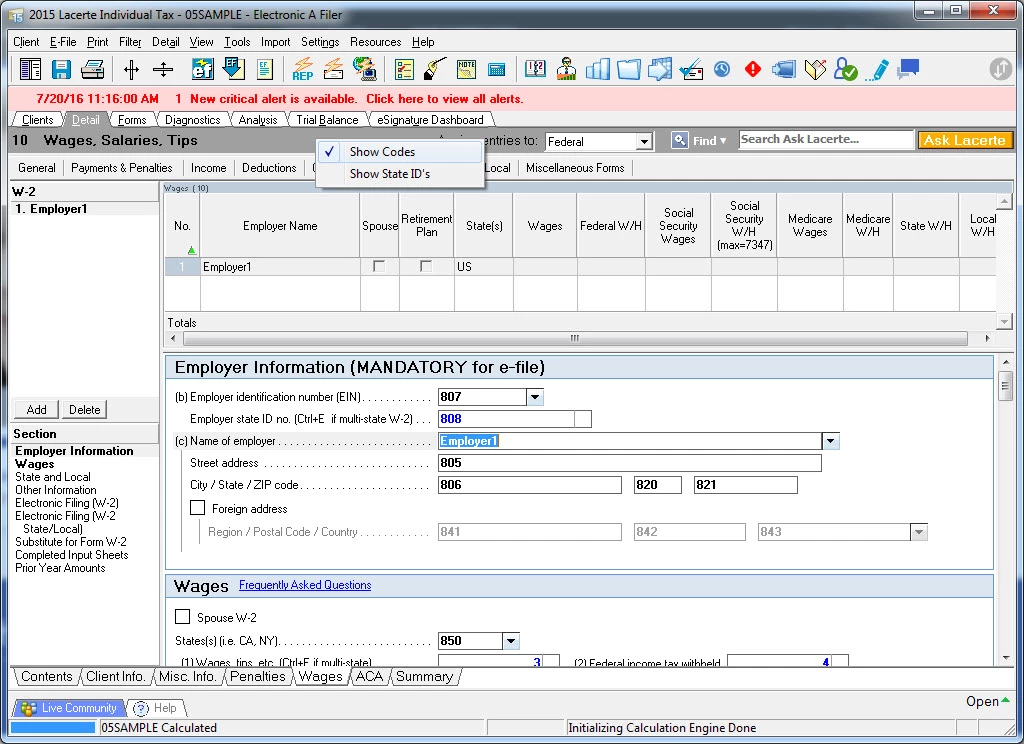
For more recent efile (or other) codes past tax year 2014, you can "show codes" for the relevant areas needed by right clicking in the gray area above the detail screen as shown in the screenshot below.


Answers are easy. Questions are hard!

3 replies

George4Tacks
Level 15
Dec 7, 2019 12:06 AM UTC

This is a user forum, so a call to support may be in order:

  1. 2018 is not fully functional yet, so don't be too trustful of the results. https://proconnect.intuit.com/community/help-articles/help/2018-lacerte-release-dates/00/4516
  2. To the best of my knowledge, there is no change in the bridge function from prior years. 

Lacerte GL Bridge Software Developer's Kit

This manual is for general ledger program developers who want to create transfer files that are compatible with the file format of the Lacerte GL Bridge program. It provides all the information you need to create transfer files that can be read by the GL Bridge program. This manual also includes the file structures and field parameters required for creating successful transfer files.

Detailed Information

See the Lacerte Bridge Software Developer's Kit manual for more information.

*Note- Lacerte Technical Support will not be able to assist with questions or issues.

For more recent efile (or other) codes past tax year 2014, you can "show codes" for the relevant areas needed by right clicking in the gray area above the detail screen as shown in the screenshot below.


Answers are easy. Questions are hard!
kwillisAuthor
Level 2
Dec 7, 2019 12:06 AM UTC
Thank you for quick response. I have not used the bridge program before but am familiar with xml and have my file ready. Lacerte is not detecting it in the data file in the 2017 program. I was wondering if the file is saved incorrectly. Can you give me the correct file extension for 2017?